
Now in order to do that we are going to have to run a calculation, grabbing a few properties, mostly the height properties, of various things. Now to talk about those height properties and figure out exactly how we're going to run this calculation, I've put together a really short section. Let's go ahead and dive right in. To illustrate exactly how we're going to run this calculation, let's take a look at the following example:

We have this light purple box, it's taller than the dark purple one. This is the entire messages container. It's probably going to contain way more messages than we can actually see in the browser. The dark purple area is what we actually see. As we scroll down the dark purple area is going to move down to the bottom, and as we scroll up it's going to shift up to the top.
Now we have access to three height properties that are going to let us make the calculations necessary to determine whether or not we should scroll down a user. These are the following:
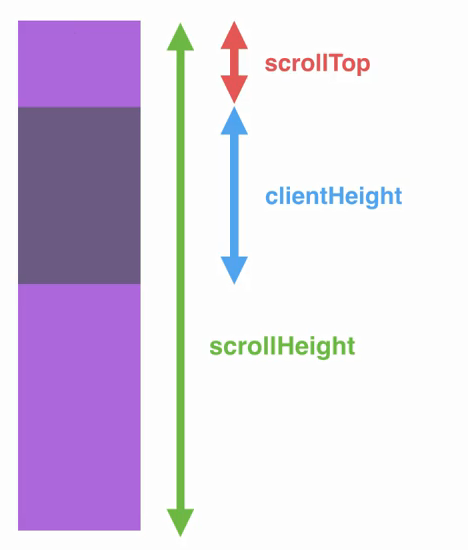
- First up scrollHeight. This is the entire height of our messages container regardless of how much is actually visible inside of the browser. This means that if we have messages before and after what we can see. They are still going to be accounted for in scrollHeight.
- Next up, we have clientHeight. This is the visible height container.
- Finally, we have scrollTop. This is the number of pixels we've scrolled down into the purple container.
Now in the current situation what do we want to do? We want to do nothing, the user really isn't scrolled that far down. It would be a burden to them if they got brought to the bottom every time a new message came in.
In the next scenario we scroll down just a little bit more:
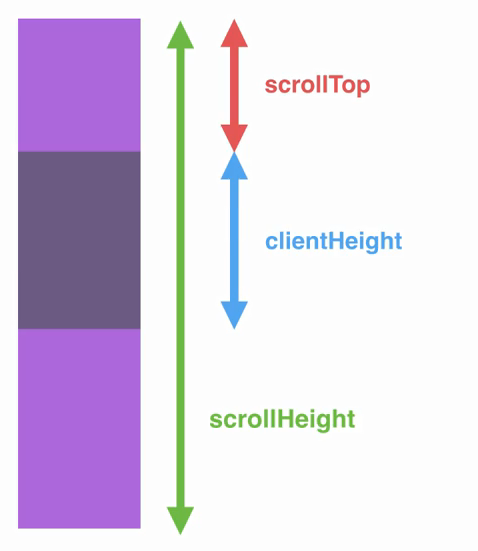
The scrollTop has increased, the clientHeight has stayed the same, and so has the scrollHeight. Now if we keep going down the list, eventually we're going to get to the very bottom. Currently, we should do nothing, but when we get to the bottom the calculations look a little different:
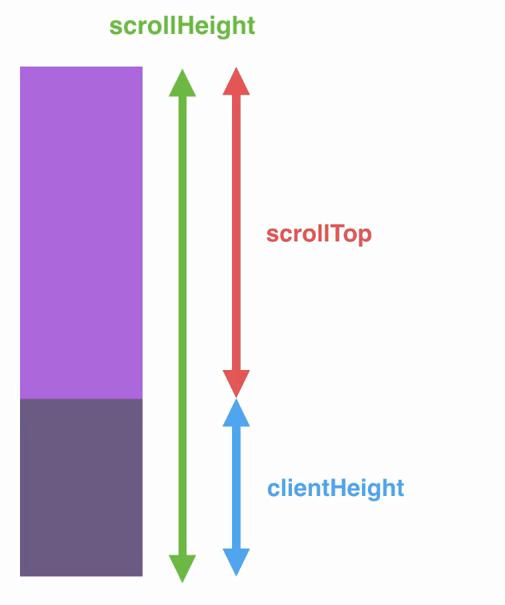
Here you can see the scrollTop value, which is the space previous what we can see, plus the clientHeight value is identical to scrollHeight. This is going to be the basics of our equation. If the scrollTop plus the clientHeight equals the scrollHeight, we do want to scroll the user down when a new message comes in, because we know they're at the very bottom of the panel. So in this situation what should we do? We should scroll to the bottom when a new message comes in. Now there is one slight little quirk:
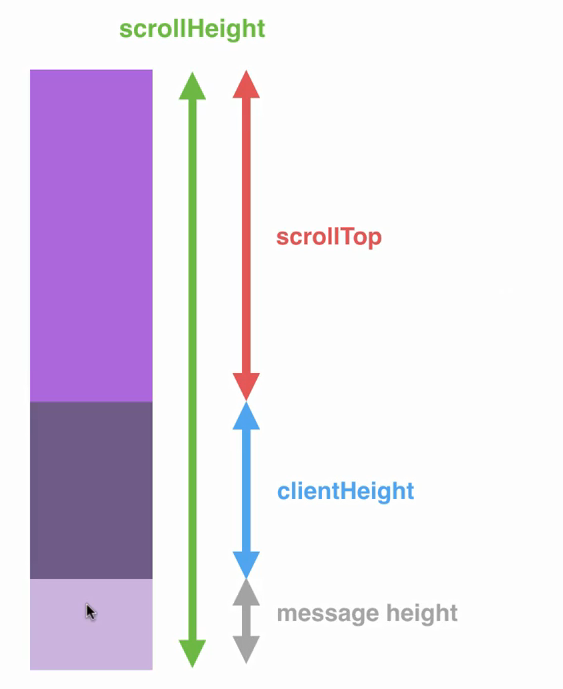
We are going to have that message already added so we're going to take into account the new messageHeight in our calculation, adding up scrollTop, clientHeight, and messageHeight, comparing that value to the scrollHeight. Using this we will once again be able to scroll the user to the bottom.
Let's go ahead and wire this up in Atom. Now that we know how we're going to run that calculation, let's go ahead and actually do it over inside index.js. We're going to make a new function that's going to do all this heavy lifting for us. It's going to determine whether or not we should scroll the user to the bottom depending on their position. Let's make a function inside at the top index.js. It's not going to take any arguments and we're going to go ahead and call this function scrollToBottom:
var socket = io();

function scrollToBottom () {

}
We're going to call scrollToBottom every time we add a new message to the chat area, which means we need to do it twice once inside of newMessage and newLocationMessage. Right inside the newLocationMessage callback, I can call scrollToBottom passing in no arguments:
socket.on('newMessage', function (message) {
  var formattedTime = moment(message.createAt).format('h:mm a');
  var template = jQuery('#message-template').html();
  var html = Mustache.render(template, {
    text: message.text,
    from: message.from,
    createdAt: formattedTime
  });

  jQuery('#message').append(html);
  scrollToBottom();
});
I'll do the same thing next when we append scrollToBottom:
socket.on('newLocationMessage', function (message) {
  var formattedTime = moment(message.createAt).format('h:mm a');
  var template = jQuery('#message-template').html();
  var html = Mustache.render(template, {
    from: message.from,
    url: message.url,
    createdAt: formattedTime
  });

  jQuery('#message').append(html);
  scrollToBottom();
});
Now all we need to do is wire up this function to:
- Determine if we should scroll them to the bottom, and
- Scroll them to the bottom if it's necessary.