
Let's fill out the first test case first and I'll kick things off by grabbing the proper ID. Let's make a variable called hexId, setting it equal to the first todos, _id property, and we're going to call toHexString to get the string back we can pass in to the URL. Next up, I'm going to go ahead and create some dummy text; this will be the new updated text. Let's make a variable called text and set it equal to whatever you like. This should be the new text. Now we can go ahead and actually make our request using request to our express application. We will be using the patch method; hopefully you were able to figure that out on your own, and if you weren't maybe you used the documentation for super test since I did not explicitly tell you how to make that patch call. Next up, we are going to be using a template string as our URL, /todos/, then we're going to inject hexId. Now, before we can make our assertions we do need to send some data along as well, so I'll call send, passing in the data. This is going to be the things we want to change. For this test we did want to set completed equal to true. I'm going to set completed: true, and we do want to update the text, so I'll set text equal to the text variable up above, and I can always leave off this part using ES6:
it('should update the todo', (done) => {
   var hexId = todos[0]._id.toHexString();
   var text = 'This should be the new text';

   request(app)
   .patch(`/todos/${hexId}`)
   .send({
         completed: true,
         text
   })
});
Now that we have send in place, we can start making our assertions. The first one's easy, we're just expecting 200. I'm going to expect(200) to be the return status code, and before we add our custom assertion, we can call end, passing in done. Now, the last thing we need to do is make those assertions about the data coming back. I'm going to call expect, passing in a function; this function as we know by now gets called with the response and we can make our custom assertions. We're going to make an assertion about text, completed, and completedAt. First up, text. We use expect(res.body.todo.text).toBe(text), the variable we defined up above. If this is equal to the data that came back, then we're good to go.
Next up, let's make some assertions about that completed property. We're going to use expect(res.body.todo.completed) and check that it's true using .toBe(true). We set completed to true so it should have changed from false to true. Now the last assertion we're going to make inside of our custom expect call is going to be an assertion about completedAt, making sure it's a number. We're going to use expect(res.body.todo.completedAt) equals a number using .toBeA, inside of quotes the number type:
it('should update the todo', (done) => {
   var hexId = todos[0]._id.toHexString();
   var text = 'This should be the new text';

   request(app)
   .patch(`/todos/${hexId}`)
   .send({
         completed: true,
         text
   })
   .expect(200)
   .expect((res) => {
         expect(res.body.todo.text).toBe(text);
         expect(res.body.todo.completed).toBe(true);
         expect(res.body.todo.completedAt).toBeA('number');
   })
   .end(done);
});
With this in place, our first test is now complete. We can go ahead and remove those comments and actually verify it's working by running it over in the Terminal. Our second test is going to fail; that's fine, as long as the first one passes, we're good to continue on. I'm going to run npm test, and this is going to fire off the test suite. We can see our first PATCH test succeeds; this is the one we just filled out, and our second one fails. We're getting a timeout after two seconds, which is expected because we never call done:
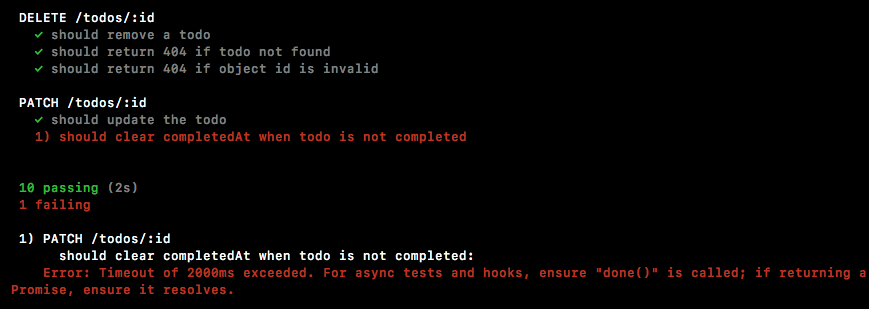
Now that the first one is in place though, we can go ahead and fill out the second one. Now, the code for these two tests is going to be really, really similar. Now, since we just wrote the code and we know exactly what it does, we can copy and paste it. I'm not a fan of copying and pasting code I don't understand, but I am a fan of being efficient. Since I know what that code does, I can paste it right in second test case, and now we can go ahead and make some changes.