
The last test we're going to write is it('should return 404 if object id is invalid'). This test is going to verify that when we have an invalid ObjectID, we do get a 404 status code back which is the expected response status code:
describe('DELETE /todos/:id', () => {
   it('should remove a todo', (done) => {

   });
   it('should return 404 if todo not found', (done) => {

   });
   it('should return 404 if object id is invalid', (done) => {

   });
});
Now, these two tests we'll fill out a little bit later; we're going to go ahead and focus on the first one because this is where we're going to need to do a few complex things. Not only are we going to need to send off the request, but after the request comes back, we're going to want to assert some things about it, and we're going to want to query the database, making sure the Todo was actually removed from the Todos collection. The first thing I'm going to do is figure out which Todo I want to delete. We have two options up above. I'm going to go ahead and delete the second Todo item, though that choice is irrelevant; you could easily just do this with the first one. Down below, we'll create a hexId variable, like we did for our previous test case. We're going to set that equal to the second item from the todos array, then we're going to go ahead and grab its _id property, calling the toHexString method:
var hexId = todos[1]._id.toHexString();
Now that we have the hexId for the second Todo item, we can start worrying about making the request. I'm going to call request, passing in the app we want to make the request to, then we can call delete, which is going to trigger a delete HTTP request. The following URL is going to have some variables injected into it, so I will use template strings: it's /todos/ followed by the ID. I'm going to inject the hexId variable. Now that we have our delete method all set up, we can move on and start making our expectations. We're going to expect that we get a 200 status code back; we should get a 200 status code because hexId is going to exist in the database. Next up, we can assert that the data comes back as the response body. I'm going to make a custom expect call, passing in our function, where we have the response argument sent in, and all we're going to do is assert that the ID is the ID right in the hexId variable. We're going to expect that the res.body property has a todo prop where the _id property equals the hexId, toBe(hexId). If this is the case then we can verify the call pretty much worked as expected:
request(app)
.delete(`/todos/${hexId}`)
.expect(200)
.expect((res) => {
   expect(res.body.todo._id).toBe(hexId);
})
The last thing we need to do is query the database and make sure the item was actually removed. I'm going to call end, passing in a callback, so we can do a few asynchronous things before we wrap up the test case, and if you remember it gets called with an error and the response. If there is an error we're going to need to handle that because otherwise there's no need to query the database, if (err). We're going to return to prevent the function execution, done, passing in that error so the error gets rendered by Mocha. Now we can go ahead and make the query, and this is actually going to be your challenge for this section.
What I want you to do is query database using findById. You're going to try to find the Todo item that has the ID stored in the hexId variable. When you try to find that ID it should fail, and you should get nothing back. You're going to create that Todo variable in your then call and make sure it does not exist. You can make sure something doesn't exist using the toNotExist assertion. That would look something like this, we expect(null).toNotExist(). Although, instead of null, you'll pass in the Todo argument which is going to be in your success handler. Now, this usually would contain the Todo item, but since we've just deleted it, it should not exist; this is going to get all of that done. Now, if there is an error you're going to do the exact same thing we did in our test case for POST /todos. We simply add a catch clause, passing the error through to done. Now that you know what to do, it's your job to get it done. What I'd like you to do is fill this out, fill out the query, make sure to handle the errors, make sure to call done, then you can go ahead and run the test suite, verifying that this test case passes. The last two test cases are going to fail, so for the moment I'm just going to comment them out; they're going to fail because we have a done argument specified, but we never called it so the test will timeout after two seconds.
The first thing to do is call Todo.findById, passing in that hexId. This is the item that should have gotten deleted. Now we can call then, passing in our callback, it is going to get called with the doc, the todo variable, and all we're going to do is verify that it does not exist. We just deleted it, so findById should return null for the doc. We're going to expect that the todo variable does not exist using the toNotExist method available on that expect library. Now, we do need to call done to wrap up the test case. From here, we can go ahead and call catch. I'm going to call catch, grabbing that error argument and passing it through to done. There's no need to provide curly braces here; we just have one statement so we can use the shortcut, which is available in ES6 for error functions. With our actual query in place, we can remove the comments that outlined what was supposed to happen and we can run the test case:
.end((err, res) => {
   if(err){
         return done(err);
   }

   Todo.findById(hexId).then((todo) => {
         expect(todo).toBeFalsy();
         done();
   }).catch((e) => done(e));
});
Over inside of the Terminal we can now run the test suite to verify that everything we set up worked as expected. Over inside of Terminal, I'm going to run the following command to start up our test suite with Nodemon:
npm run test-watch
And when it runs we see that we have our one test under the DELETE describe block and it is passing; it should remove a todo passed without any errors:
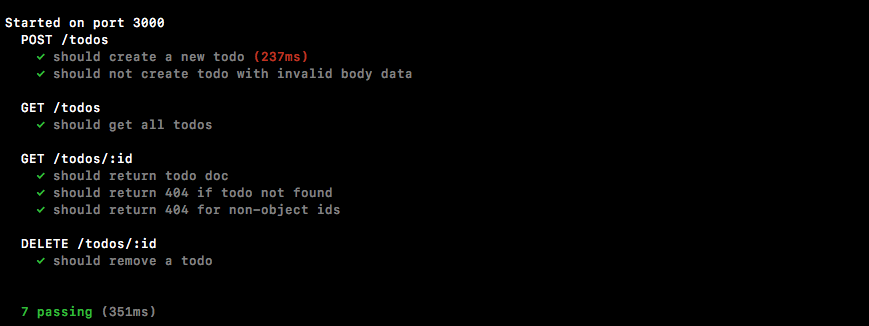
Now that we have our one test case in place we can fill out the two other ones. These test cases are going to be basically identical to the test cases we have for the GET /todos/:id route. There's no shame in copying and pasting code when you:
- Know exactly what the code does; we know what it does because we wrote it
- Actually do need it—we can't reuse it, we need to tweak it just a little bit, so it does make sense to copy