
Now that all of our Todo routes are set up and tested, in this final section we're going to be exploring how to create a separate Test database for our application. That means when we run the test suite we're not going to be deleting all of the data inside of our TodoApp database. We will have a separate database alongside of Test and TodoApp, used for the testing DB.
Now, in order to set all that up we need a way to differentiate between running our app locally and running our test suite locally, and that's exactly where we're going to start. This whole issue stems from the fact that in our mongoose.js file we either use the MONGODB_URI environment variable or we use the URL string. This string is used for both testing and for development, and when I say testing I mean when we run our test script, and when I say development I mean when we run our app locally so we can use it inside of tools like Postman. What we really need is a way to set environment variables locally as well, so we always use the MONGODB_URI variable and we never have a default string like the one we have in the mongoose.js file. Now, in order to get that done we're going to look at an environment variable that's actually pretty special: it's process.env.NODE_ENV and you don't have to write this code. I'm going to be deleting it in just a moment. This NODE_ENV environment variable was made popular by the Express library but it now has been adopted by pretty much any Node-hosting company. For example, Heroku sets this value equal to the string production by default. That means that we're going to have three environments total. We already have a production environment. This is what we call our app on Heroku; we're going to have a development environment when we run our app locally, and we'll have a test environment when we run our app through Mocha. This means we'll be able to set up a different value for MONGODB_URI for all three of those, creating a separate test database.
To kick things off we're going to add some code in the server.js file up at the very top. We'll be moving this code out of server.js a little bit later, but for now we're going to tack it at the top. Let's make a variable called env and we're going to set it equal to process.env.NODE_ENV:
var env = process.env.NODE_ENV;
Now, this variable currently is only set on Heroku; we don't have this environment variable set locally. Environment variables in general are used for much more than just Node. Your machine has probably close to two dozen environment variables, telling the computer all sorts of things: where certain programs exist, what versions of libraries you want to use, that sort of stuff. The NODE_ENV variable, however, is something that we're going to need to configure inside of our package.json file for our development and test environments. Then, just down below, we'll be able to add some if else statements to configure our app depending on the environment. If we're in development we'll use one database, if we're in test we'll use a different one. Now to kick things off inside of package.json we are going to need to tweak the test script, setting the NODE_ENV environment variable. You can set environment variables by chaining together multiple commands. The code we're about to write is going to have a fallback for Windows as well, so you can write the exact same line if you're on macOS, Linux, or Windows. This is going to work everywhere, including Heroku. The goal here is to just set NODE_ENV equal to test before we run the test suite. In order to do that we're going to start by using the export command. The export command is available in macOS and Linux. This is the way to get it done, type this even if you're in Windows because when you deploy to Heroku you are going to be using Linux. We're going to export NODE_ENV, setting it equal to test:
"scripts": {
   "start": "node server/server.js",
   "test": "export NODE_ENV = test mocha server/**/*.test.js",
   "test-watch": "nodemon --exec 'npm test'"
}
Now, if you're on Windows, the export command is going to fail; export is going to trigger an error, something along the lines of export command not found. For Windows users, we're going to add this || block where we will call SET. SET is the same as export only it's the Windows version of the command. Right after it, we'll be providing the exact same argument, NODE_ENV=test. After the final test we're going to add two ampersands to chain these commands together:
"scripts": {
   "start": "node server/server.js",
   "test": "export NODE_ENV = test || SET NODE_ENV = test && mocha server/**/*.test.js",
   "test-watch": "nodemon --exec 'npm test'"
}
So, let's go ahead and break down exactly what's going to happen. If you're on Linux, you're going to run the export command; the SET command is never going to run because the first one did. Then we're going to chain on a second command, running mocha. If you're on Windows, the export command is going to fail, which means you will run the second command; either way you get the NODE_ENV variable set, then finally you'll chain on a call to mocha. With this in place, we now have a way to set our NODE_ENV variable right inside a package.json.
"test": "export NODE_ENV=test || SET \"NODE_ENV=test\" && mocha server/**/*.test.js"
The original test script had a problem on the Windows side of things: it would set the environment variable equal to the string test with a space at the end, as opposed to just the string test. In order to properly set the env variable to just test, and not test, we're going to be wrapping the entire set argument inside of quotes, and we're escaping those quotes since we use quotes inside of our JSON file. This command is going to work on Linux, macOS, and Windows.
Now I'm actually not going to add a start script for scripts. The start script, which is for the development environment, will just be the default. We'll have it set to production on Heroku, we'll have it set to test inside of our test script, and in the case of this script we'll just default it inside of server.js because we tend to run the file without actually going through the start script. Right in the server.js file, I'll set a default to development. If we're on production, NODE_ENV is going to be set, if we're on test, development is going to be set, and if we're on development, NODE_ENV won't be set and development will be used, which means we are ready to add some if statements. if(env) is development we want to do something. The thing we want to do is set up the MongoDB URL. else if (env) is the test environment. In that case we also want to set up a custom database URL:
if(env === 'development') {

} else if(env === 'test') {

}
Now we can go ahead and actually set up our environment variables. We have two environment variables being used throughout the app, both of which are set on Heroku, so there's no reason to worry about that environment, the production environment. We have our PORT environment variable, and we have our MONGODB_URI variable. Over inside of server.js, if we are in the development environment, we're going to go ahead and set process.env.PORT=3000. This means that we can actually remove the default from the port variable; there's no need to have a default because PORT is already going to be set. It'll be set on Heroku for production, it'll be set locally for development, and right in the else if block we'll set it for our final environment, the test environment, setting it equal to 3000. Inside mongoose.js, what we're going to do is set a MONGODB_URI environment variable for development and test, which is the exact same name for the variable we have on production. I'm going to remove our default, taking the string and cutting it out so it's in my clipboard, then I can remove all the excess code for setting that default, and what we're left with is just a reference to the environment variable:
mongoose.connect(process.env.MONGODB_URI);
Over inside of server.js we can now set that environment variable for both environments, process.env.MONGODB_URI, and we're going to set that equal to the string I just copied, mongodb://localhost:27017/TodoApp. We are using the TodoApp database.
Now, down below in the else if block, we can set process.env.MONGODB_URI equal to the string we just copied, but instead of setting it equal to the TodoApp database, we're going to set it equal to the TodoAppTest database:
if(env === 'development') {
  process.env.PORT = 3000;
  process.env.MONGODB_URI = 'mongodb://localhost:27017/TodoApp';
} else if(env === 'test') {
  process.env.PORT = 3000;
  process.env.MONGODB_URI = 'mongodb://localhost:27017/TodoAppTest';
}
When we run our application in test mode, we're going to be using a completely different database, so it's not going to wipe the database that we're using for development. To test that everything is working as expected, right below the env variable all I'm going to do is log out of the environment variable using console.log. I'm going to print the string env with a couple of asterisks so it's easy to spot in the Terminal output, and then I'll go ahead and pass the env variable in as the second argument:
console.log('env *****', env);
Now we can go ahead and test that everything is working as expected. Over inside of the Terminal I'm going to start up our app using the following command:
node server/server.js
We get an env equal to development, which is exactly what we'd expect:

And now we can play around with it in Postman. Over inside of Postman I'm going to switch to my Local environment, Todo App Local, then I'm going to go ahead and fetch all of my Todos, and you can see we have some leftover test data:
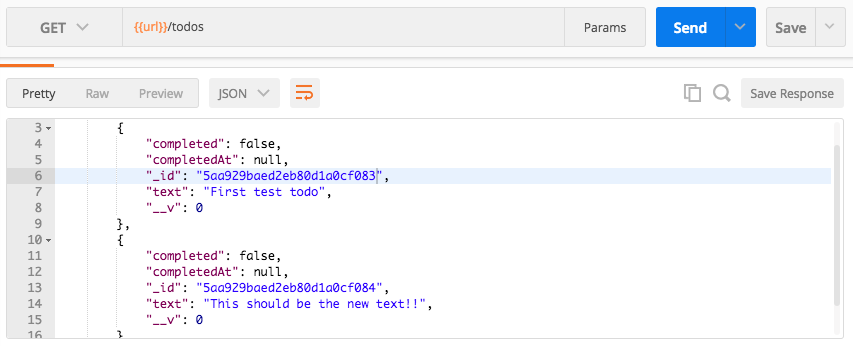
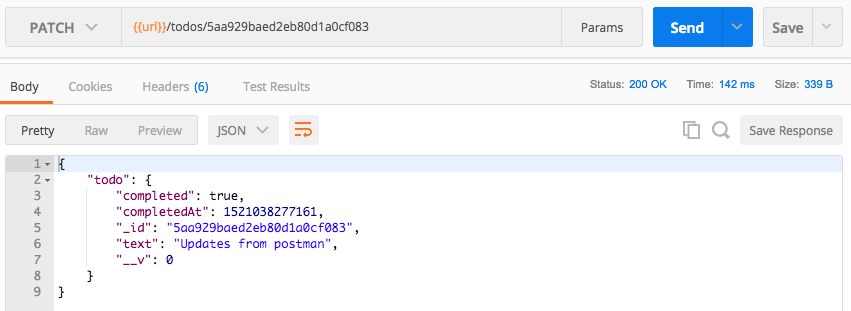
What I want to do is go ahead and tweak this first one so it's different. Then we'll run our tests and make sure that the tweaked Todo still shows up, because when we run the tests we shouldn't be accessing the same database, so none of this data should get changed. I'm going to copy the id for the first item, moving it into my PATCH call. I'm updating the text property and the completed property, so that's good, I don't need to change that. I'm going to go ahead and swap out the ID in the URL, send off the call, and now we have the updated Todo with the text property of Updates from postman:
Next up, I'm going to go into the Terminal, shut down node server, and run our tests using npm test:
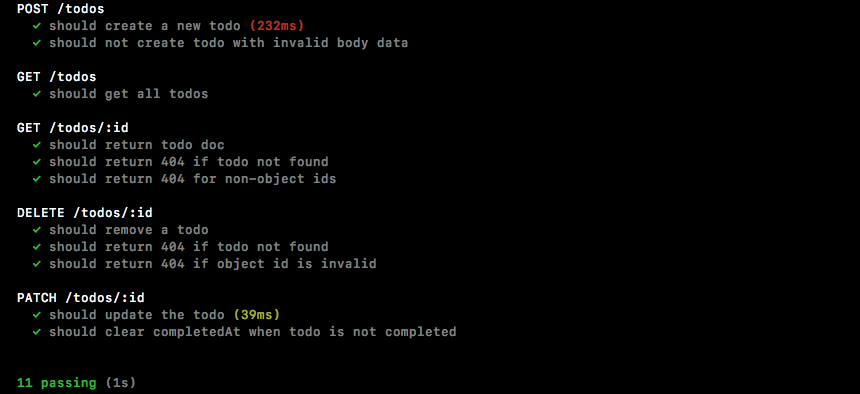
We get our env variable set to test, then it runs through the test suite; all of our tests pass, which is fantastic. The true test as to whether or not what we set up works is if we start up the server again and we try to fetch our data from the development database.
Over inside of Postman I'm going to make that GET /todos request one last time and right there our Todo data still shows up as expected. Even though the test suite did run, it didn't matter because it's not wiping this database anymore, it's now wiping a brand new database you can view in Robomongo. If I click the connection and click Refresh, we now have two TodoApp databases: we have TodoApp and we have TodoAppTest. This is fantastic; everything is set up and we are ready to get rolling.
Now what I do want to do before we go is take all of this code out of server.js and move it somewhere else; it doesn't really belong here and it only makes the server file more complex than it needs to be. In the server folder, I'm going to make a brand new folder called config, and in the config folder I'll make a new file called config.js, and inside we can do all of that process environment variable configuration. I'm going to copy all of the code and replace it with a require call to that file. It's a relative file so we'll go to /config/config:
require('./config/config');
Inside of config.js we can now copy the code in and remove the line related to console.log. Let's wrap this section up by committing our changes and deploying to Heroku.
Over inside of the Terminal I'm going to clear the Terminal output, then we can go ahead and run git status to see what files we have changed, and we have quite a few:
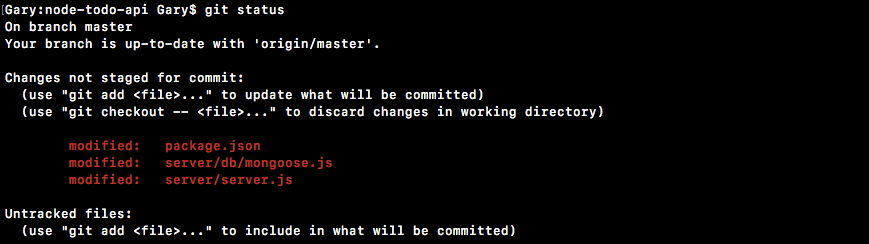
We also have some new files in the server directory. I'm going to use git add . to add all of that to the next commit and I'll use git status again to confirm everything looks good. Now we're ready for the commit and I can go ahead and do that, git commit with the -m flag providing our message, Setup separate test and development envs:
git commit -m 'Setup separate test and development envs'
And I'm also going to deploy it to Heroku so we can verify we haven't broken anything there:
git push heroku master
Once this is done we'll wrap the section up by heading into Postman and making a GET /todos request to our Heroku application. Over inside of Postman I'm going to switch environments from Todo App Local to Todo App Heroku and we can fire off the request:
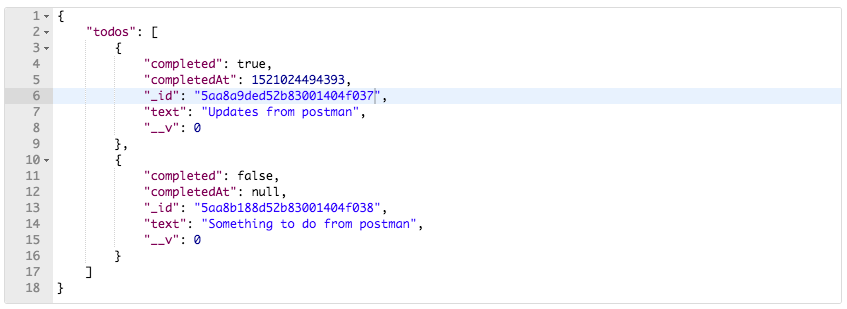
Now, as shown in the preceding screenshot, we get our two todo items coming from the real database, which means nothing was broken on the Heroku application, and it shouldn't be—technically we haven't changed anything. In Heroku, all we're doing is we're running the config file, but we don't use the default because it's already set, and it's not going to pass any of those statements because the env variable is going to be equal to the string production, so as far as Heroku is concerned, nothing has changed, and it's showing that because the data is still coming back as expected.
That is it for this section, and that is it for this chapter. In this section, we learned about MongoDB, Mongoose APIs, Postman, testing, routes, all sorts of great features. In the next chapter, we're going to wrap up the Todo application by adding authentication.