
Before you can add sockets to your web application, you need a web application to add them to, which is exactly what we'll create in this section. We'll make a basic Express app, which we'll get up on GitHub. Then, we'll deploy it to Heroku so we can view it live in the browser.
Now, the first step to that process is going to be to making a directory. We'll do a few things together to get us all going in the right direction. The first step in the process from the desktop is to run mkdir to make a new directory for this project; I'm going to call it node-chat-app.
Then, we can use cd to navigate into that directory and we can run a few commands:
mkdir node-chat-app
cd node-chat-app
First up, npm init. As with all of our projects in this book, we'll be taking advantage of npm, so we'll run the following command:
npm init
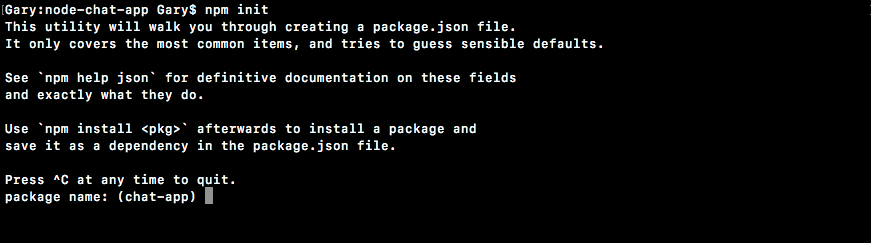
Then, we'll use the enter key to use the default value for every option:
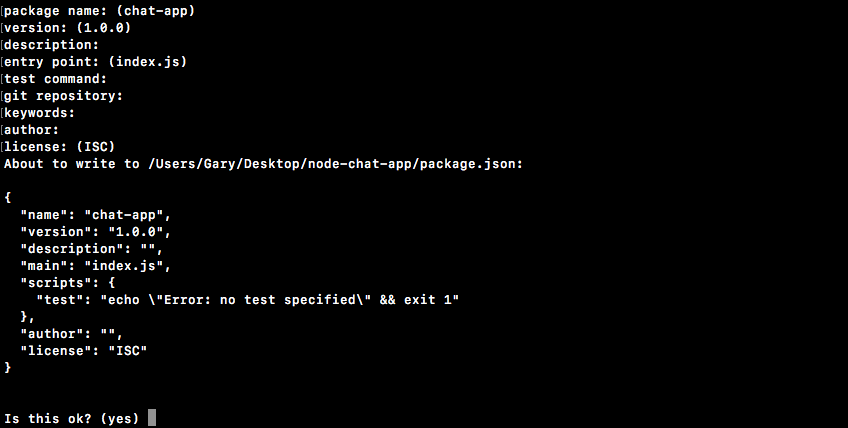
When we're done, we can type yes, and now we have a package.json file. Before we move into Atom, we'll run the following command to initialize a new Git repository:
git init
We'll be putting this project under version control using Git, and we'll also use Git to push to GitHub and Heroku. With this in place, I can use the clear command to clear the Terminal output, and we can move into Atom. We'll start by opening up the folder and setting up our basic app structure.