
Over in the Terminal, if I run npm test, all we're going to see is that we have zero tests in place:

Here we have the server-test file globbing pattern; it could not resolve any files. We can fix this issue by simply adding a test file. I'm going to add a test file for the message utility, message.test.js. Now we can go ahead and rerun the npm test command. This time around it does indeed find a file and we see we have zero passing tests, which is a great starting point:

Inside message.test.js, we'll need to add a test for the message function we just defined. Now this test is going to verify that the object we get back is what we would expect given the parameters we passed in. We'll set up the basic structure of the test file together, and you'll write the individual test case.
First up we need to load in Expect using var expect = require('expect'). This will let us make our assertions about the return value from our generateMessage function:
var expect = require('expect');
The next thing we're going to do is add a describe block. Here, we're going to add a describe block for the function generateMessage, and inside the callback function we'll have all of the test cases for that function:
describe('generateMessage', () => {

});
Before we can actually create a test case and fill it out, we do need to load in the module we're testing. I'll make a variable and using ES6 destructuring. We're going to pull off generateMessage, and then we can go ahead and require it using require, specifying the local path, ./message:
var expect = require('expect');
var {generateMessage} = require('./message');

describe('generateMessage', () => {

});
It's in the same directory as the test file where we currently are, so there's no reason to do any directory moving. With this in place we can now add the individual test case, it ('should generate the correct message object'). This is going to be a synchronous test, so there is no need to provide done. All you need to do is call generateMessage with two values, from and text. You're going to get the response back, and store the response in variable:
describe('generateMessage', () => {
  it('should generate correct message object', () => {
    //store res in variable
  });
});
Then you're going to make some assertions about the response. First up, assert that from is correct, assert from matches the value you passed in. You're also going to assert that the text matches up, and lastly you're going to assert that the createdAt value is a number:
var expect = require('expect');
var {generateMessage} = require('./message');

describe('generateMessage', () => {
  it('should generate correct message object', () => {
    // store res in variable
    // assert from match
    // assert text match
    // assert createdAt is number
  });
});
It doesn't matter what number it is; you're going to use the toBeA method to check the type and assert createdAt is number. To get this done, the first thing I'll do is define some variables.
To get started I'll make a from variable to store the from value. I'll go ahead and use Jen. I'll also make a text variable to store the text value, Some message. Now what I want to do is make my final variable, which is going to store the response, the message that comes back from the generateMessage function, which is exactly what I'm going to call. I'm going to call generateMessage passing in the two necessary arguments, the from argument and the text argument:
describe('generateMessage', () => {
  it('should generate correct message object', () => {
    var from = 'Jen';
    var text = 'Some message';
    var message = generateMessage(from, text);
Next up, and the final thing, we need to do is make assertions about this object that comes back. I'm going to expect that message.createdAt is a number using toBeA and passing in the type number:
describe('generateMessage', () => {
  it('should generate correct message object', () => {
    var from = 'Jen';
    var text = 'Some message';
    var message = generateMessage(from, text);

    expect(message.createdAt).toBeA('number');
This was the first assertion you needed to make to verify the property is correct. Next up we're going to expect that message has certain properties inside it. We're going to do this using the toInclude assertion, though you could have created two separate statements: one for message.from and a separate one for message.text. All of those are valid solutions. I'll just use toInclude and specify some things that message should include:
expect(message.createdAt).toBeA('number');
expect(message).toInclude({

});
First up, it should have a from property equal to the from variable. We can go ahead and use ES6 to define that; and the same thing is going to happen for text, text should equal text and we're going to use ES6 to set that up. We can even simplify this further using from, text:
expect(message.createdAt).toBeA('number');
expect(message).toInclude({from, text});
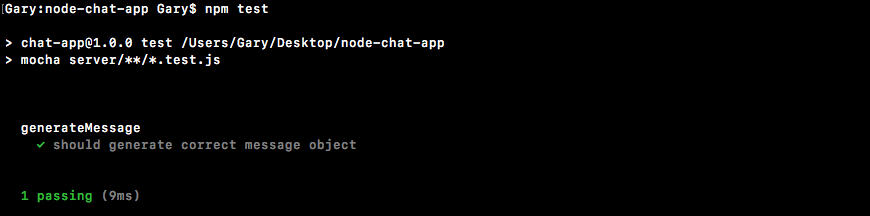
With this in place our test case is now done and we can go ahead and remove these commented outlines, and the final thing you needed to do was run the test suite from the Terminal by running npm test. When we do it what do we get? We get our one test under generateMessage, should generate correct message object, and it is indeed passing, which is fantastic:
Now that we have some tests verifying our function works as expected, let's go ahead and integrate it into our application by moving into server.js and replacing all of the objects we pass to the emit function with calls to our new function.