
The text element, as its name describes, is used to display text in SVG. The basic HTML code to create a text node is as follows:
<text x="250" y="150">Hello world!</text>
It has an x and a y coordinate to tell it where to begin writing in the SVG coordinate system. Styling can be achieved with a CSS class in order to have a clear separation of concerns within our code base. For example, check out the following code:
<text x="250" y="150" class="myText">Hello world!</text>

.myText{
  font-size:22px;
  font-family:Helvetica;
  stroke-width:2;
}
Text also supports rotation in order to provide flexibility when positioning it on the visualization:
<svg width="600" height="600">
        <text x="250" y="150" class="myText"
         transform="rotate(45,200,0)" font-family="Verdana"
         font-size="100">Hello world!</text>
</svg>;
Some examples are located at http://localhost:8080/chapter-2/text.html and displayed as shown in the following image:
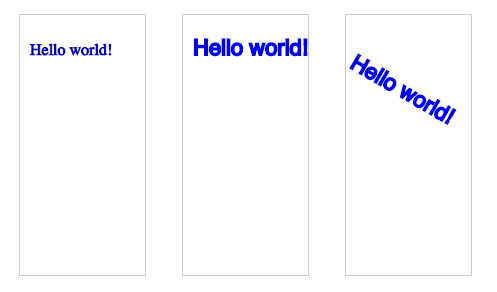
Keep in mind that, if you rotate the text, it will rotate relative to its origin (x and y). You can specify the origin of the translation via cx and cy, or in this case 250,150. See the transform property in the code for more clarity.