
The final tip involves merging multiple shapefiles into a single TopoJSON file. This is extremely useful if you need separate geographic information but want to fetch it in a single AJAX request. To append additional files, you add them after the - in the command line. Consider this command:
topojson -o ../topojson/spain-topo-simple.json -p  name=ISO -s 7e-7 -
- ESP_adm0.shp ESP_adm1.shp
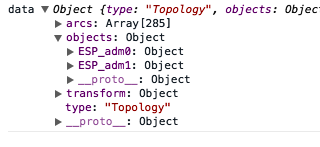
It will produce the following object structure, where the data for ESP_adm0 is the data for the country, and ESP_adm1 is the data for the regions:
There is also the opportunity to rename the object they will map to in the resulting TopoJSON file. Again, this can help create readable code. The renaming follows the same convention as renaming specific properties. For example, type in this command:
topojson -o ../topojson/spain-topo-simple.json -p  name=ISO -s 7e-7 -
- country=ESP_adm0.shp regions=ESP_adm1.shp
The preceding command will create the following:
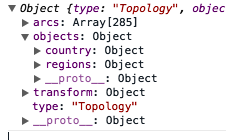
In this case, you would change your original code, which is as follows:
var country = topojson.feature(data, data.objects.ESP_adm0);
You have to change it to the following code:
var country = topojson.feature(data, data.objects.country);
This is much nicer to look at! Please look at example-3.html (http://localhost:8080/chapter-6/example-3.html) to see how all of this information can be tied together.