
The Bootstrap project contains the following files and directories:
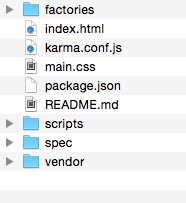
The project works out of the box with example code already in place. To see this in action, we will launch the example. From the example Bootstrap code provided, first, install all the dependencies (note that you only have to execute this command once):
npm install
Then, to see the visualization, execute the following:
node node_modules/http-server/bin/http-server
Next, open the browser to http://localhost:8080. You should see three bars changing based on random data in a series of tests. Note that if you have the previous examples already open, you will have to kill that process in order to run this one, as both of them use the same port.
To see the unit tests working, just execute the following:
node_modules/karma/bin/karma start
You should see a summary of five unit tests running in the terminal, and a continuous running process monitoring your project:
INFO [karma]: Karma v0.12.21 server started at
http://localhost:9876/
INFO [launcher]: Starting browser Chrome
INFO [Chrome 37.0.2062 (Mac OS X 10.9.5)]: Connected on socket
goMqmrnZkxyz9nlpQHem with id 16699326Chrome 37.0.2062 (Mac OS X 10.9.5): Executed 5 of 5 SUCCESS
(0.018 secs / 0.013 secs)
We will explain how to write unit tests for the project later in this chapter. For a quick peek at what tests are running, look at spec/viz_spec.js.
If you change any of the methods in this file, you will notice that the test runner will detect that a change has been made in the code and re-execute the tests! This provides a fantastic feedback loop to the developer as you continue to enhance your work.