
GeoJSON is a specific JSON format for describing geographic data structures. It is important to know that GeoJSON does the following:
- Contains all the information required to draw geographic data.
- Is a standard JSON format and can be used instantly in JavaScript when building for the web.
- Is required by D3 when defining our d3.geo.path function, as seen in the previous chapters.
- Discretely defines each geographic shape. For example, if two countries share a border, the GeoJSON file will completely define both countries, therefore defining the border twice. It does not provide any mechanisms to optimize the data file.
Because D3 relies on GeoJSON, we will explain some of the highlights of the specification. For a complete explanation, please see http://geojson.org.
Typically, you will not incorporate the GeoJSON file directly in your D3 work. TopoJSON, explained in the next section, offers a more compact solution. However, it is still important to understand the specification, so let's walk through the GeoJSON of Spain:
{
    "type": "FeatureCollection",
    "features": [
        {
            "type": "Feature",
            "properties": {
                "GADMID": 70,
                "ISO": "ESP",
                "NAME_ENGLI": "Spain",
                "NAME_ISO": "SPAIN",
                "NAME_FAO": "Spain",
                "NAME_LOCAL": "España",
                ...
            },
            "geometry": {
                "type": "MultiPolygon",
                "coordinates": [
                    [
                        [
                            [
                                0.518472,
                                40.53236
                            ],
                            [
                                0.518194,
                                40.53236
                            ],
                            ...
                        ]
                    ]
                ]
            }
        }
    ]
}
The first property of the JSON object identifies the GeoJSON file as a collection of features (FeatureCollection). Each member of the collection (the array in the preceding features property) holds a specially formatted JSON object called a feature. The d3.geo.path function that we used in the previous chapters knows how to convert the feature object into a polygon using an SVG path. By iterating over an array of these features and drawing each polygon one by one, we create a D3 map.
The feature object must adhere to the following properties in order for D3 to convert the object into a polygon:
-
geometry: This is another GeoJSON specification that contains types and coordinates that indicate exactly how to draw the shape. We will not spend a lot of time explaining exactly how the specification draws the object. D3 will do all the hard work for us. Leveraging the enter/update/exit pattern, we pass a special d3.geo.path function to each feature. This function will take the geometry information about the feature and create the shape for us automatically.
-
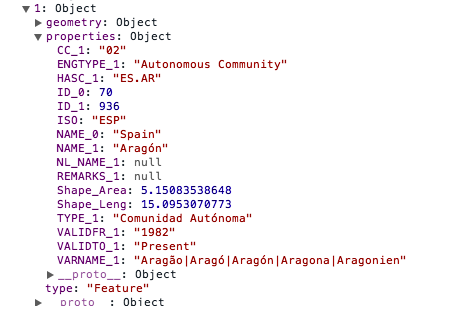
properties: This is any additional data to be attached to the feature. This is a typical name/value pair JSON object. In the preceding example, the properties attribute is leveraged to store the name of the country. This is very helpful when we need to find the country later to bind additional data to the visualization. See the following screenshot for examples of properties that can be bound to a feature object:
- id: This is a placeholder that can be leveraged to store a unique identifier to the particular feature in the collection.