
You will likely use this transformation in all of your cartography work and will see it in most D3 examples online. As a technique, it's often used with a margin object to shift the entire visualization. The following syntax can be applied to any element:
transform="translate(x,y)"
Here, x and y are the coordinates to move the element by.
For example, a translate transform can move our circle 50 pixels to the left and 50 pixels down by using the following code:
<circle cx="62" cy="62" r="50" transform="translate(50,50)"></circle>
Here is the output:
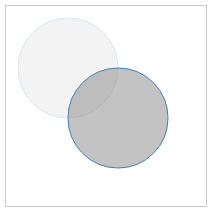
Note that the translucent image represents the original image and the location the shape moved from. The translate attribute is not an absolute position. It adjusts the origin of the circle relatively to cx, cy and adds 50 to those coordinates. If you were to move the circle to the top-left of the container, you would translate with negative values. For example:
transform="translate(-10,-10)"
Feel free to experiment with your Chrome developer tools or code editor at
http://localhost:8080/chapter-2/translate.html.