
A common operation in D3 is to select a DOM element and append SVG elements. Subsequent calls will then set the SVG attributes, which we learned about in Chapter 2, Creating Images from Simple Text. D3 accomplishes this operation through an easy-to-read, functional syntax called method chaining. Let's walk through a very simple example to illustrate how this is accomplished (go to http://localhost:8080/chapter-3/example-1.html if you have the http-server running):
var svg = d3.select("body")
    .append("svg")
    .attr("width", 200)
    .attr("height", 200)
First, we select the body tag and append an SVG element to it. This SVG element has a width and height of 200 pixels. We also store the selection in a variable:
svg.append('rect')
    .attr('x', 10)
    .attr('y', 10)
    .attr("width",50)
    .attr("height",100);
Next, we use the svg variable and append a <rect> item to it. This rect item will start at (10,10) and will have a width of 50 and a height of 100. From your Chrome browser, open the Chrome developer tools with the Elements tab selected and inspect the SVG element:
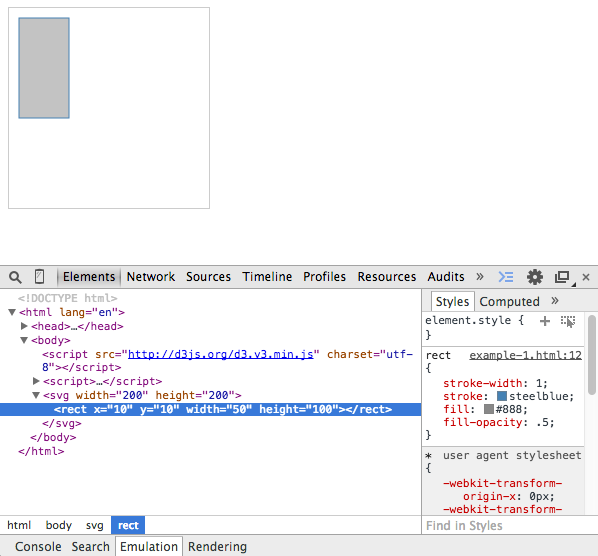
Notice the pattern: append('svg') creates <svg></svg>. attr('width',200) and attr('height',200) sets width="200" and height="200" respectively. Together, they produce the SVG syntax we learned about in the previous chapter:
<svg width="200" height="200">...</svg>