We've discussed enter() and update. We've seen how one determines the starting point of our visualization and the other modifies its attributes based on new data coming in. However, the examples covered had the exact number of data elements with the same properties. What would happen if our new dataset had a different amount of items? What if it has fewer or more?
Let's take the update part of the previous example and modify it a bit to demonstrate what we're talking about (http://localhost:8080/chapter-3/example-5.html):
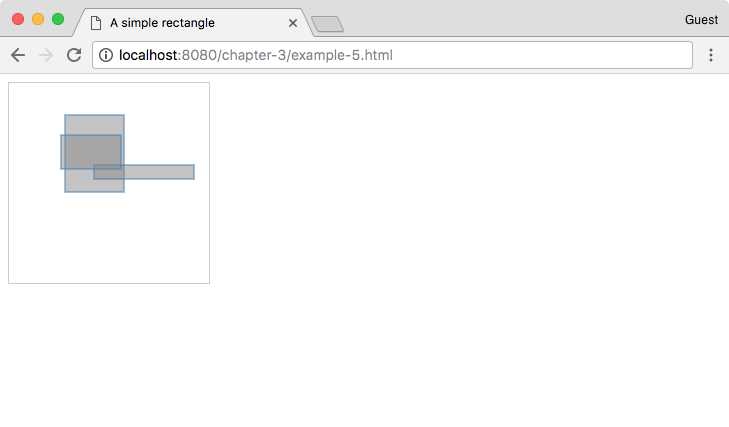
We can explain how this works with two small changes to the rectangles function:
var rectangles = function(svg) {
var data = makeData((Math.random() * 5) + 1);
Here, we tell the data function to create a random number of data objects:
  var rect = svg.selectAll('rect').data(data);

  // Enter
  rect.enter().append('rect')
    .attr('test', function(d,i) {
      // Enter called 2 times only
      console.log('enter placing inital rectangle: ', i)
  });

  // Update
  rect.transition().duration(500).attr('x', function(d){ return d.x; })
      .attr('y', function(d){ return d.y; })
      .attr('width', function(d){ return d.width; })
      .attr('height', function(d){ return d.height; })
      .attr('test', function(d, i) {
        // update every data change
        console.log('updating x position to: ', d.x)
      });
The exit() function will be the same as before. Add a new exit() section:
  // Exit
  rect.exit().attr('test', function(d) {
    console.log('no data...')
  }).remove();
}
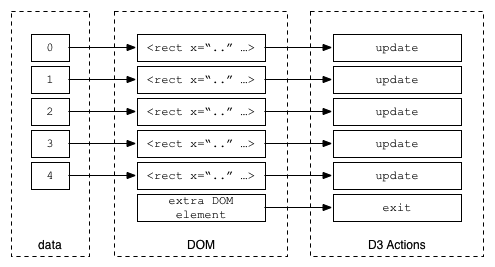
The exit() method serves the purpose of cleansing or cleaning the no-longer-used DOM items in our visualization. This is helpful because it allows us to join our data with DOM elements, keeping them in sync. An easy way to remember this is as follows: if there are more data elements than DOM elements, the enter() section will be invoked; if there are fewer data elements than DOM elements, the exit() section will be invoked. In the previous example, we just removed the DOM element if there was no matching data.
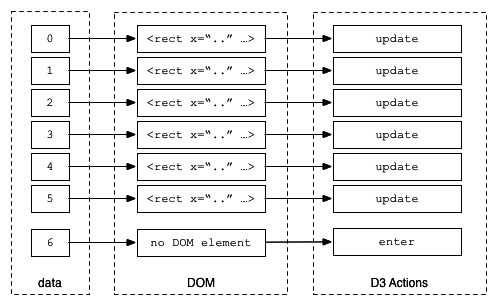
The following is a graphical representation of the sequence that occurs when enter() and update functions are called. Notice that there's no DOM element for data element 6, so, the enter() section is executed. For data elements 0 to 5, the update code is always called. For data element 6, the update section will be executed after the enter process has completed. Refer to the following diagram:
This illustrates what happens when you have fewer data elements than DOM elements. The update section is always called where there is a match, as shown in the following diagram: