Table of Contents for
Mastering PostCSS for Web Design
 Mastering PostCSS for Web Design
Published by
Packt Publishing, 2016
Mastering PostCSS for Web Design
Published by
Packt Publishing, 2016
- Cover
- Table of Contents
- Mastering PostCSS for Web Design
- Mastering PostCSS for Web Design
- Credits
- About the Author
- About the Reviewer
- www.PacktPub.com
- Preface
- What you need for this book
- Who this book is for
- Conventions
- Reader feedback
- Customer support
- 1. Introducing PostCSS
- Introducing PostCSS
- Setting up a development environment
- Creating a simple example using PostCSS
- Linting code using plugins
- Exploring how PostCSS works
- Summary
- 2. Creating Variables and Mixins
- Creating a hover effect example
- Transitioning to using PostCSS
- Adding variable support to PostCSS
- Updating our hover effect demo
- Setting the order of plugins
- Creating mixins with PostCSS
- Looping content with PostCSS
- Summary
- 3. Nesting Rules
- Navigating through pages
- Transitioning to using PostCSS plugins
- Exploring the pitfalls of nesting
- Making the switch to BEM
- Exploring our changes in more detail
- Summary
- 4. Building Media Queries
- Exploring custom media queries in PostCSS
- Making images responsive
- Adding responsive text support
- Optimizing media queries
- Retrofitting support for older browsers
- Moving away from responsive design
- Taking things further with CSS4
- Summary
- 5. Managing Colors, Images, and Fonts
- Managing fonts with PostCSS
- Creating image sprites
- Working with SVG in PostCSS
- Adding support for WebP images
- Manipulating colors and color palettes
- Creating color functions with PostCSS
- Summary
- 6. Creating Grids
- Creating an example with Bourbon Neat
- Exploring the grid plugins in PostCSS
- Transitioning to using PostCSS-Neat
- Creating a site using Neat and PostCSS
- Adding responsive capabilities
- Summary
- 7. Animating Elements
- Moving away from jQuery
- Making use of pre-built libraries
- Switching to using SASS
- Making the switch to PostCSS
- Exploring plugin options within PostCSS
- Updating code to use PostCSS
- Creating a demo in PostCSS
- Optimizing our animations
- Using our own animation plugin
- Summary
- 8. Creating PostCSS Plugins
- Dissecting the architecture of a standard plugin
- Creating an transition plugin
- Building a custom font plugin
- Simplifying the development process
- Guidelines for plugin building
- Making the plugin available for use
- Summary
- 9. Working with Shortcuts, Fallbacks, and Packs
- Exploring plugin packs for PostCSS
- Adding shortcuts with Rucksack
- Linting and optimizing your code
- Providing fallback support
- Summary
- 10. Building a Custom Processor
- Exploring our processor
- Dissecting issues with our processor
- Optimizing the output
- Adding reload capabilities
- Extending our processor further
- Testing the final pre-processor
- Getting started with some hints and tips
- Introducing the CSStyle library
- Summary
- 11. Manipulating Custom Syntaxes
- Preparing our environment
- Implementing custom syntax plugins
- Parsing CSS
- Formatting the output with the API
- Highlighting our syntax code
- Summary
- 12. Mixing Preprocessors
- Exploring the conversion process
- Introducing the Pleeease library
- Compiling with other preprocessors
- Using the PreCSS library
- Converting a WordPress installation
- Setting up our environment
- Considering the conversion process
- Making changes to our code
- Compiling and testing the changes
- Summary
- 13. Troubleshooting PostCSS Issues
- Exploring some common issues
- Getting help from others
- Summary
- 14. Preparing for the Future
- Converting CSS4 styles for use
- Supporting future syntax with cssnext
- Creating plugins to provide extra CSS4 support
- Summary
- Index
PostCSS as a processing system is easy to set up and use, but occasionally we may come across issues during development. The issues will vary, of course, but to help you along, we can explore some of the more common issues we may face during development.
For the purposes of this chapter, we will assume that the Gulp task runner has been used—you will likely see similar issues with other task runners such as Grunt or Broccoli. It's time to explore some of these issues in more detail.
The beauty of PostCSS is that we can install any one of dozens of plugins available—if we're using a task runner such as Gulp, then we can easily extend this to cover the vast array available for use.
In most instances, plugins will install without a hitch; you may find that you see this appear occasionally:

The warning message that is of most importance to us is not the ENOENT messages, but this one:
notsup: Not compatible with your operating system or architecture: fsevents@1.0.6
It should be noted that this is only a warning, and not an error (as such)—it is caused by the use of fsevents, which is MacOSX only and will not work on Windows or Linux environments. In most cases this can be ignored, although it would be wise to test your processor to ensure it has not had any detrimental impact on your code.
We've created a Gulp task file with a number of tasks within, and run it to compile our style sheet. Instead of getting our processed files, we end up with this message:
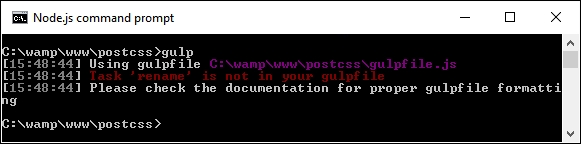
This is caused by the Gulp task not being present in the gulp file—in this declaration example, we're calling the rename task:
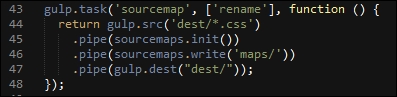
But a look through the gulp file shows that there is no rename task in sight:
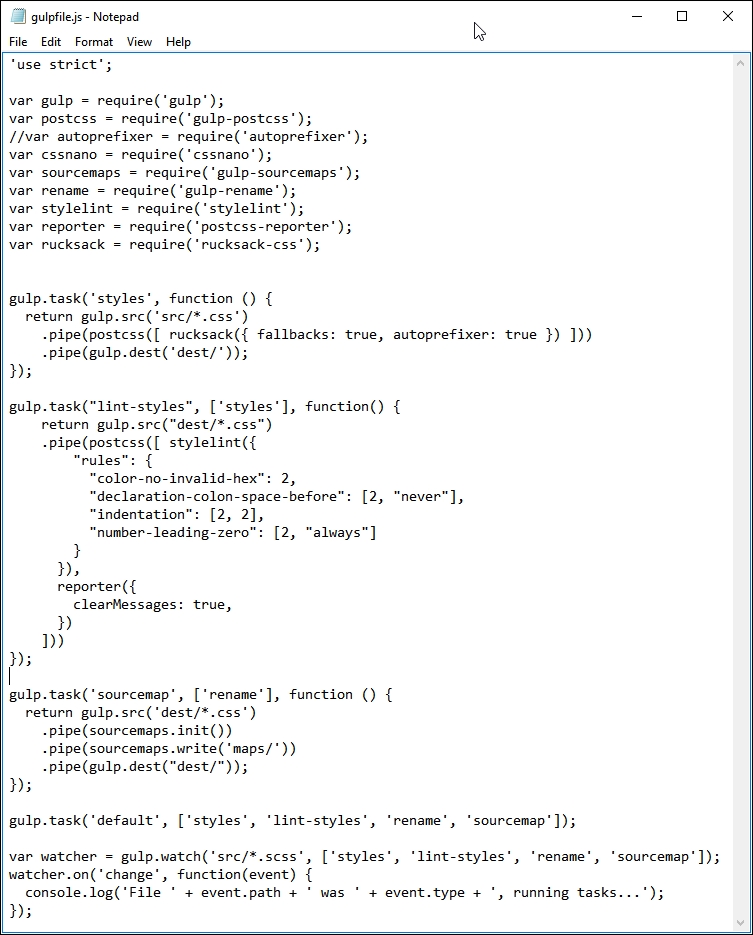
This is a simple fix—just rename the task so that the names match, and retry the compilation. Note, though—if more than one task is incorrectly named, then the process will fail but will only show the name of the first one that is at fault. Make sure that each task name is entered correctly in the file to ensure successful compilation.
If any error is likely to catch us out, then it is this one—let me explain:
As you get to grips with installing PostCSS plugins, you will see many that use the naming convention postcss-<name of plugin>. It seems a sensible proposition, but beware – not every PostCSS plugin uses this naming convention!
A great example is Rucksack – one would expect to use postcss-rucksack (and yes, that includes me!), but we will get this error if we do:
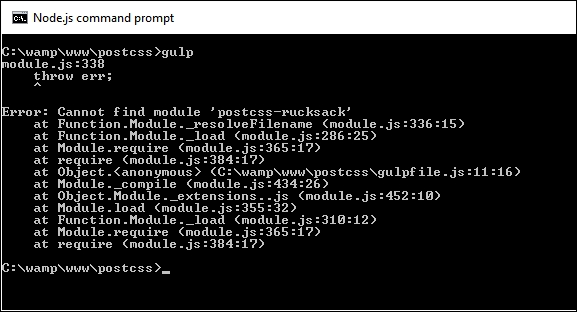
It turns out that Rucksack is one of those examples that doesn't use the same naming convention that many people would expect it to use. Instead, it uses rucksack-css, as the name we would expect to use had already been taken.
This is one of those instances where it pays to read the documentation, if only to save a lot of embarrassment later:
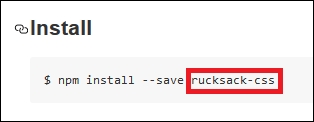
It clearly states what name to use when installing the plugin! Yes, it happens to the best of us…
Let us assume that we have a series of tasks in our gulp file, but for some unknown reason, we're getting this error when we compile our code:
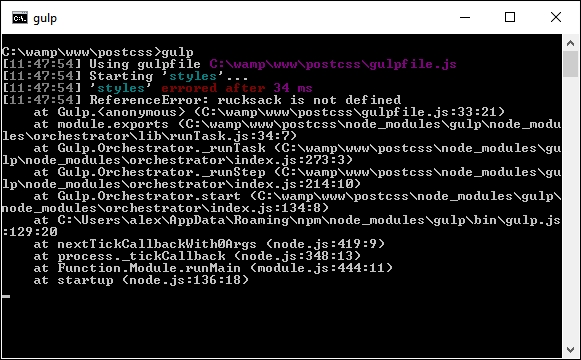
What could be causing it? Well, there are at least two possible causes:
- We include the plugin within the task itself, but forget to include a reference to it within the declarations at the top of our file
- We do manage to include both the plugin within the task and its associated declaration, but somehow manage not to give the same declaration name
The fix for this is to make sure that when we include the declaration at the top of the Gulp task file, that the same name is used when calling the task later in the file.
This next error is one that can catch anyone out, but is easy to fix—as time goes by you will develop your own processor; you will likely reach a point where you start to move some of the PostCSS processor tasks out from the main PostCSS call into their own task.
Imagine that you have a PostCSS task similar to this:

There is a natural temptation to split this task into separate ones; after all, I extolled the virtues of keeping a 1:1 relationship between the task name (that is, styles), and what it does in the task! If, however, you take things a little too far, and think that you don't need to have a PostCSS processor in the task, then you may come unstuck, and land up with an error similar to this screenshot:
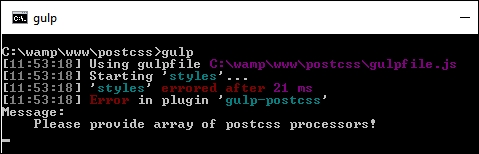
A quick check in your Gulp task file will likely show something akin to this:
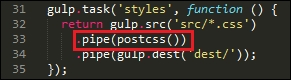
We have a postcss task, but without any processors within it! Although it is tempting to rework processors to ensure we maintain that 1:1 relationship, we must always leave one processor in the postcss() task, to ensure it operates correctly.
This next error is a little trickier to catch, but the fix for it is easy—over time, you will likely make changes to your Gulp task file; this of course means that new plugins will need to be added from another package.json file (if already installed), or added afresh, if they haven't already been installed.
As the Gulp task file is just a plain text file, we can edit it in any text editor—my personal favorite is Sublime Text 3 (http://www.sublimetext.com/3), but any will suffice. Notepad isn't a good one, as it will fail to handle the line-endings correctly!
This aside, if we edit our package.json file to remove an entry, then add a new one, we might come across this warning:
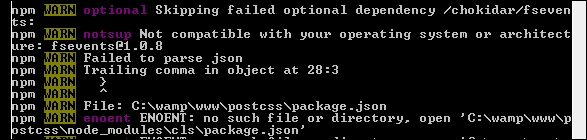
The cause of this little gem is a really irritating one—it's amazing how one single character can cause all these warnings! The culprit is the extraneous comma at the end of a line where there isn't another plugin listed immediately after, as shown on line 27 in this screenshot:
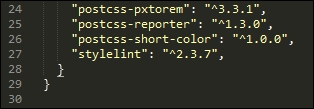
If we remove the comma and retry the installation, we will soon see that the error has disappeared.
This final error can be deceptive—it's not strictly speaking even an error! Imagine we've created a killer processor application using Node and Gulp; it contains a number of tasks similar to the ones we created earlier, and have since used throughout this book.
We enter the relevant command and hit Enter. PostCSS starts the compilation: so far so good. A look in the dest folder shows this—where's our minified file and source map?
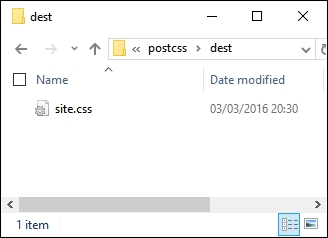
But hold on – where's the error? A check of the output from the compilation process shows no error, so what gives?
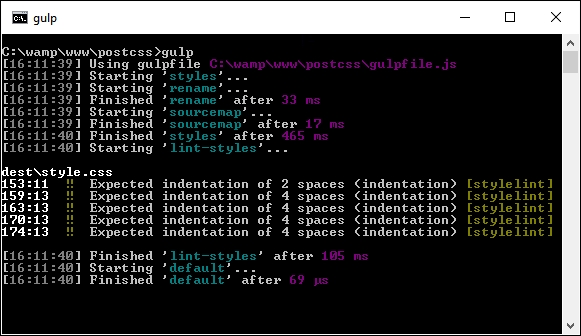
This little oddity is caused by miscalculating the order in which tasks should run—although the screenshot clearly says an error, it's not an error in the true sense. Let me explain.
The key to a successful compilation process (and by default, a working processor), lies in the need to make sure that each task we run is fired in the right order. To generate this error, I removed the constraint on our rename task in the Gulp file from the T45 – converting to use Rucksack demo, thus:
gulp.task('rename', function () {
  return gulp.src('dest/*.css')
    .pipe(postcss([ cssnano() ]))
    .pipe(rename('style.min.css'))
    .pipe(gulp.dest("dest/"));
});
The task looks perfectly acceptable, but introduces a problem—instead of just one starting task, we now have two!
The net result of this is that the styles task is run first (as it is called first in the default task from line 36). It's quickly followed by the rename task (no constraint on it), then sourcemap and lint-styles (following the constraints set against each task).
We end up with just one compiled file in the dest folder—the rename and styles tasks are both run at the same time; as the latter isn't completed, the former can't produce any content!
Let's move on. If all else fails, and you find problems you can't fix, then it is time to seek help….here's a quick rundown of the options available to you as a beginner to using PostCSS.