Table of Contents for
Mastering PostCSS for Web Design
 Mastering PostCSS for Web Design
Published by
Packt Publishing, 2016
Mastering PostCSS for Web Design
Published by
Packt Publishing, 2016
- Cover
- Table of Contents
- Mastering PostCSS for Web Design
- Mastering PostCSS for Web Design
- Credits
- About the Author
- About the Reviewer
- www.PacktPub.com
- Preface
- What you need for this book
- Who this book is for
- Conventions
- Reader feedback
- Customer support
- 1. Introducing PostCSS
- Introducing PostCSS
- Setting up a development environment
- Creating a simple example using PostCSS
- Linting code using plugins
- Exploring how PostCSS works
- Summary
- 2. Creating Variables and Mixins
- Creating a hover effect example
- Transitioning to using PostCSS
- Adding variable support to PostCSS
- Updating our hover effect demo
- Setting the order of plugins
- Creating mixins with PostCSS
- Looping content with PostCSS
- Summary
- 3. Nesting Rules
- Navigating through pages
- Transitioning to using PostCSS plugins
- Exploring the pitfalls of nesting
- Making the switch to BEM
- Exploring our changes in more detail
- Summary
- 4. Building Media Queries
- Exploring custom media queries in PostCSS
- Making images responsive
- Adding responsive text support
- Optimizing media queries
- Retrofitting support for older browsers
- Moving away from responsive design
- Taking things further with CSS4
- Summary
- 5. Managing Colors, Images, and Fonts
- Managing fonts with PostCSS
- Creating image sprites
- Working with SVG in PostCSS
- Adding support for WebP images
- Manipulating colors and color palettes
- Creating color functions with PostCSS
- Summary
- 6. Creating Grids
- Creating an example with Bourbon Neat
- Exploring the grid plugins in PostCSS
- Transitioning to using PostCSS-Neat
- Creating a site using Neat and PostCSS
- Adding responsive capabilities
- Summary
- 7. Animating Elements
- Moving away from jQuery
- Making use of pre-built libraries
- Switching to using SASS
- Making the switch to PostCSS
- Exploring plugin options within PostCSS
- Updating code to use PostCSS
- Creating a demo in PostCSS
- Optimizing our animations
- Using our own animation plugin
- Summary
- 8. Creating PostCSS Plugins
- Dissecting the architecture of a standard plugin
- Creating an transition plugin
- Building a custom font plugin
- Simplifying the development process
- Guidelines for plugin building
- Making the plugin available for use
- Summary
- 9. Working with Shortcuts, Fallbacks, and Packs
- Exploring plugin packs for PostCSS
- Adding shortcuts with Rucksack
- Linting and optimizing your code
- Providing fallback support
- Summary
- 10. Building a Custom Processor
- Exploring our processor
- Dissecting issues with our processor
- Optimizing the output
- Adding reload capabilities
- Extending our processor further
- Testing the final pre-processor
- Getting started with some hints and tips
- Introducing the CSStyle library
- Summary
- 11. Manipulating Custom Syntaxes
- Preparing our environment
- Implementing custom syntax plugins
- Parsing CSS
- Formatting the output with the API
- Highlighting our syntax code
- Summary
- 12. Mixing Preprocessors
- Exploring the conversion process
- Introducing the Pleeease library
- Compiling with other preprocessors
- Using the PreCSS library
- Converting a WordPress installation
- Setting up our environment
- Considering the conversion process
- Making changes to our code
- Compiling and testing the changes
- Summary
- 13. Troubleshooting PostCSS Issues
- Exploring some common issues
- Getting help from others
- Summary
- 14. Preparing for the Future
- Converting CSS4 styles for use
- Supporting future syntax with cssnext
- Creating plugins to provide extra CSS4 support
- Summary
- Index
A question: if you had the choice of three websites: one static, one with badly done animation, and one which has been enhanced with subtle use of animation, which would you choose? Well, my hope is the answer to that question should be number three: animation can really make a site stand out if done well, or fail miserably if done badly!
So far, our content has been relatively static, save for the use of media queries. It's time, though, to take a look at how PostCSS can help make animating content a little easier. We'll begin with a quick recap on the basics of animation, before exploring the route to moving away from pure animation, through to SASS, and finally, across to PostCSS. We will cover a number of topics throughout this chapter, which will include:
A recap on the use of jQuery to animate content:
- Switching to CSS-based animation
- Exploring the use of pre-built libraries such as
Animate.css - Exploring the options available when making the change to using PostCSS
- Working through creating an animation-based demo, using PostCSS
- Learning how to optimize animations using PostCSS
Let's make a start…!
Animation is quickly becoming king in web development, more and more websites are using animations to help bring life and keep content fresh. If done correctly, they add an extra layer of experience for the end user; done badly, and the website will soon lose more custom than water through a sieve!
Throughout the course of the chapter, we'll take a look at making the change from writing standard animation, through to using processors such as SASS, and finally, switching to using PostCSS. I can't promise you that we'll be creating complex JavaScript-based demos such as the Caaaat animation (http://roxik.com/cat/—try resizing the window!), but we will see that using PostCSS is really easy when creating animations for the browser.
To kick off our journey, we'll start with a quick look at the traditional animation—how many times have you had to use .animate() in jQuery, over the years? Thankfully, we have the power of CSS3 to help with simple animations, but there was a time when we had to animate content using jQuery.
As a quick reminder, try running animate.html from the T34 – Basic animation using jQuery animate() folder. It's not going to set the world on fire, but is a nice reminder of times gone by, when we didn't know any better:
If we take a look at a profile of this animation from within a DOM inspector from within a browser such as Firefox, it would look something like this screenshot:
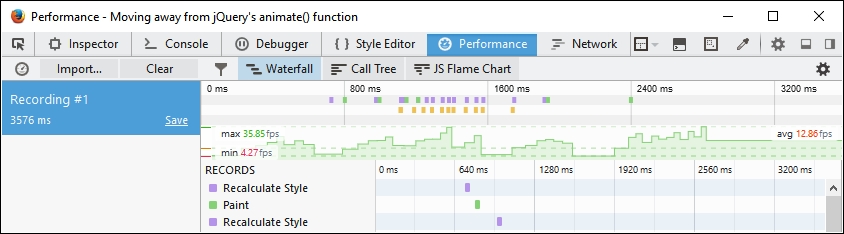
Whilst the numbers aren't critical, the key point here is the two dotted green lines, and that the results show a high degree of inconsistent activity. This is a good indicator that activity is erratic, with a low frame count, resulting in animations that are jumpy and less than 100% smooth.
The great thing, though, is that there are options available to help provide smoother animations; we'll take a brief look at some of the options available, before making the change to using PostCSS. For now though, let's make that first step to moving away from using jQuery, beginning with a look at the options available for reducing dependency on the use of .animate() or jQuery.