Table of Contents for
QGIS: Becoming a GIS Power User
 QGIS: Becoming a GIS Power User
Published by
Packt Publishing, 2017
QGIS: Becoming a GIS Power User
Published by
Packt Publishing, 2017
- Cover
- Table of Contents
- QGIS: Becoming a GIS Power User
- QGIS: Becoming a GIS Power User
- QGIS: Becoming a GIS Power User
- Credits
- Preface
- What you need for this learning path
- Who this learning path is for
- Reader feedback
- Customer support
- 1. Module 1
- 1. Getting Started with QGIS
- Running QGIS for the first time
- Introducing the QGIS user interface
- Finding help and reporting issues
- Summary
- 2. Viewing Spatial Data
- Dealing with coordinate reference systems
- Loading raster files
- Loading data from databases
- Loading data from OGC web services
- Styling raster layers
- Styling vector layers
- Loading background maps
- Dealing with project files
- Summary
- 3. Data Creation and Editing
- Working with feature selection tools
- Editing vector geometries
- Using measuring tools
- Editing attributes
- Reprojecting and converting vector and raster data
- Joining tabular data
- Using temporary scratch layers
- Checking for topological errors and fixing them
- Adding data to spatial databases
- Summary
- 4. Spatial Analysis
- Combining raster and vector data
- Vector and raster analysis with Processing
- Leveraging the power of spatial databases
- Summary
- 5. Creating Great Maps
- Labeling
- Designing print maps
- Presenting your maps online
- Summary
- 6. Extending QGIS with Python
- Getting to know the Python Console
- Creating custom geoprocessing scripts using Python
- Developing your first plugin
- Summary
- 2. Module 2
- 1. Exploring Places – from Concept to Interface
- Acquiring data for geospatial applications
- Visualizing GIS data
- The basemap
- Summary
- 2. Identifying the Best Places
- Raster analysis
- Publishing the results as a web application
- Summary
- 3. Discovering Physical Relationships
- Spatial join for a performant operational layer interaction
- The CartoDB platform
- Leaflet and an external API: CartoDB SQL
- Summary
- 4. Finding the Best Way to Get There
- OpenStreetMap data for topology
- Database importing and topological relationships
- Creating the travel time isochron polygons
- Generating the shortest paths for all students
- Web applications – creating safe corridors
- Summary
- 5. Demonstrating Change
- TopoJSON
- The D3 data visualization library
- Summary
- 6. Estimating Unknown Values
- Interpolated model values
- A dynamic web application – OpenLayers AJAX with Python and SpatiaLite
- Summary
- 7. Mapping for Enterprises and Communities
- The cartographic rendering of geospatial data – MBTiles and UTFGrid
- Interacting with Mapbox services
- Putting it all together
- Going further – local MBTiles hosting with TileStream
- Summary
- 3. Module 3
- 1. Data Input and Output
- Finding geospatial data on your computer
- Describing data sources
- Importing data from text files
- Importing KML/KMZ files
- Importing DXF/DWG files
- Opening a NetCDF file
- Saving a vector layer
- Saving a raster layer
- Reprojecting a layer
- Batch format conversion
- Batch reprojection
- Loading vector layers into SpatiaLite
- Loading vector layers into PostGIS
- 2. Data Management
- Joining layer data
- Cleaning up the attribute table
- Configuring relations
- Joining tables in databases
- Creating views in SpatiaLite
- Creating views in PostGIS
- Creating spatial indexes
- Georeferencing rasters
- Georeferencing vector layers
- Creating raster overviews (pyramids)
- Building virtual rasters (catalogs)
- 3. Common Data Preprocessing Steps
- Converting points to lines to polygons and back – QGIS
- Converting points to lines to polygons and back – SpatiaLite
- Converting points to lines to polygons and back – PostGIS
- Cropping rasters
- Clipping vectors
- Extracting vectors
- Converting rasters to vectors
- Converting vectors to rasters
- Building DateTime strings
- Geotagging photos
- 4. Data Exploration
- Listing unique values in a column
- Exploring numeric value distribution in a column
- Exploring spatiotemporal vector data using Time Manager
- Creating animations using Time Manager
- Designing time-dependent styles
- Loading BaseMaps with the QuickMapServices plugin
- Loading BaseMaps with the OpenLayers plugin
- Viewing geotagged photos
- 5. Classic Vector Analysis
- Selecting optimum sites
- Dasymetric mapping
- Calculating regional statistics
- Estimating density heatmaps
- Estimating values based on samples
- 6. Network Analysis
- Creating a simple routing network
- Calculating the shortest paths using the Road graph plugin
- Routing with one-way streets in the Road graph plugin
- Calculating the shortest paths with the QGIS network analysis library
- Routing point sequences
- Automating multiple route computation using batch processing
- Matching points to the nearest line
- Creating a routing network for pgRouting
- Visualizing the pgRouting results in QGIS
- Using the pgRoutingLayer plugin for convenience
- Getting network data from the OSM
- 7. Raster Analysis I
- Using the raster calculator
- Preparing elevation data
- Calculating a slope
- Calculating a hillshade layer
- Analyzing hydrology
- Calculating a topographic index
- Automating analysis tasks using the graphical modeler
- 8. Raster Analysis II
- Calculating NDVI
- Handling null values
- Setting extents with masks
- Sampling a raster layer
- Visualizing multispectral layers
- Modifying and reclassifying values in raster layers
- Performing supervised classification of raster layers
- 9. QGIS and the Web
- Using web services
- Using WFS and WFS-T
- Searching CSW
- Using WMS and WMS Tiles
- Using WCS
- Using GDAL
- Serving web maps with the QGIS server
- Scale-dependent rendering
- Hooking up web clients
- Managing GeoServer from QGIS
- 10. Cartography Tips
- Using Rule Based Rendering
- Handling transparencies
- Understanding the feature and layer blending modes
- Saving and loading styles
- Configuring data-defined labels
- Creating custom SVG graphics
- Making pretty graticules in any projection
- Making useful graticules in printed maps
- Creating a map series using Atlas
- 11. Extending QGIS
- Defining custom projections
- Working near the dateline
- Working offline
- Using the QspatiaLite plugin
- Adding plugins with Python dependencies
- Using the Python console
- Writing Processing algorithms
- Writing QGIS plugins
- Using external tools
- 12. Up and Coming
- Preparing LiDAR data
- Opening File Geodatabases with the OpenFileGDB driver
- Using Geopackages
- The PostGIS Topology Editor plugin
- The Topology Checker plugin
- GRASS Topology tools
- Hunting for bugs
- Reporting bugs
- Bibliography
- Index
If there was a list of top features of QGIS, data-defined labels would be high on that list. They offer the ease of automatic labeling with the customization of freehand labeling. You can mix and match automatic and custom edits, storing the values in a table for later reference.
There are a couple of useful plugins for data-defined labeling which will add the extra attribute fields that you need to either an existing layer or make a new layer just for labels. Download and install Layer to labeled layer and Create labeled layer.
- Open QGIS and load
census_wake2000.shp. - Create a copy of the layer using the Save As dialog, and save the layer as
census_wake2000_label.shp. (You don't always have to do this but this process does modify the table, so it's a good idea to make a backup.) - Highlight
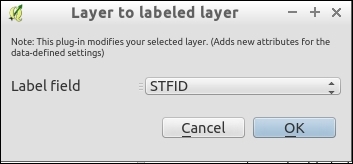
census_wake2000_label.shpin the layer list. - Run the Layer to labeled layer plugin (Plugins | Layer to Labeled layer plugin):
- Set Label Field to
STFID. - Click on OK:
- Set Label Field to
- If you look at the attribute table now, you will see a whole bunch of new fields, starting with the Lbl prefix, which are
NULL: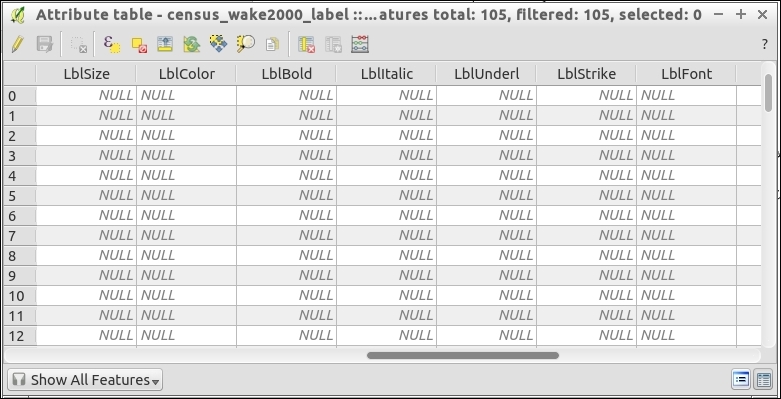
- Now, ensure that you have the Label toolbar open (View | Toolbars | Label):

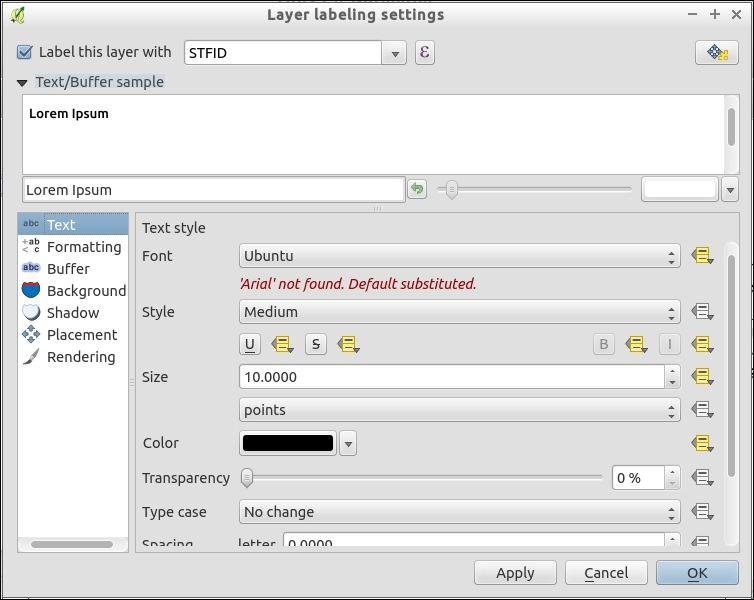
- Either in the layer (by navigating to Properties | Labels) or using the first button on Label Toolbar, Layer Labeling Options, open the label management dialog.
- Throughout the dialogs, you will see markers next to each field. A yellow one indicates a data-defined attribute, a white marker is the same setting for all:
- Now, you are ready to make custom edits to various labels and have the table store the settings. Depending on the setting, there are a couple of ways to make the edits. Note that you must toggle editing on the layer before you can change the labels:
- You can edit the field directly in the table either by hand, or you can use the field calculator to automate repetitive patterns (for example, give all major roads the same Font and Color label).
- For some attributes, such as X,Y and rotation, you can also edit by hand in the map using the Label Toolbar option.
- Toggle editing by clicking on the following icon:

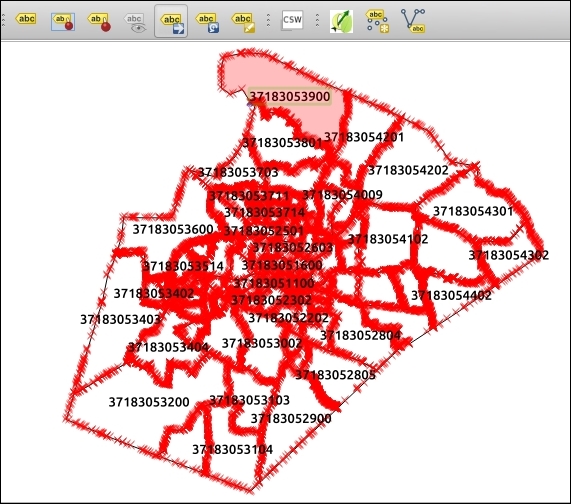
- On the Label Toolbar menu, select the Move Label button. Now, click on a label and drag it to a new location, releasing the mouse button when you are done moving the label. Note that you must ensure that the X and Y fields in step 38 are set for this tool to be usable:
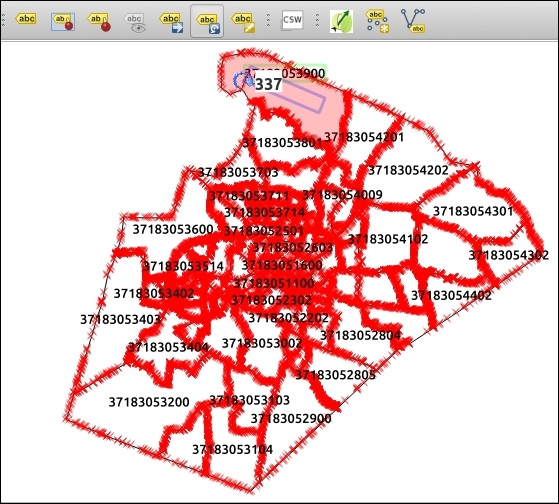
- Now, try the Rotate Label button. See if you can make some of the labels fit inside their polygons using the move and rotate:
You can also use the Change Label button to edit the other properties of a specific label that you select. This is really nice when you just need some fine-tuning.
- Save your edits and toggle editing off to keep your changes.
The basic premise is that you keep an extra set of attributes in a table often as additional fields to your existing table.
These fields if you set them are used in determining the location, size, font, color, angle, and so on, of the label for the given row. If you don't set them, then the automatic settings from the labeling engine are kept.
Data-defined labels are powerful in that you can combine automated, calculated, and custom-edited values. They are automated from the built-in labeling engine and calculated using the field calculator to populate the data-defined fields (for example, with if statements or calculations that are based on other attributes). Lastly, by just making these little hand tweaks, you can fix a few not-quite labels that misbehave.
Note that you don't have to use data-defined labeling on an existing layer. You can create just a label layer with the Create labeled layer plugin. In other software, user-defined labeling is often called Annotation layers. QGIS also has annotation layers. These are layers where you click to add a label to the map and then write and style it however you want. The biggest problem is that these layers are not associated with the data that they label. You can't easily give them to someone else, and if a label name or style changes, you have to chase down and hand-edit every fix. In QGIS, data-defined labeling solves almost all the shortcomings of annotation layers because it actually saves to a shapefile with all its properties as fields.