Table of Contents for
OpenLayers 3.x Cookbook - Second Edition
 OpenLayers 3.x Cookbook - Second Edition
Published by
Packt Publishing, 2016
OpenLayers 3.x Cookbook - Second Edition
Published by
Packt Publishing, 2016
- Cover
- Table of Contents
- OpenLayers 3.x Cookbook Second Edition
- OpenLayers 3.x Cookbook Second Edition
- Credits
- About the Authors
- About the Reviewer
- www.PacktPub.com
- Preface
- What you need for this book
- Who this book is for
- Sections
- Conventions
- Reader feedback
- Customer support
- 1. Web Mapping Basics
- Creating a simple fullscreen map
- Playing with the map's options
- Managing the map's stack layers
- Managing the map's controls
- Moving around the map view
- Restricting the map's extent
- 2. Adding Raster Layers
- Using Bing imagery
- Using OpenStreetMap imagery
- Adding WMS layers
- Changing the zoom effect
- Changing layer opacity
- Buffering the layer data to improve map navigation
- Creating an image layer
- Setting the tile size in WMS layers
- 3. Working with Vector Layers
- Adding a GML layer
- Adding a KML layer
- Creating features programmatically
- Exporting features as GeoJSON
- Reading and creating features from a WKT
- Using point features as markers
- Removing or cloning features using overlays
- Zooming to the extent of a layer
- Adding text labels to geometry points
- Adding features from a WFS server
- Using the cluster strategy
- Reading features directly using AJAX
- Creating a heat map
- 4. Working with Events
- Creating a side-by-side map comparator
- Implementing a work-in-progress indicator for map layers
- Listening for the vector layer features' events
- Listening for mouse or touch events
- Using the keyboard to pan or zoom
- 5. Adding Controls
- Adding and removing controls
- Working with geolocation
- Placing controls outside the map
- Drawing features across multiple vector layers
- Modifying features
- Measuring distances and areas
- Getting feature information from a data source
- Getting information from a WMS server
- 6. Styling Features
- Styling layers
- Styling features based on geometry type
- Styling based on feature attributes
- Styling interaction render intents
- Styling clustered features
- 7. Beyond the Basics
- Working with projections
- Creating a custom control
- Selecting features by dragging out a selection area
- Transitioning between weather forecast imagery
- Using the custom OpenLayers library build
- Drawing in freehand mode
- Modifying layer appearance
- Adding features to the vector layer by dragging and dropping them
- Making use of map permalinks
- Index
When a vector layer is populated with features, it can be very useful to query the data source in order to retrieve feature information. OpenLayers provides some methods from the vector source class (ol.source.Vector) that enable us to perform queries, such as finding out what features are within a custom extent (getFeaturesInExtent), or returning any features at a particular coordinate (getFeaturesAtCoordinate), as well as other useful types of queries.
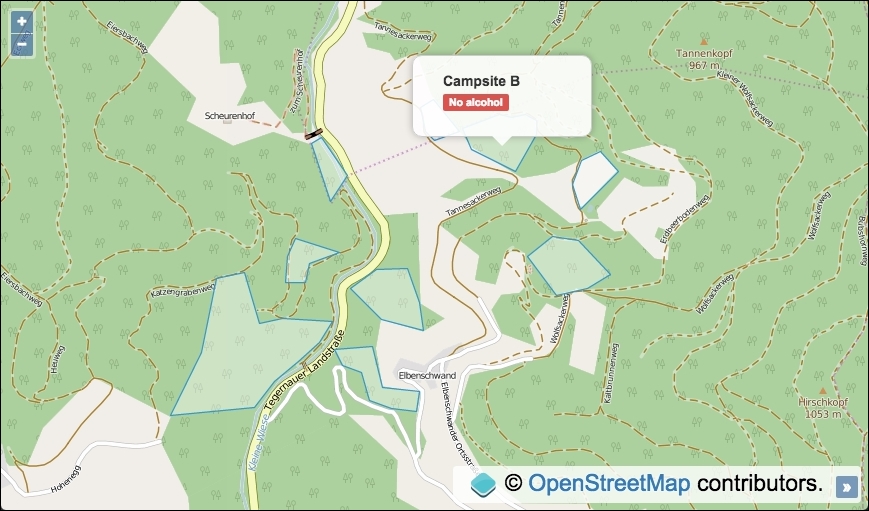
We are going to create a map with a tile raster layer and a vector layer with features from a custom GeoJSON file. The polygon features will represent campsites within a region, each with some properties that can be extracted for display. We will call the getFeaturesAtCoordinate source query method when the map is clicked on and display the applicable feature information within overlay if a feature exists at this coordinate.
The source code can be found in ch05/ch05-feature-info-from-source, and here's a screenshot of what we'll end up with:
In order to find out how to retrieve feature information from a data source, follow these steps:
- Create an HTML file with the OpenLayers dependencies and
divto contain the map. In particular, add the markup foroverlayand content:<div id="js-overlay" class="overlay"> <ul> <li><strong id="js-ref"></strong></li> <li><span id="js-restrictions"></span></li> </ul> </div>
- Create a custom JavaScript file and set up a vector source with content from a local GeoJSON file:
var vectorSource = new ol.source.Vector({ url: 'geojson.json', format: new ol.format.GeoJSON({ defaultDataProjection: 'EPSG:3857' }) }); - Initialize
mapwith a raster tile layer, vector layer, andview:var map = new ol.Map({ view: new ol.View({ zoom: 15, center: [872800, 6065125] }), target: 'js-map', layers: [ new ol.layer.Tile({source: new ol.source.OSM()}), new ol.layer.Vector({source: vectorSource}) ] }); - Cache some DOM elements that are accessed multiple times:
var overlayElem = document.getElementById('js-overlay'); var featureRefElem = document.getElementById('js-ref'); var featureRestrictionsElem = document.getElementById( 'js-restrictions' ); - Instantiate an instance of
overlay, add it tomap, and set the CSS display:var overlay = new ol.Overlay({ element: overlayElem }); map.addOverlay(overlay); overlayElem.style.display = 'block'; - Finish off by subscribing to the
singleclickmap event and display the feature information withinoverlayif appropriate:map.on('singleclick', function(event) { overlay.setPosition(undefined); var features = vectorSource.getFeaturesAtCoordinate(event.coordinate); if (features.length > 0) { overlay.setPosition(event.coordinate); featureRefElem.innerHTML = features[0].get('ref'); featureRestrictionsElem.innerHTML = features[0].get('restrictions'); } });
We have excluded much of the HTML and all CSS from this recipe for brevity, but please take a look at the source code for the complete implementation.
Much of this recipe will be similar to earlier examples in this book, so let's narrow in on the map click event handler and the source query that we utilize:
map.on('singleclick', function(event) {
  overlay.setPosition(undefined);
  var features =
    vectorSource.getFeaturesAtCoordinate(event.coordinate);
We subscribe to the singleclick event published by the map object when a user clicks or taps on the map. The overlay method is passed an argument of undefined so that it's hidden until we know that we wish to display it.
We make use of the getFeaturesAtCoordinate source query method to determine whether or not a feature exists at the coordinate of the click event (event.coordinate). The result is stored in a variable, namely features.
    if (features.length > 0) {
    overlay.setPosition(event.coordinate);
    featureRefElem.innerHTML = features[0].get('ref');
    featureRestrictionsElem.innerHTML =
      features[0].get('restrictions');
 }
Although we know that our data contains no overlapping features at any given coordinate, with other data sources this scenario may occur, which is why OpenLayers returns the result of the query as an array of features. We check whether the length of the array is greater than zero; if this is the case, we can infer that a feature is present at this particular coordinate.
The overlay is positioned at the coordinate via the setPosition method, and the overlay content is populated with the feature ref property and the restrictions property, both via the get method that ol.Feature inherits from ol.Object. The text is added to the relevant DOM elements using the JavaScript innerHTML method.
We can even use the getFeaturesAtCoordinate source query method with a coordinate, where a feature resides but is not currently visible from the viewport extent. It will still return the feature detected at this location.
Other powerful data source queries exist, such as getClosestFeatureToCoordinate and getFeaturesInExtent, which could be very useful when developing mapping applications. I recommend that you visit the OpenLayers documentation (http://openlayers.org) to discover other useful methods and find out what these methods can do for you.