Table of Contents for
OpenLayers 3.x Cookbook - Second Edition
 OpenLayers 3.x Cookbook - Second Edition
Published by
Packt Publishing, 2016
OpenLayers 3.x Cookbook - Second Edition
Published by
Packt Publishing, 2016
- Cover
- Table of Contents
- OpenLayers 3.x Cookbook Second Edition
- OpenLayers 3.x Cookbook Second Edition
- Credits
- About the Authors
- About the Reviewer
- www.PacktPub.com
- Preface
- What you need for this book
- Who this book is for
- Sections
- Conventions
- Reader feedback
- Customer support
- 1. Web Mapping Basics
- Creating a simple fullscreen map
- Playing with the map's options
- Managing the map's stack layers
- Managing the map's controls
- Moving around the map view
- Restricting the map's extent
- 2. Adding Raster Layers
- Using Bing imagery
- Using OpenStreetMap imagery
- Adding WMS layers
- Changing the zoom effect
- Changing layer opacity
- Buffering the layer data to improve map navigation
- Creating an image layer
- Setting the tile size in WMS layers
- 3. Working with Vector Layers
- Adding a GML layer
- Adding a KML layer
- Creating features programmatically
- Exporting features as GeoJSON
- Reading and creating features from a WKT
- Using point features as markers
- Removing or cloning features using overlays
- Zooming to the extent of a layer
- Adding text labels to geometry points
- Adding features from a WFS server
- Using the cluster strategy
- Reading features directly using AJAX
- Creating a heat map
- 4. Working with Events
- Creating a side-by-side map comparator
- Implementing a work-in-progress indicator for map layers
- Listening for the vector layer features' events
- Listening for mouse or touch events
- Using the keyboard to pan or zoom
- 5. Adding Controls
- Adding and removing controls
- Working with geolocation
- Placing controls outside the map
- Drawing features across multiple vector layers
- Modifying features
- Measuring distances and areas
- Getting feature information from a data source
- Getting information from a WMS server
- 6. Styling Features
- Styling layers
- Styling features based on geometry type
- Styling based on feature attributes
- Styling interaction render intents
- Styling clustered features
- 7. Beyond the Basics
- Working with projections
- Creating a custom control
- Selecting features by dragging out a selection area
- Transitioning between weather forecast imagery
- Using the custom OpenLayers library build
- Drawing in freehand mode
- Modifying layer appearance
- Adding features to the vector layer by dragging and dropping them
- Making use of map permalinks
- Index
The arrival of Google Maps led to an explosion in the world of GIS and web mapping. Google introduced not only an API but also certain file formats.
The Keyhole Markup Language (KML) has become one of the most extensively-used formats, and it has become an OGC standard. For some more details on the KML standard, refer to https://en.wikipedia.org/wiki/Keyhole_Markup_Language. The following screenshot shows how to create vector layers from a KML file:
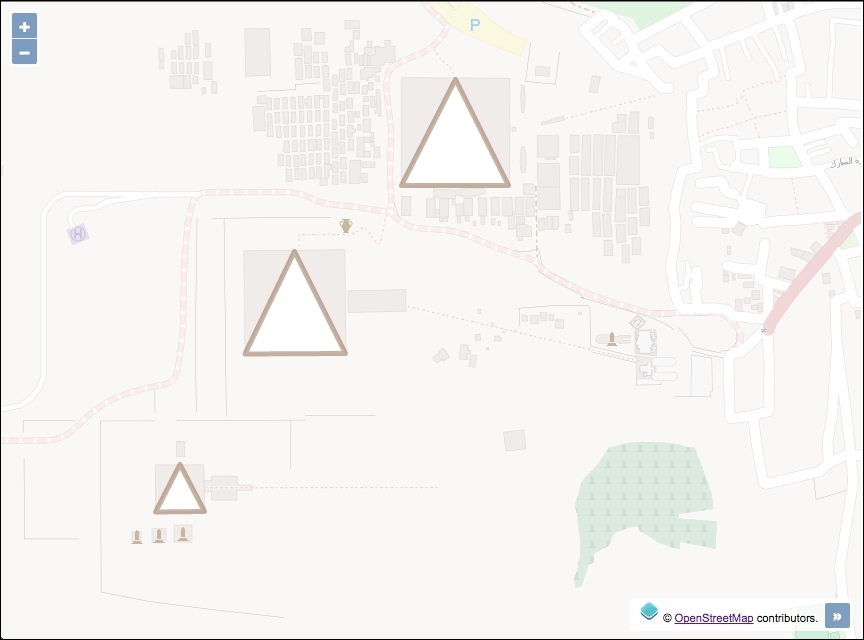
This recipe (found in ch03/ch03-kml-layer/) will show you how easy it is to add features from a KML file. You can find the necessary files in the KML format attached to the source code of this book and available on the Packt Publishing website.
In order to import features from KML format into the map, follow these instructions:
- Create an HTML file that includes the OpenLayers dependencies and insert a
divto contain the map:<div id="js-map"></div>
- Create the JavaScript file and initialize the map with a base layer and then add the vector layer pointing to the KML source, as follows:
var map = new ol.Map({
  view: new ol.View({
    zoom: 16,
    center: [3465642, 3500474]
  }),
  target: 'js-map',
  layers: [
    new ol.layer.Tile({
      source: new ol.source.OSM(),
      opacity: 0.4
    }),
    new ol.layer.Vector({
      source: new ol.source.Vector({
        url: 'egypt-pyramids.kml',
        format: new ol.format.KML()
      })
    })
  ]
});
The instantiation of the vector layer follows the same structure as seen in the previous GML layer recipe. The only noticeable change is the difference in url and format:
new ol.layer.Vector({
  source: new ol.source.Vector({
    url: 'egypt-pyramids.kml',
    format: new ol.format.KML()
  })
})
OpenLayers makes an AJAX request for the KML file from the string passed to the url property. The format (ol.format.KML) corresponds to the KML file request so that OpenLayers knows how to process the response. The ol.format.KML class provides some properties that can be customized on instantiation. One of which is extractStyles. This property informs OpenLayers whether or not to extract feature styling information from the KML file (such as color and line width) and use it to render on the map. This defaults to true.
Like GML, the KML format offers tons of options and possibilities at the cost of complexity. Google has some useful documentation to help developers structure their KML files at https://developers.google.com/kml/documentation
In the KML format, placemarks can have a description attached to them, and if you load a KML file in Google Maps, the placemark's description is shown as a balloon (or a popup) when you click on it. With OpenLayers, this kind of behavior requires some manual intervention to achieve similar results.