Table of Contents for
OpenLayers 3.x Cookbook - Second Edition
 OpenLayers 3.x Cookbook - Second Edition
Published by
Packt Publishing, 2016
OpenLayers 3.x Cookbook - Second Edition
Published by
Packt Publishing, 2016
- Cover
- Table of Contents
- OpenLayers 3.x Cookbook Second Edition
- OpenLayers 3.x Cookbook Second Edition
- Credits
- About the Authors
- About the Reviewer
- www.PacktPub.com
- Preface
- What you need for this book
- Who this book is for
- Sections
- Conventions
- Reader feedback
- Customer support
- 1. Web Mapping Basics
- Creating a simple fullscreen map
- Playing with the map's options
- Managing the map's stack layers
- Managing the map's controls
- Moving around the map view
- Restricting the map's extent
- 2. Adding Raster Layers
- Using Bing imagery
- Using OpenStreetMap imagery
- Adding WMS layers
- Changing the zoom effect
- Changing layer opacity
- Buffering the layer data to improve map navigation
- Creating an image layer
- Setting the tile size in WMS layers
- 3. Working with Vector Layers
- Adding a GML layer
- Adding a KML layer
- Creating features programmatically
- Exporting features as GeoJSON
- Reading and creating features from a WKT
- Using point features as markers
- Removing or cloning features using overlays
- Zooming to the extent of a layer
- Adding text labels to geometry points
- Adding features from a WFS server
- Using the cluster strategy
- Reading features directly using AJAX
- Creating a heat map
- 4. Working with Events
- Creating a side-by-side map comparator
- Implementing a work-in-progress indicator for map layers
- Listening for the vector layer features' events
- Listening for mouse or touch events
- Using the keyboard to pan or zoom
- 5. Adding Controls
- Adding and removing controls
- Working with geolocation
- Placing controls outside the map
- Drawing features across multiple vector layers
- Modifying features
- Measuring distances and areas
- Getting feature information from a data source
- Getting information from a WMS server
- 6. Styling Features
- Styling layers
- Styling features based on geometry type
- Styling based on feature attributes
- Styling interaction render intents
- Styling clustered features
- 7. Beyond the Basics
- Working with projections
- Creating a custom control
- Selecting features by dragging out a selection area
- Transitioning between weather forecast imagery
- Using the custom OpenLayers library build
- Drawing in freehand mode
- Modifying layer appearance
- Adding features to the vector layer by dragging and dropping them
- Making use of map permalinks
- Index
The Web Feature Service (WFS) is an OGC standard that provides independent platform calls to request geographical features to a server. In practice, this means that a client makes an HTTP request to a server that implements the WFS standard and gets a set of features in varying formats, typically GML (Geographic Markup Language, http://en.wikipedia.org/wiki/Geography_Markup_Language).
Note
If you want to learn more about this, there is a complete specification on the OGC site, http://www.opengeospatial.org/standards/wfs. From the OpenLayers point of view, the WFS is nothing more than another data source that we can read to fill a vector layer.
Before continuing, there is an important point to take into account. Most of the requests made by OpenLayers when data is loaded, such as GML, KML, or GeoJSON files, are made asynchronously through AJAX requests.
Any JavaScript call is limited by the security model imposed by the browser, which avoids cross-domain requests. This means that you can only make requests to the same server that the web page originally came from.
There are different ways to bypass this limitation. Such techniques include JSONP (https://en.wikipedia.org/wiki/JSONP) and adjusting CORS permissions (https://en.wikipedia.org/wiki/Cross-origin_resource_sharing), or the use of a proxy on the server-side.
Note
You can read a clearer explanation of proxy implementations at http://developer.yahoo.com/javascript/howto-proxy.html.
The idea of a proxy is simple; instead of making a request directly to a cross domain, we make a request to a script on the same domain, which is responsible for forwarding the cross-domain request for us and returning the results. A script on the server is not limited by the cross-domain requests that browser vendors impose.
For this recipe (found in ch03/ch03-wfs-layer/), we will be using a proxy server written in Node.js in order to forward the request and return the response (refer to the server.js file in the root of the book's source code). We'll end up with a rendered WFS layer looking similar to the following screenshot:
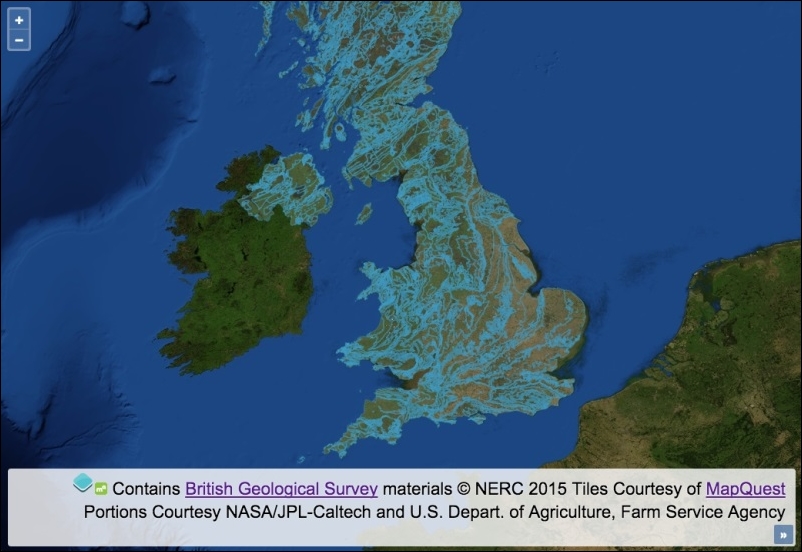
Connect to an external WFS server and render the features on the map by following these instructions:
- Create an HTML file including the OpenLayers dependencies, and add a
divelement to hold the map. - Create a custom JavaScript file and initiate
map:var map = new ol.Map({ view: new ol.View({ zoom: 6, center: [-415817, 6790054] }), target: 'js-map', layers: [ new ol.layer.Tile({ source: new ol.source.MapQuest({layer: 'sat'}) }) ] }); - Create the vector source that will be responsible for the WFS requests:
var vectorSource = new ol.source.Vector({ format: new ol.format.WFS(), url: function(extent, resolution, projection) { return [ '/proxy?proxyHost=ogc.bgs.ac.uk', 'proxyPath=/digmap625k_gsml32_cgi_gs/wfs?', 'service=WFS', 'version=1.1.0', 'request=GetFeature', 'typename=test:uk_625k_mapped_feature', 'srsname=' + projection.getCode(), 'bbox=' + extent.join(',') + ',' + projection.getCode(), 'outputformat=gml3' ].join('&'); }, strategy: ol.loadingstrategy.tile(ol.tilegrid.createXYZ()), attributions: [ new ol.Attribution({ html: 'Contains <a href="http://bgs.ac.uk/">British Geological Survey</a> ' + 'materials © NERC 2015' }) ] }); - Set up a vector layer, add the vector source to it, and add the layer to the map:
var vectorLayer = new ol.layer.Vector({
  source: vectorSource,
  opacity: 0.4
});
map.addLayer(vectorLayer);
There's always some amount of upfront work involved when creating WFS layers, as you'll need to interpret the capabilities of the service that you're trying to retrieve information from and then shape the HTTP requests accordingly.
To help us find out about the WFS service, the server normally provides an XML document outlining the capabilities of the service. As an example, the capabilities document for the WFS service that we access in this recipe can be found here at http://ogc.bgs.ac.uk/digmap625k_gsml32_cgi_gs/wfs?service=WFS&request=GetCapabilities.
Let's focus on the content of the vector source and how it influences the outcome of this recipe:
var vectorSource = new ol.source.Vector({
  format: new ol.format.WFS(),
When this vector source retrieves content from the WFS service, we inform OpenLayers what the expected format of the response will be in order to successfully parse the data and add it to the map. The format of the data will be in the WFS format, and the features will be presented in GML3 (which we specify as part of the URL string, namely output format).
You can pass an optional configuration object to the WFS format constructor, which has some properties worth mentioning, as follows:
- gmlFormat: The default GML format for
ol.format.WFSisol.format.GML3, but you can specifyol.format.GML2if you need to - featureType: This is the feature type; you've got an opportunity to be selective here
- featureNS: This is the namespace URI used for features
Let's move on to the next property of the vector source configuration:
url: function(extent, resolution, projection) {
    return [
      '/proxy?proxyHost=ogc.bgs.ac.uk',
      'proxyPath=/digmap625k_gsml32_cgi_gs/wfs?',
      'service=WFS',
      'version=1.1.0',
      'request=GetFeature',
      'typename=test:uk_625k_mapped_feature',
      'srsname=' + projection.getCode(),
      'bbox=' + extent.join(',') + ',' + projection.getCode(),
      'outputformat=gml3'
    ].join('&');
  },
We manually construct the URL that will make up the AJAX request through a function assigned to the url property. This function must conform to the function type of ol.FeatureUrlFunction, which, as you see, takes extent (type ol.Extent), the map's resolution (type number) and the map's projection (type ol.proj.Projection). We can use these available arguments to dynamically build out the URL. Our function must return the URL as a string.
We are using a proxy mechanism to complete the request for us. The proxy implementation requires that we pass the host name as the proxyHost parameter, and the path name as the proxyPath parameter. If it helps, so far, we have the following endpoint: ogc.bgs.ac.uk/digmap625k_gsml32_cgi_gs/wfs?. We append further criteria to this string as query key/value pairs.
Some of the key/value pairs are static values that match up with the capabilities offered by the WFS service. These will begin to look more familiar to you once you've worked with a few different web services, such as version 1.1.0, and requests, such as GetFeature. The typename key specifies what type of feature set we're interested in. This will inevitably vary between providers.
We dynamically set the srsname key (spatial reference), which is retrieved from the map's current projection (for example, EPSG:3857). The bbox is dynamically determined from a combination of the view extent (which is originally an array converted into a comma-delimited string via the JavaScript join method) and the map's projection (projection.getCode()).
This function must return the URL as a string, so we convert the array into a string once again using the join method, which inserts an ampersand between each item in the array, conforming to the standard query string structure, that is, service=WFS&version=1.0.0.
strategy: ol.loadingstrategy.tile(ol.tilegrid.createXYZ()),
We have chosen to use a nondefault data loading strategy of tile (ol.loadingstrategy.all being the default). This makes requests and loads in features based on the tile grid with the XYZ tiling scheme. To find out more about the XYZ tiling scheme, refer to http://wiki.openstreetmap.org/wiki/Slippy_map_tilenames. There's also a good resource that explains the difference between XYZ and Tile Map Service (TMS) tiling schemes, found here at https://gist.github.com/tmcw/4954720.
This WFS service only covers the UK, so we could optimally restrict the extent of the tile grid to the bounds of the UK so that wasteful requests are avoided. The ol.tilegrid.createXYZ class can be optionally given a configuration object, of which the extent property can be assigned an ol.Extent array that will confine the bounds of the requests. We can also specify minimum and maximum zoom levels and the tile size.
You may find that map servers that support WMS and WFS protocols can serve the same information both in raster and vector formats.
Imagine a set of regions stored in PostgreSQL/PostGIS and a map server, such as GeoServer, with a layer of countries configured to be served both as raster images via WMS requests or in the vector GML format using WFS requests.
- The Adding WMS layers recipe from Chapter 2, Adding Raster Layers
- The Removing or cloning features using overlays recipe
- The Using point features as markers recipe
- The Reading features directly using AJAX recipe