Inheriting properties works by defining the default property values and the property types as static attributes of a base class. Any classes that inherit from this base class also inherit the property values and the property specs. Let's take a look at a base class implementation:
import { Component } from 'react';
import PropTypes from 'prop-types';

export default class BaseComponent extends Component {
  // The specifiction for these base properties.
  static propTypes = {
    users: PropTypes.array.isRequired,
    groups: PropTypes.array.isRequired
  };

  // The default values of these base properties.
  static defaultProps = {
    users: [],
    groups: []
  };

  render() {
    return null;
  }
}
The class itself doesn't actually do anything. The only reason to define it is so that there's a place to declare the default property values and their type constraints. Respectively, these are the defaultProps and the propTypes static class attributes.
Now, let's take a look at a component that inherits these properties:
import React from 'react';
import { Map } from 'immutable';

import BaseComponent from './BaseComponent';

// Renders the given "text" as a header, unless
// the given "length" is 0.
const SectionHeader = ({ text, length }) =>
  Map([[0, null]]).get(length, <h1>{text}>/h1>);

export default class MyComponent extends BaseComponent {
  render() {
    const { users, groups } = this.props;

    // Renders the "users" and "groups" arrays. There
    // are not property validators or default values
    // in this component, since these are declared in
    // "BaseComponent".
    return (
      <section>
        <SectionHeader text="Users" length={users.length} />
        <ul>{users.map(i => <li key={i}>{i}</li>)}</ul>

        <SectionHeader text="Groups" length={groups.length} />
        <ul>{groups.map(i => <li key={i}>{i}</li>)}</ul>
      </section>
    );
  }
}
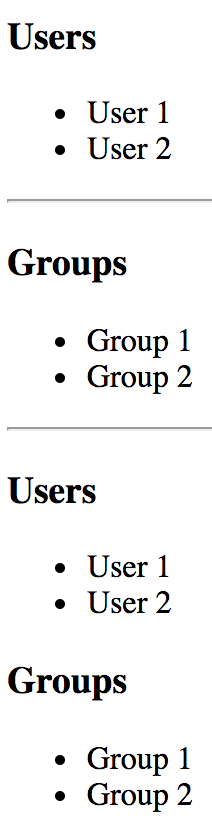
Let's try rendering MyComponent to make sure that the inherited properties are working as expected:
import React from 'react';
import { render } from 'react-dom';

import ErrorBoundary from './ErrorBoundary';
import MyComponent from './MyComponent';

const users = ['User 1', 'User 2'];

const groups = ['Group 1', 'Group 2'];

render(
  <section>
    {/* Renders as expected, using the defaults. */}
    <ErrorBoundary>
      <MyComponent />
    </ErrorBoundary>

    {/* Renders as expected, using the "groups" default. */}
    <ErrorBoundary>
      <MyComponent users={users} />
      <hr />
    </ErrorBoundary>

    {/* Renders as expected, using the "users" default. */}
    <ErrorBoundary>
      <MyComponent groups={groups} />
      <hr />
    </ErrorBoundary>

    {/* Renders as expected, providing property values. */}
    <ErrorBoundary>
      <MyComponent users={users} groups={groups} />
    </ErrorBoundary>

    {/* Fails to render, the property validators in the base
         component detect the invalid number type. */}
    <ErrorBoundary>
      <MyComponent users={0} groups={0} />
    </ErrorBoundary>
  </section>,
  document.getElementById('root')
);
Despite the fact that MyComponent doesn't define any property defaults or types, you get the expected behavior. When you try to pass numbers to the users and groups properties, you don't see anything rendered. That's because MyComponent is expecting a map() method on these property values, and there isn't one.
The ErrorBoundary elements are used here to isolate errors. Without them, any of the MyComponent elements failing would cause other components on the page to fail as well, for example, by passing number values to users and groups. Here's what the ErrorBoundary component looks like:
import { Component } from 'react';

// Uses the componentDidCatch() method to set the
// error state of this component. When rendering,
// if there's an error it gets logged and nothing
// is rendered.
export default class ErrorBoundary extends Component {
  state = { error: null };

  componentDidCatch(error) {
    this.setState({ error });
  }

  render() {
    if (this.state.error === null) {
      return this.props.children;
    } else {
      console.error(this.state.error);
      return null;
    }
  }
}
This component uses the componentDidCatch() lifecycle method that you learned about in Chapter 6, The React Component Lifecycle. If it catches an error, it sets the error state so that the render() method knows to not render the component that caused the error again. Here's what the rendered content looks like: