
Let's plot some local breweries! Here's how you pass annotations to the MapView component:
import React from 'react';
import { View } from 'react-native';
import MapView from 'react-native-maps';

import styles from './styles';

export default () => (
  <View style={styles.container}>
    <MapView
      style={styles.mapView}
      showsPointsOfInterest={false}
      showsUserLocation
      followUserLocation
    >
      <MapView.Marker
        title="Duff Brewery"
        description="Duff beer for me, Duff beer for you"
        coordinate={{
          latitude: 43.8418728,
          longitude: -79.086082
        }}
      />
      <MapView.Marker
        title="Pawtucket Brewery"
        description="New! Patriot Light!"
        coordinate={{
          latitude: 43.8401328,
          longitude: -79.085407
        }}
      />
    </MapView>
  </View>
);
Annotations are exactly what they sound like; additional information rendered on top of the basic map geography. In fact, you get annotations by default when you render MapView components because they will show points of interest. In this example, you've opted out of this capability by setting the showsPointsOfInterest property to false. Let's see where these breweries are located:
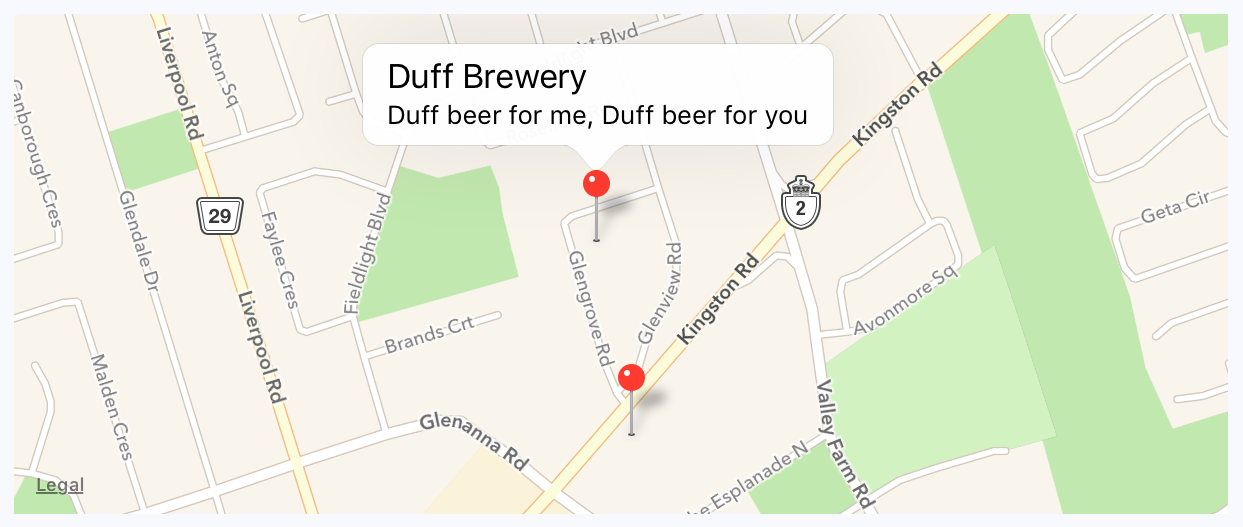
The callout is displayed when you press the marker that shows the location of the brewery on the map. The title and the description property values that you give to <MapView.Marker> are used to render this text.