The final topic of this section is the any property validator. That is, it doesn't actually care what value it gets—anything is valid, including not passing a value at all. In fact, the isRequired validator can be combined with the any validator. For example, if you're working on a component and you just want to make sure that something is passed, but not sure exactly which type you're going to need yet, you could do something like myProp: PropTypes.any.isRequired.
Another reason to have the any property validator is for the sake of consistency. Every component should have property specifications. The any validator is useful in the beginning, when you're not exactly sure what the property type will be. You can at least begin the property spec, and then refine it later as things unfold.
Let's take a look at some code now:
import React from 'react';
import PropTypes from 'prop-types';

// Renders a component with a header and a simple
// progress bar, using the provided property
// values.
const MyComponent = ({ label, value, max }) => (
  <section>
    <h5>{label}</h5>
    <progress {...{ max, value }} />
  </section>
);

// These property values can be anything, as denoted by
// the "PropTypes.any" prop type.
MyComponent.propTypes = {
  label: PropTypes.any,
  value: PropTypes.any,
  max: PropTypes.any
};

export default MyComponent;
This component doesn't actually validate anything because the three properties in its property spec will accept anything. However, it's a good starting point, because at a glance, I can see the names of the three properties that this component uses. So later on, when I decide exactly which types these properties should have, the change is simple. Let's see this component in action now:
import React from 'react';
import { render } from 'react-dom';

import MyComponent from './MyComponent';

render(
  <section>
    {/* Passes a string and two numbers to
         "<MyComponent>". Everything works as
         expected. */}
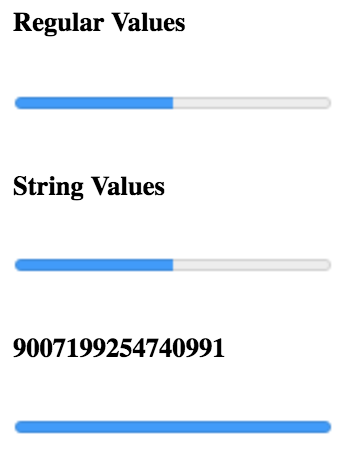
    <MyComponent label="Regular Values" max={20} value={10} />

    {/* Passes strings instead of numbers to the
         progress bar, but they're correctly
         interpreted as numbers. */}
    <MyComponent label="String Values" max="20" value="10" />

    {/* The "label" has no issue displaying
         "MAX_SAFE_INTEGER", but the date that's
         passed to "max" causes the progress bar
         to break. */}
    <MyComponent
      label={Number.MAX_SAFE_INTEGER}
      max={new Date()}
      value="10"
    />
  </section>,
  document.getElementById('root')
);
Strings and numbers are interchangeable in several places. Allowing just one or the other seems overly restrictive. As you'll see in the next section, React has other property validators that allow you to further restrict property values allowed by your component.
Here's what our component looks like when rendered: