
The App component includes the page heading and a list of links to various article categories. When the user moves around the user interface, the App component is always rendered, but each <Route> element renders different content based on the current route. Let's take a look at the component, and then we'll break down how it works:
import React from 'react';
import {
  BrowserRouter as Router,
  Route,
  NavLink
} from 'react-router-dom';
import { connect } from 'react-redux';

// Components that render application state.
import Home from './Home';
import Article from './Article';

// Higher order component for making the
// various article section components out of
// the "Home" component. The only difference
// is the "filter" property. Having unique JSX
// element names is easier to read than a bunch
// of different property values.
const articleList = filter => props => (
  <Home {...props} filter={filter} />
);

const categoryListStyle = {
  listStyle: 'none',
  margin: 0,
  padding: 0,
  display: 'flex'
};

const categoryItemStyle = {
  padding: '5px'
};

const Local = articleList('local');
const Global = articleList('global');
const Tech = articleList('tech');
const Sports = articleList('sports');

// Routes to the home page, the different
// article sections, and the article details page.
// The "<Provider>" element is how we pass Redux
// store data to each of our components.
export default connect(state => state.get('App').toJS())(
  ({ title, links }) => (
    <Router>
      <main>
        <h1>{title}</h1>
        <ul style={categoryListStyle}>
          {/* Renders a link for each article category.
             The key thing to note is that the "links"
             value comes from a Redux store. */}
          {links.map(l => (
            <li key={l.url} style={categoryItemStyle}>
              <NavLink
                exact
                to={l.url}
                activeStyle={{ fontWeight: 'bold' }}
              >
                {l.name}
              </NavLink>
            </li>
          ))}
        </ul>
        <section>
          <Route exact path="/" component={Home} />
          <Route exact path="/local" component={Local} />
          <Route exact path="/global" component={Global} />
          <Route exact path="/tech" component={Tech} />
          <Route exact path="/sports" component={Sports} />
          <Route exact path="/articles/:id" component={Article} />
        </section>
      </main>
    </Router>
  )
);
This component requires a title property and a links property. Both of these values are actually states that come from the Redux store. Note that it's exporting a higher-order component, created using the connect() function. This function accepts a callback function that transforms the store state into properties that the component needs.
In this example, you need the App state. Turning this map into a plain JavaScript object is done using the toJS() method. This is how Redux state is passed to components. Here's what the rendered content of the App component looks like:
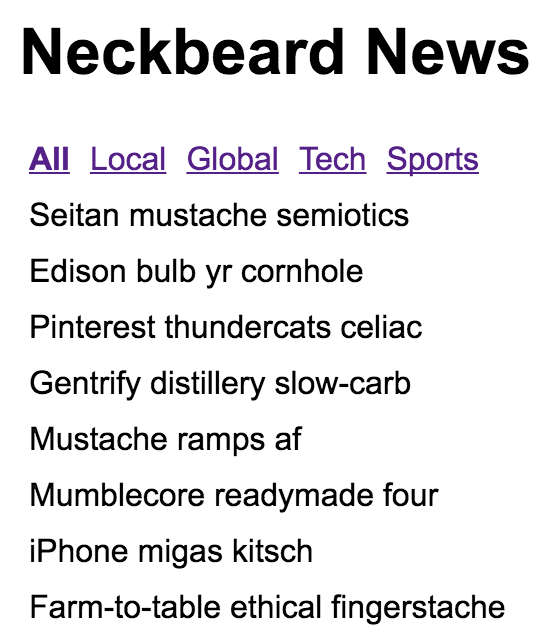
Ignore the amazing article titles for a moment; we'll return to these briefly. The title and the category links are rendered by the App component. The article titles are rendered by a one of the <Route> elements.
Notice how the All category is bold? This is because it's the currently selected category. If the Local category is selected, the All text will go back to regular font, and the Local text will be emboldened. This is all controlled through the Redux state. Let's take a look at the App reducer function now as follows:
import { fromJS } from 'immutable';
import initialState from './initialState';

// The initial page heading.
const title = initialState.getIn(['App', 'title']);

// Links to display when an article is displayed.
const articleLinks = fromJS([
  {
    name: 'Home',
    url: '/'
  }
]);

// Links to display when we're on the home page.
const homeLinks = initialState.getIn(['App', 'links']);

// Maps the action type to a function
// that returns new state.
const typeMap = fromJS({
  // The article is being fetched, adjust
  // the "title" and "links" state.
  FETCHING_ARTICLE: state =>
    state.set('title', '...').set('links', articleLinks),

  // The article has been fetched. Set the title
  // of the article.
  FETCH_ARTICLE: (state, payload) =>
    state.set('title', payload.title),

  // The list of articles are being fetched. Set
  // the "title" and the "links".
  FETCHING_ARTICLES: state =>
    state.set('title', title).set('links', homeLinks),

  // The articles have been fetched, update the
  // "title" state.
  FETCH_ARTICLES: state => state.set('title', title)
});

// This reducer relies on the "typeMap" and the
// "type" of action that was dispatched. If it's
// not found, then the state is simply returned.
export default (state, { type, payload }) =>
  typeMap.get(type, () => state)(state, payload);
There are two points I'd like to make about this reducer logic. First, you can now see how having immutable data structures in place makes this code concise and easy to follow. Second, a lot of state handling happens here in response to simple actions. Take the FETCHING_ARTICLE and FETCHING_ARTICLES actions, for example. You want to change the UI before actually issuing a network request. I think this type of explicitness is the real value of Flux and Redux. You know exactly why something changes. It's explicit, but not verbose.