
Rendering components in Node.js means rendering to strings, instead of trying to figure out the best way to insert them into the DOM. The string content is then returned to the browser, which displays this to the user immediately. Let's look at an example. First, the component to render:
import React from 'react';
import PropTypes from 'prop-types';

const App = ({ items }) => (
  <ul>{items.map(i => <li key={i}>{i}</li>)}</ul>
);

App.propTypes = {
  items: PropTypes.arrayOf(PropTypes.string).isRequired
};

export default App;
Next, let's implement the server that will render this component when the browser asks for it:
import React from 'react';

// The "renderToString()" function is like "render()",
// except it returns a rendered HTML string instead of
// manipulating the DOM.
import { renderToString } from 'react-dom/server';
import express from 'express';

// The component that we're going to render as a string.
import App from './App';

// The "doc()" function takes the rendered "content"
// of a React component and inserts it into an
// HTML document skeleton.
const doc = content =>
  `
  <!doctype html>
  <html>
    <head>
      <title>Rendering to strings</title>
    </head>
    <body>
      <div id="app">${content}</div>
    </body>
  </html>
  `;

const app = express();

// The root URL of the APP, returns the rendered
// React component.
app.get('/', (req, res) => {
  // Some properties to render...
  const props = {
    items: ['One', 'Two', 'Three']
  };

  // Render the "App" component using
  // "renderToString()"
  const rendered = renderToString(<App {...props} />);

  // Use the "doc()" function to build the final
  // HTML that is sent to the browser.
  res.send(doc(rendered));
});

app.listen(8080, () => {
  console.log('Listening on 127.0.0.1:8080');
});
Now if you visit http://127.0.0.1:8080 in your browser, you'll see the rendered component content:
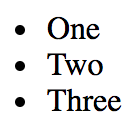
There are two things to pay attention to with this example. First, there's the doc() function. This creates the basic HTML document template with a placeholder for rendered React content. The second is the call to renderToString() , which is just like the render() call that you're used to. This is called in the server request handler and the rendered string is sent to the browser.