You've seen how the componentDidMount() and getDerivedStateFromProps() lifecycle methods help get your component the data it needs. There's one more scenario that you need to consider—re-rendering the component container.
Let's take a look at a simple button component that tracks the number of times it's been clicked:
import React from 'react';

export default ({
  clicks,
  disabled,
  text,
  onClick
}) => (
  <section>
    {/* Renders the number of button clicks,
         using the "clicks" property. */}
    <p>{clicks} clicks</p>

    {/* Renders the button. It's disabled state
         is based on the "disabled" property, and
         the "onClick()" handler comes from the
         container component. */}
    <button disabled={disabled} onClick={onClick}>
      {text}
    </button>
  </section>
);
Now, let's implement a container component for this feature:
import React, { Component } from 'react';
import { fromJS } from 'immutable';

import MyButton from './MyButton';

class MyFeature extends Component {
  state = {
    data: fromJS({
      clicks: 0,
      disabled: false,
      text: ''
    })
  };

  // Getter for "Immutable.js" state data...
  get data() {
    return this.state.data;
  }

  // Setter for "Immutable.js" state data...
  set data(data) {
    this.setState({ data });
  }

  // Click event handler, increments the "click" count.
  onClick = () => {
    this.data = this.data.update('clicks', c => c + 1);
  };

  // Renders the "<MyButton>" component, passing it the
  // "onClick()" handler, and the state as properties.
  render() {
    return <MyButton onClick={this.onClick} {...this.data.toJS()} />;
  }

  // If the component is re-rendered with new
  // property values, this method is called with the
  // new property values. If the "disabled" property
  // is provided, we use it to update the "disabled"
  // state. Calling "setState()" here will not
  // cause a re-render, because the component is already
  // in the middle of a re-render.
  static getDerivedStateFromProps({ disabled, text }, state) {
    return {
      ...state,
      data: state.data.set('disabled', disabled).set('text', text)
    };
  }
}

MyFeature.defaultProps = {
  text: 'A Button'
};

export default MyFeature;
The same approach as the preceding example is used here. The getDerivedStateFromProps() method is called before every render and this is where you can use prop values to figure out if and how the component state should be updated. Let's see how to re-render this component and whether or not the state behaves as expected:
import React from 'react';
import { render as renderJSX } from 'react-dom';

import MyFeature from './MyFeature';

// Determines the state of the button
// element in "MyFeature".
let disabled = true;

function render() {
  // Toggle the state of the "disabled" property.
  disabled = !disabled;

  renderJSX(
    <MyFeature {...{ disabled }} />,
    document.getElementById('root')
  );
}

// Re-render the "<MyFeature>" component every
// 3 seconds, toggling the "disabled" button
// property.
setInterval(render, 3000);

render();
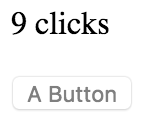
Sure enough, everything goes as planned. Whenever the button is clicked, the click counter is updated. <MyFeature> is re-rendered every 3 seconds, toggling the disabled state of the button. When the button is re-enabled and clicking resumes, the counter continues from where it left off.
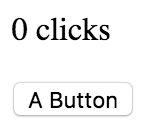
Here is what the MyButton component looks like when first rendered:
Here's what it looks like after it has been clicked a few times and the button has moved into a disabled state: