
So far in this chapter, you've learned how to detect the state of a network connection, and how to store data locally in a React Native application. Now it's time to combine these two concepts and implement an app that can detect network outages and continue to function.
The basic idea is to only make network requests when you know for sure that the device is online. If you know that it isn't, you can store any changes in state locally. Then, when you're back online, you can synchronize those stored changes with the remote API.
Let's implement a simplified React Native app that does this. The first step is implementing an abstraction that sits between the React components and the network calls that store data. We'll call this module store.js:
import { NetInfo, AsyncStorage } from 'react-native';
import { Map as ImmutableMap } from 'immutable';

// Mock data that would otherwise come from a real
// networked API endpoint.
const fakeNetworkData = {
  first: false,
  second: false,
  third: false
};

// We'll assume that the device isn't "connected"
// by default.
let connected = false;

// There's nothing to sync yet...
const unsynced = [];

// Sets the given "key" and "value". The idea
// is that application that uses this function
// shouldn't care if the network is connected
// or not.
export const set = (key, value) =>
  // The returned promise resolves to true
  // if the network is connected, false otherwise.
  new Promise((resolve, reject) => {
    if (connected) {
      // We're online - make the proper request (or fake
      // it in this case) and resolve the promise.
      fakeNetworkData[key] = value;
      resolve(true);
    } else {
      // We're offline - save the item using "AsyncStorage"
      // and add the key to "unsynced" so that we remember
      // to sync it when we're back online.
      AsyncStorage.setItem(key, value.toString()).then(
        () => {
          unsynced.push(key);
          resolve(false);
        },
        err => reject(err)
      );
    }
  });

// Gets the given key/value. The idea is that the application
// shouldn't care whether or not there is a network connection.
// If we're offline and the item hasn't been synced, read it
// from local storage.
export const get = key =>
  new Promise((resolve, reject) => {
    if (connected) {
      // We're online. Resolve the requested data.
      resolve(key ? fakeNetworkData[key] : fakeNetworkData);
    } else if (key) {
      // We've offline and they're asking for a specific key.
      // We need to look it up using "AsyncStorage".
      AsyncStorage.getItem(key).then(
        item => resolve(item),
        err => reject(err)
      );
    } else {
      // We're offline and they're asking for all values.
      // So we grab all keys, then all values, then we
      // resolve a plain JS object.
      AsyncStorage.getAllKeys().then(
        keys =>
          AsyncStorage.multiGet(keys).then(
            items => resolve(ImmutableMap(items).toJS()),
            err => reject(err)
          ),
        err => reject(err)
      );
    }
  });

// Check the network state when the module first
// loads so that we have an accurate value for "connected".
NetInfo.getConnectionInfo().then(
  connection => {
    connected = ['wifi', 'unknown'].includes(connection.type);
  },
  () => {
    connected = false;
  }
);

// Register a handler for when the state of the network changes.
NetInfo.addEventListener('connectionChange', connection => {
  // Update the "connected" state...
  connected = ['wifi', 'unknown'].includes(connection.type);

  // If we're online and there's unsynced values,
  // load them from the store, and call "set()"
  // on each of them.
  if (connected && unsynced.length) {
    AsyncStorage.multiGet(unsynced).then(items => {
      items.forEach(([key, val]) => set(key, val));
      unsynced.length = 0;
    });
  }
});
This module exports two functions—set() and get(). Their jobs are to set and get data, respectively. Since this is just a demonstration of how to sync between local storage and network endpoints, this module just mocks the actual network with the fakeNetworkData object.
Let's start by looking at the set() function. It's an asynchronous function that will always return a promise that resolves to a Boolean value. If it's true, it means that you're online, and that the call over the network was successful. If it's false, it means that you're offline, and AsyncStorage was used to save the data.
The same approach is used with the get() function. It returns a promise that resolves a Boolean value that indicates the state of the network. If a key argument is provided, then the value for that key is looked up. Otherwise, all values are returned, either from the network or from AsyncStorage.
In addition to these two functions, this module does two other things. It uses NetInfo.getConnectionInfo() to set the connected state. Then, it adds a listener for changes in the network state. This is how items that have been saved locally when you're offline become synced with the network when it's connected again.
Now let's check out the main application that uses these functions as follows:
import React, { Component } from 'react';
import { Text, View, Switch, NetInfo } from 'react-native';
import { fromJS } from 'immutable';

import styles from './styles';
import { set, get } from './store';

// Used to provide consistent boolean values
// for actual booleans and their string representations.
const boolMap = {
  true: true,
  false: false
};

export default class SynchronizingData extends Component {
  // The message state is used to indicate that
  // the user has gone offline. The other state
  // items are things that the user wants to change
  // and sync.
  state = {
    data: fromJS({
      message: null,
      first: false,
      second: false,
      third: false
    })
  };

  // Getter for "Immutable.js" state data...
  get data() {
    return this.state.data;
  }

  // Setter for "Immutable.js" state data...
  set data(data) {
    this.setState({ data });
  }

  // Generates a handler function bound to a given key.
  save = key => value => {
    // Calls "set()" and depending on the resolved value,
    // sets the user message.
    set(key, value).then(
      connected => {
        this.data = this.data
          .set('message', connected ? null : 'Saved Offline')
          .set(key, value);
      },
      err => {
        this.data = this.data.set('message', err);
      }
    );
  };

  componentDidMount() {
    // We have to call "NetInfo.fetch()" before
    // calling "get()" to ensure that the
    // connection state is accurate. This will
    // get the initial state of each item.
    NetInfo.getConnectionInfo().then(() =>
      get().then(
        items => {
          this.data = this.data.merge(items);
        },
        err => {
          this.data = this.data.set('message', err);
        }
      )
    );
  }

  render() {
    // Bound methods...
    const { save } = this;

    // State...
    const { message, first, second, third } = this.data.toJS();

    return (
      <View style={styles.container}>
        <Text>{message}</Text>
        <View>
          <Text>First</Text>
          <Switch
            value={boolMap[first.toString()]}
            onValueChange={save('first')}
          />
        </View>
        <View>
          <Text>Second</Text>
          <Switch
            value={boolMap[second.toString()]}
            onValueChange={save('second')}
          />
        </View>
        <View>
          <Text>Third</Text>
          <Switch
            value={boolMap[third.toString()]}
            onValueChange={save('third')}
          />
        </View>
      </View>
    );
  }
}
The job of the App component is to save the state of three checkboxes, which is difficult when you're providing the user with a seamless transition between online and offline modes. Thankfully, your set() and get() abstractions, implemented in another module, hide most of the details from the application functionality.
You will notice, however, that you need to check the state of the network in this module before you attempt to load any items. If you don't do this, then the get() function will assume that you're offline, even if the connection is fine. Here's what the app looks like:
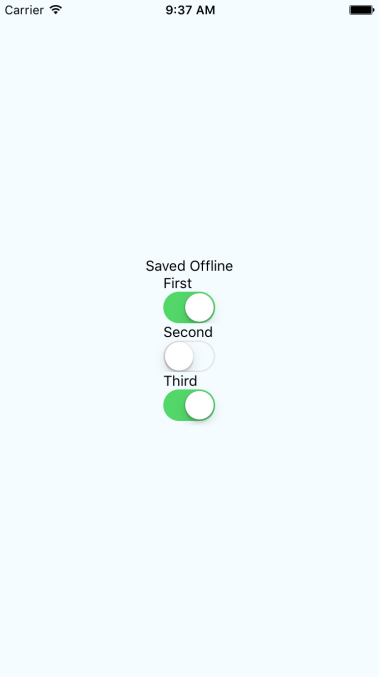
Note that you won't actually see the Saved Offline message until you change something in the UI.