Sometimes, you need optional URL path values and query parameters. URLs work best for simple options, and query parameters work best if there are many values that the component can use.
Let's implement a user list component that renders a list of users. Optionally, you want to be able to sort the list in descending order. Let's make this an optional path segment in the route definition for this page:
import React from 'react';
import { render } from 'react-dom';
import { BrowserRouter as Router, Route } from 'react-router-dom';

import UsersContainer from './UsersContainer';

render(
  <Router>
    <Route path="/users/:desc?" component={UsersContainer} />
  </Router>,
  document.getElementById('root')
);
The: syntax marks a variable which the ? suffix marks the variable as optional. This means that the user can provide anything they want after /users/. This also means that the component needs to make sure that the string desc is provided, and that everything else is ignored.
It's also up to the component to handle any query strings provided to it. So while the route declaration doesn't provide any mechanism to define accepted query strings, the router will still pass the raw query string to the component. Let's take a look at the user list container component now:
import React, { Component } from 'react';
import PropTypes from 'prop-types';
import { fromJS } from 'immutable';

import Users from './Users';
import { fetchUsers } from './api';

export default class UsersContainer extends Component {
  // The "users" state is an empty immutable list
  // by default.
  state = {
    data: fromJS({
      users: []
    })
  };

  // Getter for "Immutable.js" state data...
  get data() {
    return this.state.data;
  }

  // Setter for "Immutable.js" state data...
  set data(data) {
    this.setState({ data });
  }

  componentDidMount() {
    // The URL and query string data we need...
    const { match: { params }, location: { search } } = this.props;

    // If the "params.desc" value is "desc", it means that
    // "desc" is a URL segment. If "search.desc" is true, it
    // means "desc" was provided as a query parameter.
    const desc =
      params.desc === 'desc' ||
      !!new URLSearchParams(search).get('desc');

    // Tell the "fetchUsers()" API to sort in descending
    // order if the "desc" value is true.
    fetchUsers(desc).then(users => {
      this.data = this.data.set('users', users);
    });
  }

  render() {
    return <Users {...this.data.toJS()} />;
  }
}

UsersContainer.propTypes = {
  params: PropTypes.object.isRequired,
  location: PropTypes.object.isRequired
};
In the componentDidMount() method, this component looks for either params.desc or search.desc. It uses this as an argument to the fetchUsers() API, to determine the sort order.
Here's what the Users component looks like:
import React from 'react';
import PropTypes from 'prop-types';

// Renders a list of users...
const Users = ({ users }) => (
  <ul>{users.map(i => <li key={i}>{i}</li>)}</ul>
);

Users.propTypes = {
  users: PropTypes.array.isRequired
};

export default Users;
Here's what's rendered when you navigate to /users:
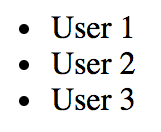
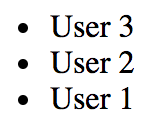
And if you include the descending parameter by navigating to /users/desc, here's what we get: