
When you set the state of a React component, you're actually merging the state of the component with the object that you pass to setState(). This is useful because it means that you can set part of the component state while leaving the rest of the state as it is. Let's look at an example now. First, a component with some state:
import React, { Component } from 'react';

export default class MyComponent extends Component {
  // The initial state...
  state = {
    first: 'loading...',
    second: 'loading...',
    third: 'loading...',
    fourth: 'loading...',
    doneMessage: 'finished!'
  };

  render() {
    const { state } = this;

    // Renders a list of items from the
    // component state.
    return (
      <ul>
        {Object.keys(state)
          .filter(key => key !== 'doneMessage')
          .map(key => (
            <li key={key}>
              <strong>{key}: </strong>
              {state[key]}
            </li>
          ))}
      </ul>
    );
  }
}
This component renders the keys and values of its state—except for doneMessage. Each value defaults to loading.... Let's write some code that sets the state of each state property individually:
import React from 'react';
import { render } from 'react-dom';

import MyComponent from './MyComponent';

// Stores a reference to the rendered component...
const myComponent = render(
  <MyComponent />,
  document.getElementById('root')
);

// Change part of the state after 1 second...
setTimeout(() => {
  myComponent.setState({ first: 'done!' });
}, 1000);

// Change another part of the state after 2 seconds...
setTimeout(() => {
  myComponent.setState({ second: 'done!' });
}, 2000);

// Change another part of the state after 3 seconds...
setTimeout(() => {
  myComponent.setState({ third: 'done!' });
}, 3000);

// Change another part of the state after 4 seconds...
setTimeout(() => {
  myComponent.setState(state => ({
    ...state,
    fourth: state.doneMessage
  }));
}, 4000);
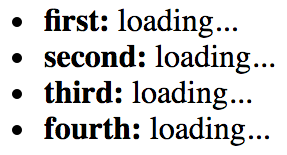
The takeaway from this example is that you can set individual state properties on components. It will efficiently re-render itself. Here's what the rendered output looks like for the initial component state:
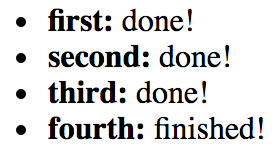
Here's what the output looks like after two of the setTimeout() callbacks have run:
The fourth call to setState() looks different from the first three. Instead of passing a new object to merge into the existing state, you can pass a function. This function takes a state argument—the current state of the component. This is useful when you need to base state changes on current state values. In this example, the doneMessage value is used to set the value of fourth. The function then returns the new state of the component. It's up to you to merge existing state values into the new state. You can use the spread operator to do this (...state).