
The shouldComponentUpdate() lifecycle method is used to determine whether or not the component will render when asked to. For example, if this method were implemented, and returned false, the entire lifecycle of the component is short-circuited, and no render happens. This can be an important check to have in place if the component is rendering a lot of data and is re-rendered frequently. The trick is knowing whether or not the component state has changed.
This is the beauty of immutable data—you can easily check if it has changed. This is especially true if you're using a library such as Immutable.js to control the state of the component. Let's take a look at a simple list component:
import React, { Component } from 'react';
import { fromJS } from 'immutable';

export default class MyList extends Component {
  state = {
    data: fromJS({
      items: [...Array(5000).keys()]
    })
  };

  // Getter for "Immutable.js" state data...
  get data() {
    return this.state.data;
  }

  // Setter for "Immutable.js" state data...
  set data(data) {
    this.setState({ data });
  }

  // If this method returns false, the component
  // will not render. Since we're using an Immutable.js
  // data structure, we simply need to check for equality.
  // If "state.data" is the same, then there's no need to
  // render because nothing has changed since the last render.
  shouldComponentUpdate(props, state) {
    return this.data !== state.data;
  }

  // Renders the complete list of items, even if it's huge.
  render() {
    const items = this.data.get('items');

    return <ul>{items.map(i => <li key={i}>{i}</li>)}</ul>;
  }
}
The items state is initialized to an Immutable.js List with 5000 items in it. This is a fairly large collection, so you don't want the virtual DOM inside React to constantly diff this list. The virtual DOM is efficient at what it does, but not nearly as efficient as code that can perform a simple should or shouldn't render check. The shouldComponentRender() method that you've implemented here does exactly that. It compares the new state with the current state; if they're the same object, completely sidestep the virtual DOM.
Now, let's put this component to work and see what kind of efficiency gains you get:
import React from 'react';
import { render as renderJSX } from 'react-dom';

import MyList from './MyList';

// Renders the "<MyList>" component. Then, it sets
// the state of the component by changing the value
// of the first "items" element. However, the value
// didn't actually change, so the same Immutable.js
// structure is reused. This means that
// "shouldComponentUpdate()" will return false.
function render() {
  const myList = renderJSX(
    <MyList />,
    document.getElementById('root')
  );

  // Not actually changing the value of the first
  // "items" element. So, Immutable.js recognizes
  // that nothing changed, and instead of
  // returning a new object, it returns the same
  // "myList.data" reference.
  myList.data = myList.data.setIn(['items', 0], 0);
}

// Instead of performing 500,000 DOM operations,
// "shouldComponentUpdate()" turns this into
// 5000 DOM operations.
for (let i = 0; i < 100; i++) {
  render();
}
You're rendering <MyList>, over and over, in a loop. Each iteration has 5,000 list items to render. Since the state doesn't change, the call to shouldComponentUpdate() returns false on every one of these iterations. This is important for performance reasons, because there are a lot of them. You're not going to have code that re-renders a component in a tight loop, in a real application. This code is meant to stress the rendering capabilities of React. If you were to comment out the shouldComponentUpdate() method, you'd see what I mean. Here's what the performance profile looks like for this component:
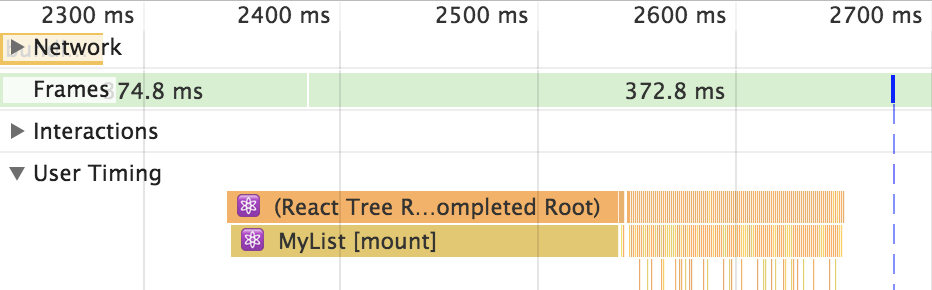
The initial render takes the longest—a few hundred milliseconds. But then you have all of these tiny time slices that are completely imperceptible to the user experience. These are the result of shouldComponentUpdate() returning false. Let's comment out this method now and see how this profile changes:
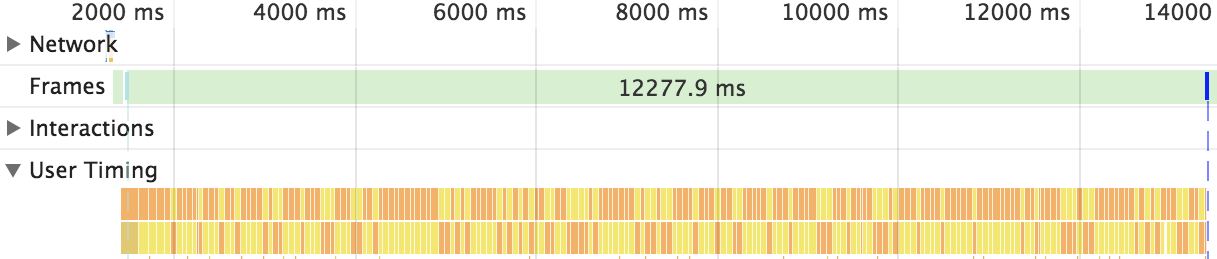
Without shouldComponentUpdate(), the end result is much larger time slices with a drastically negative impact on user experience.