Sometimes, you just want to make sure that a property value is something that can be rendered by JSX markup. For example, if a property value is an array of plain objects, this can't be rendered by putting it in {}. You have to map the array items to JSX elements.
This sort of checking is especially useful if your component passes property values to other elements as children. Let's look at an example of what this looks like:
import React from 'react';
import PropTypes from 'prop-types';

const MyComponent = ({ myHeader, myContent }) => (
  <section>
    <header>{myHeader}</header>
    <main>{myContent}</main>
  </section>
);

// The "myHeader" property requires a React
// element. The "myContent" property requires
// a node that can be rendered. This includes
// React elements, but also strings.
MyComponent.propTypes = {
  myHeader: PropTypes.element.isRequired,
  myContent: PropTypes.node.isRequired
};

export default MyComponent;
This component has two properties that require values that can be rendered. The myHeader property wants an element. This can be any JSX element. The myContent property wants a node. This can be any JSX element or any string value. Let's pass this component some values and render it:
import React from 'react';
import { render } from 'react-dom';

import MyComponent from './MyComponent';

// Two React elements we'll use to pass to
// "<MyComponent>" as property values.
const myHeader = <h1>My Header</h1>;
const myContent = <p>My Content</p>;

render(
  <section>
    {/* Renders as expected, both properties are passed
         React elements as values. */}
    <MyComponent {...{ myHeader, myContent }} />

    {/* Triggers a warning because "myHeader" is expecting
         a React element instead of a string. */}
    <MyComponent myHeader="My Header" {...{ myContent }} />

    {/* Renders as expected. A string is a valid type for
         the "myContent" property. */}
    <MyComponent {...{ myHeader }} myContent="My Content" />

    {/* Renders as expected. An array of React elements
         is a valid type for the "myContent" property. */}
    <MyComponent
      {...{ myHeader }}
      myContent={[myContent, myContent, myContent]}
    />
  </section>,
  document.getElementById('root')
);
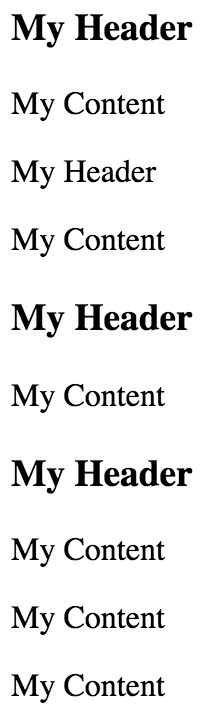
The myHeader property is more restrictive about the values it will accept. The myContent property will accept a string, an element, or an array of elements. These two validators are important when passing in child data from properties, as this component does. For example, trying to pass a plain object or a function as a child will not work, and it's best if you check for this situation using a validator.
Here's what this component looks like when rendered: