Table of Contents for
Mastering OpenLayers 3
 Mastering OpenLayers 3
Published by
Packt Publishing, 2016
Mastering OpenLayers 3
Published by
Packt Publishing, 2016
- Cover
- Table of Contents
- Mastering OpenLayers 3
- Mastering OpenLayers 3
- Credits
- About the Author
- About the Reviewer
- www.PacktPub.com
- Preface
- What you need for this book
- Who this book is for
- Conventions
- Reader feedback
- Customer support
- 1. Creating Simple Maps with OpenLayers 3
- Structure of OpenLayers 3
- Building the layout
- Using the API documentation
- Debugging the code
- Summary
- 2. Applying Custom Styles
- Customizing the default appearance
- Styling vector layers
- Customizing the appearance with JavaScript
- Creating a WebGIS client layout
- Summary
- 3. Working with Layers
- Building a layer tree
- Adding layers dynamically
- Adding vector layers with the File API
- Adding vector layers with a library
- Removing layers dynamically
- Changing layer attributes
- Changing the layer order with the Drag and Drop API
- Clearing the message bar
- Summary
- 4. Using Vector Data
- Accessing attributes
- Setting attributes
- Validating attributes
- Creating thematic layers
- Saving vector data
- Saving with WFS-T
- Modifying the geometry
- Summary
- 5. Creating Responsive Applications with Interactions and Controls
- Building the toolbar
- Mapping interactions to controls
- Building a set of feature selection controls
- Adding new vector layers
- Building a set of drawing tools
- Modifying and snapping to features
- Creating new interactions
- Building a measuring control
- Summary
- 6. Controlling the Map – View and Projection
- Customizing a view
- Constraining a view
- Creating a navigation history
- Working with extents
- Rotating a view
- Changing the map's projection
- Creating custom animations
- Summary
- 7. Mastering Renderers
- Using different renderers
- Creating a WebGL map
- Drawing lines and polygons with WebGL
- Blending layers
- Clipping layers
- Exporting a map
- Creating a raster calculator
- Creating a convolution matrix
- Clipping a layer with WebGL
- Summary
- 8. OpenLayers 3 for Mobile
- Responsive styling with CSS
- Generating geocaches
- Adding device-dependent controls
- Vectorizing the mobile version
- Making the mobile application interactive
- Summary
- 9. Tools of the Trade – Integrating Third-Party Applications
- Exporting a QGIS project
- Importing shapefiles
- Spatial analysis with Turf
- Spatial analysis with JSTS
- 3D rendering with Cesium
- Summary
- 10. Compiling Custom Builds with Closure
- Configuring Node JS
- Compiling OpenLayers 3
- Bundling an application with OpenLayers 3
- Extending OpenLayers 3
- Creating rich documentation with JSDoc
- Summary
- Index
Now that we are kind of familiar with Turf, let's take a look at another topological library: JSTS. In this example, called ch09_jsts, we will reproduce the first two spatial operations from the previous example with JSTS. As we would like to make the least replicated code, we will use ch09_turf as the basis for this example.
JSTS Topology Suite (JSTS) is another reasonably mature topology library out there. It is the JavaScript port of the famous desktop topology application, Java Topology Suite (JTS). The most important difference between Turf and JSTS is that JSTS is more robust but less capable of implementation. It uses an internal format to handle geometries and offers some I/O capabilities. It can traditionally read from Well-Known Text (WKT), but now it can also read from GeoJSON, OpenLayers 2, and OpenLayers 3's internal geometry formats. It can also write to these formats. As JSTS can directly read and write OpenLayers 3's geometries, the overhead of converting geometries to an exchange format is minimal. The biggest downside of JSTS is its terribly poor documentation. It is old and highly outdated; therefore, the newest features can only be explored by reading the source code or experimenting from the console.
Tip
You can download the latest release of JSTS from the GitHub repository at https://github.com/bjornharrtell/jsts/releases.
First, like in the previous examples, we will resolve the dependencies of JSTS in the HTML file. For JSTS, we have to include two JavaScript files, and as JSTS initializes itself with the other utility library, the order really matters:
<head>
    […]
    <script type="text/javascript" src="../../js/jsts-0.17.0/javascript.util.min.js"></script>
    <script type="text/javascript" src="../../js/jsts-0.17.0/jsts.min.js"></script>
</head>As we have gone through the implementing process already, we will now only discuss the changes between the previous implementation and this one. First, we initialize our control and define some variables for the buffer operation:
ol.control.JSTS = function (opt_options) {
    […]
    controlDiv.className = options.class || 'ol-jsts ol-unselectable ol-control';
    […]
    bufferButton.addEventListener('click', function (evt) {
        var layer = _this.getMap().get('selectedLayer');
        if (layer instanceof ol.layer.Vector) {
            var parser = new jsts.io.olParser();
            var features = layer.getSource().getFeatures();
            var buffered = [];
JSTS can read and write OpenLayers 3's geometries but not its features. This way, if we would like to keep the attributes of the original features, we need to clone them first and set their geometries for the result of the operation. To store these features, we initialize an empty array. Next, we iterate through the features and buffer them one by one:
            for (var i = 0; i < features.length; i += 1) {
                buffered.push(features[i].clone());
                var geom = parser.read(features[i].getGeometry());
                buffered[i].setGeometry(parser.write(geom.buffer(10000)));
            }
We create a clone of every feature, add it to our array, and override its geometries dynamically. In JSTS, we can call topological methods from the converted geometry objects. The buffer method of JSTS needs only one parameter: the radius in map units. It has two optional parameters: the number of segments that the approximation of a circular line end should be made up of and the line end (cap) style. Finally, we finish our control by creating a new layer, adding the content of our array to it, and adding it to the map:
            var bufferedLayer = new ol.layer.Vector({
                source: new ol.source.Vector({
                    features: buffered
                }),
                name: 'Buffer result'
            });
            _this.getMap().addLayer(bufferedLayer);
        }
    });
Next, we implement the merge operation. It is available in JSTS under the union method and accepts one argument: another JSTS geometry. Theoretically, it can calculate a union of a geometry collection if it is called on one without any arguments; however, in practice, it throws an error. This way, we can merge our layer by calling the union method with every feature. First, we will set up the required variables:
   […]
   mergeButton.addEventListener('click', function (evt) {
        var layer = _this.getMap().get('selectedLayer');
        if (layer instanceof ol.layer.Vector) {
            var parser = new jsts.io.olParser();
            var features = layer.getSource().getFeatures();
            var unionGeom = parser.read(features[0].getGeometry());
We initialize our operation with the first feature of the layer that's converted to a JSTS geometry. This variable will store the union of the processed features and will be extended for every iteration. Next, we create the iteration, and add a new, merged layer to the map. Note that we will only have one geometry in the end; therefore, we will lose every attribute that's associated with the original dataset:
            for (var i = 1; i < features.length; i += 1) {
                unionGeom = unionGeom.union(parser.read(features[i].getGeometry()));
            }
            var mergedLayer = new ol.layer.Vector({
                source: new ol.source.Vector({
                    features: [
                        new ol.Feature({
                            geometry: parser.write(unionGeom)
                        })
                    ]
                }),
                name: 'Merge result'
            });
            _this.getMap().addLayer(mergedLayer);
        }
    });
    […]
};
ol.inherits(ol.control.JSTS, ol.control.Control);
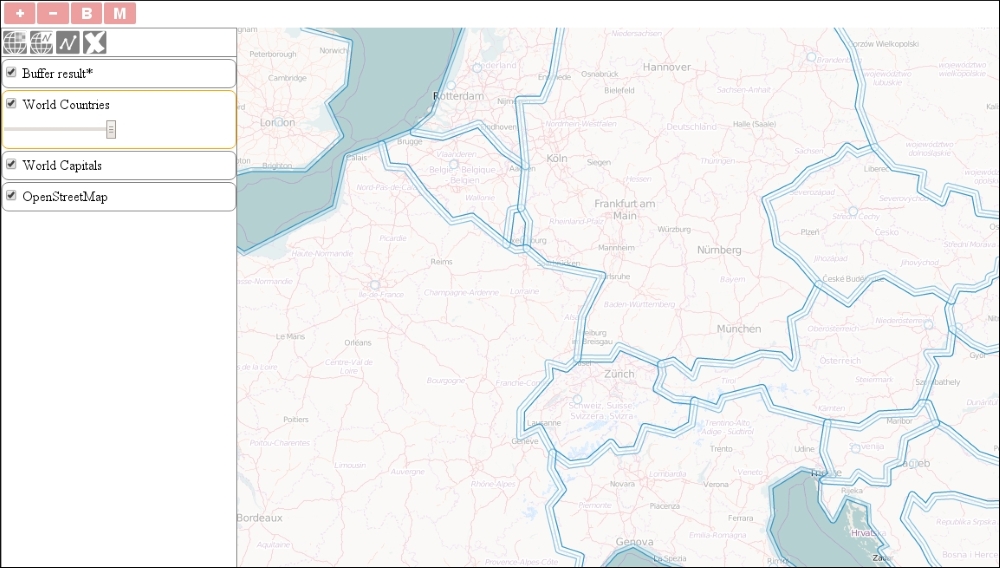
If you save the code and load it in your browser, you can try out the topological functions that we implemented with JSTS. Don't forget to try out buffering with the help of the polygon layer: