Table of Contents for
Mastering OpenLayers 3
 Mastering OpenLayers 3
Published by
Packt Publishing, 2016
Mastering OpenLayers 3
Published by
Packt Publishing, 2016
- Cover
- Table of Contents
- Mastering OpenLayers 3
- Mastering OpenLayers 3
- Credits
- About the Author
- About the Reviewer
- www.PacktPub.com
- Preface
- What you need for this book
- Who this book is for
- Conventions
- Reader feedback
- Customer support
- 1. Creating Simple Maps with OpenLayers 3
- Structure of OpenLayers 3
- Building the layout
- Using the API documentation
- Debugging the code
- Summary
- 2. Applying Custom Styles
- Customizing the default appearance
- Styling vector layers
- Customizing the appearance with JavaScript
- Creating a WebGIS client layout
- Summary
- 3. Working with Layers
- Building a layer tree
- Adding layers dynamically
- Adding vector layers with the File API
- Adding vector layers with a library
- Removing layers dynamically
- Changing layer attributes
- Changing the layer order with the Drag and Drop API
- Clearing the message bar
- Summary
- 4. Using Vector Data
- Accessing attributes
- Setting attributes
- Validating attributes
- Creating thematic layers
- Saving vector data
- Saving with WFS-T
- Modifying the geometry
- Summary
- 5. Creating Responsive Applications with Interactions and Controls
- Building the toolbar
- Mapping interactions to controls
- Building a set of feature selection controls
- Adding new vector layers
- Building a set of drawing tools
- Modifying and snapping to features
- Creating new interactions
- Building a measuring control
- Summary
- 6. Controlling the Map – View and Projection
- Customizing a view
- Constraining a view
- Creating a navigation history
- Working with extents
- Rotating a view
- Changing the map's projection
- Creating custom animations
- Summary
- 7. Mastering Renderers
- Using different renderers
- Creating a WebGL map
- Drawing lines and polygons with WebGL
- Blending layers
- Clipping layers
- Exporting a map
- Creating a raster calculator
- Creating a convolution matrix
- Clipping a layer with WebGL
- Summary
- 8. OpenLayers 3 for Mobile
- Responsive styling with CSS
- Generating geocaches
- Adding device-dependent controls
- Vectorizing the mobile version
- Making the mobile application interactive
- Summary
- 9. Tools of the Trade – Integrating Third-Party Applications
- Exporting a QGIS project
- Importing shapefiles
- Spatial analysis with Turf
- Spatial analysis with JSTS
- 3D rendering with Cesium
- Summary
- 10. Compiling Custom Builds with Closure
- Configuring Node JS
- Compiling OpenLayers 3
- Bundling an application with OpenLayers 3
- Extending OpenLayers 3
- Creating rich documentation with JSDoc
- Summary
- Index
Now that we can add layers dynamically with our layer tree, it's time to add the capability of removing layers. For this task, we create a button that's designated to removing a selected layer, and add some logic to select a single layer in the layer tree. You can see this example if you look for ch03_deletelayer.
First of all, we need to make the layers selectable, and we can do this by registering further events to the layer elements in the constructor function. To make it simple and clear, we create a utility method to add this event type to the layer element:
layerTree.prototype.addSelectEvent = function (node, isChild) {
    var _this = this;
    node.addEventListener('click', function (evt) {
        var targetNode = evt.target;
        if (isChild) {
            evt.stopPropagation();
            targetNode = targetNode.parentNode;
        }
        if (_this.selectedLayer) {
            _this.selectedLayer.classList.remove('active');
        }
        _this.selectedLayer = targetNode;
        targetNode.classList.add('active');
    });
    return node;
};
The function adds an event listener to the input element, which grabs a reference of it and saves it to the object's selectedLayer property. It also grants some visual feedback by appending an active class to the clicked layer element and removes it from the previously selected layer.
There is one problem with this. If we click on the layer name, which is a child of the layer element, we get a reference that doesn't make sense. To resolve this issue, our method accepts an isChild Boolean. If the boolean is set to true, the method simply grabs the reference of the clicked element's parent node and stops propagating to the layer element itself. Next, we create rules for the active class and the remove button in our CSS file:
.layertree-buttons .deletelayer {
    background-image: url(../../res/button_delete.png);
}
.layercontainer .layer.active {
    border-color: orange;
}
Next, we extend our constructor by adding the remove button and selection logic:
var layerTree = function (options) {
        […]
        controlDiv.appendChild(this.createButton('deletelayer', 'Remove Layer', 'deletelayer'));
        […]
        this.selectedLayer = null;
        this.createRegistry = function (layer, buffer) {
            […]
            this.addSelectEvent(layerDiv);
            […]
            layerDiv.appendChild(this.addSelectEvent(layerSpan, true));
            […]
        };
        […]
        this.map.getLayers().on('remove', function (evt) {
            this.removeRegistry(evt.element);
        }, this);
        […]
};We also register an event to the map's layer stack. If a layer gets deleted, we also remove its element from the layer tree with the removeRegistry method:
layerTree.prototype.removeRegistry = function (layer) {
    var layerDiv = document.getElementById(layer.get('id'));
    this.layerContainer.removeChild(layerDiv);
    return this;
};
As you must have noticed, in the button creation, we used a different button type. Remember when we used a switch statement in the button creation method? It's time to extend it with the deletelayer case:
layerTree.prototype.createButton = function (elemName, elemTitle, elemType) {
    […]
        case 'deletelayer':
            var _this = this;
            buttonElem.addEventListener('click', function () {
                if (_this.selectedLayer) {
                    var layer = _this.getLayerById(_this.selectedLayer.id);
                    console.log(layer);
                    _this.map.removeLayer(layer);
                    _this.messages.textContent = 'Layer removed successfully.';
                } else {
                    _this.messages.textContent = 'No selected layer to remove.';
                }
            });
            return buttonElem;
        […]
};
When we click on the remove button, it tries to decide which layer we would like to remove. As it has the layer's id, it can easily search for it in the map's layer stack. To make things even more transparent, we create a getLayerById method for this task:
layerTree.prototype.getLayerById = function (id) {
    var layers = this.map.getLayers().getArray();
    for (var i = 0; i < layers.length; i += 1) {
        if (layers[i].get('id') === id) {
            return layers[i];
        }
    }
    return false;
};
This method grabs a reference to the internal array of the layer stack and searches for the one with the input ID. When it finds the layer, the method returns.
Note
One valid case for using the internal array of an OpenLayers 3 collection object is this method used previously. As we can have many layers, we don't want to iterate through all of them, just as many as necessary. With the collection's forEach method, we can't use a return statement to save some time.
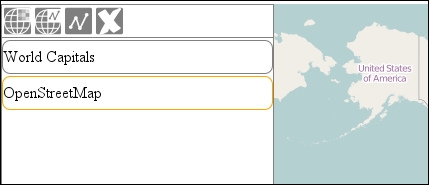
If you save and load the example, you can try out our new functionality: