Table of Contents for
Mastering OpenLayers 3
 Mastering OpenLayers 3
Published by
Packt Publishing, 2016
Mastering OpenLayers 3
Published by
Packt Publishing, 2016
- Cover
- Table of Contents
- Mastering OpenLayers 3
- Mastering OpenLayers 3
- Credits
- About the Author
- About the Reviewer
- www.PacktPub.com
- Preface
- What you need for this book
- Who this book is for
- Conventions
- Reader feedback
- Customer support
- 1. Creating Simple Maps with OpenLayers 3
- Structure of OpenLayers 3
- Building the layout
- Using the API documentation
- Debugging the code
- Summary
- 2. Applying Custom Styles
- Customizing the default appearance
- Styling vector layers
- Customizing the appearance with JavaScript
- Creating a WebGIS client layout
- Summary
- 3. Working with Layers
- Building a layer tree
- Adding layers dynamically
- Adding vector layers with the File API
- Adding vector layers with a library
- Removing layers dynamically
- Changing layer attributes
- Changing the layer order with the Drag and Drop API
- Clearing the message bar
- Summary
- 4. Using Vector Data
- Accessing attributes
- Setting attributes
- Validating attributes
- Creating thematic layers
- Saving vector data
- Saving with WFS-T
- Modifying the geometry
- Summary
- 5. Creating Responsive Applications with Interactions and Controls
- Building the toolbar
- Mapping interactions to controls
- Building a set of feature selection controls
- Adding new vector layers
- Building a set of drawing tools
- Modifying and snapping to features
- Creating new interactions
- Building a measuring control
- Summary
- 6. Controlling the Map – View and Projection
- Customizing a view
- Constraining a view
- Creating a navigation history
- Working with extents
- Rotating a view
- Changing the map's projection
- Creating custom animations
- Summary
- 7. Mastering Renderers
- Using different renderers
- Creating a WebGL map
- Drawing lines and polygons with WebGL
- Blending layers
- Clipping layers
- Exporting a map
- Creating a raster calculator
- Creating a convolution matrix
- Clipping a layer with WebGL
- Summary
- 8. OpenLayers 3 for Mobile
- Responsive styling with CSS
- Generating geocaches
- Adding device-dependent controls
- Vectorizing the mobile version
- Making the mobile application interactive
- Summary
- 9. Tools of the Trade – Integrating Third-Party Applications
- Exporting a QGIS project
- Importing shapefiles
- Spatial analysis with Turf
- Spatial analysis with JSTS
- 3D rendering with Cesium
- Summary
- 10. Compiling Custom Builds with Closure
- Configuring Node JS
- Compiling OpenLayers 3
- Bundling an application with OpenLayers 3
- Extending OpenLayers 3
- Creating rich documentation with JSDoc
- Summary
- Index
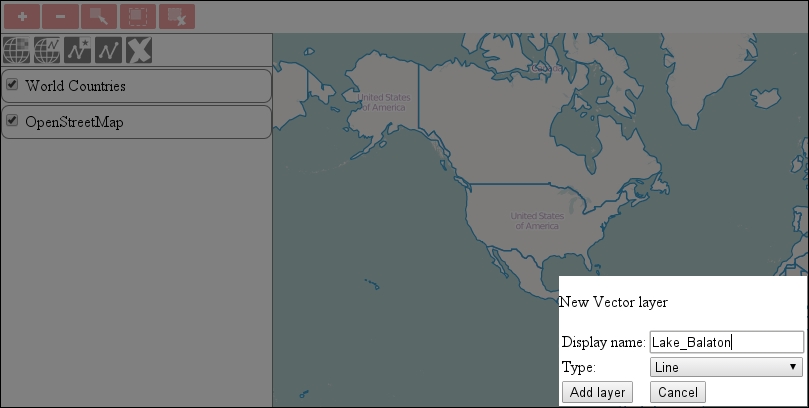
In this example, ch05_newvector, we take a little detour back to our layer tree model. We have to make some inevitable enhancements to it before we can proceed to our next goal. We are going to create an option to add new, typed vector layers. We also need to create an event firing mechanism that can be used to detect changes in the currently active layer.
As we extend our layer tree with a new layer addition option, we have to create the required HTML form and CSS rule for it. Both of them are very simple. The rule only contains the URL of the background image as usual:
.layertree-buttons .newvector {
    background-image: url(../../res/button_newvector.png);
}
The HTML form enables us to name the layer and choose a type for it. The type can be one of the main vector types: point, line, or polygon. We also allow you to choose a collection type: geometry collection. Later, we will restrict the drawing options based on the layer's type:
<div id="newvector" class="toggleable" style="display: none;">
    <form id="newvector_form" class="addlayer">
        <p>New Vector layer</p>
        <table>
            <tr>
                <td>Display name:</td>
                <td><input name="displayname" type="text"></td>
            </tr>
            <tr>
                <td>Type:</td>
                <td><select name="type" required="required">
                    <option value="point">Point</option>
                    <option value="line">Line</option>
                    <option value="polygon">Polygon</option>
                    <option value="geomcollection">Geometry Collection</option>
                </select></td>
            </tr>
            <tr>
                <td><input type="submit" value="Add layer"></td>
                <td><input type="button" value="Cancel" onclick="this.form.parentNode.style.display = 'none'"></td>
            </tr>
        </table>
    </form>
</div>Now that we have a form for the new vector layer, we can extend the layer tree with the necessary parts. Firstly, we extend the constructor function with a new button and the empty ol.Observable object:
var layerTree = function (options) {
   […]
        controlDiv.appendChild(this.createButton('newvector', 'New Vector Layer', 'addlayer'));
    […]
        this.selectEventEmitter = new ol.Observable();
    […]
        this.map.getLayers().on('remove', function (evt) {
            this.removeRegistry(evt.element);
            this.selectEventEmitter.changed();
    […]
};
The reason behind our choice of event object is that ol.Observable is the most lightweight class that can create events, and be listened to. Practically, this is the only task of this class. We can immediately find a place to fire a change event in our constructor—when we remove the selected layer. Next, we find the other occurrence where firing the change event is appropriate:
layerTree.prototype.addSelectEvent = function (node, isChild) {
    var _this = this;
    node.addEventListener('click', function (evt) {
    […]
        _this.selectEventEmitter.changed();
    […]
};
Next, we create the method responsible for reading the form and add the vector layer to the map accordingly:
layerTree.prototype.newVectorLayer = function (form) {
    var type = form.type.value;
    if (type !== 'point' && type !== 'line' && type !== 'polygon' && type !== 'geomcollection') {
        this.messages.textContent = 'Unrecognized layer type.';
        return false;
    }
    var layer = new ol.layer.Vector({
        source: new ol.source.Vector(),
        name: form.displayname.value || 'Unnamed Layer',
        type: type
    });
    this.addBufferIcon(layer);
    this.map.addLayer(layer);
    layer.getSource().changed();
    this.messages.textContent = 'New vector layer created successfully.';
    return this;
};
Note that, if we try to manually alter the type of the layer and provide a custom value, it will get stuck on the first check. Also, as vector layers generally get a buffering icon from the layer tree and our layer's source is empty, we must manually trigger a change event on it for the buffering icon to disappear. The order matters as we have to trigger the change event after the layer's div element has been created.
Finally, we add the required event listener for the form, as usual, and see the results:
document.getElementById('newvector_form').addEventListener('submit', function (evt) {
    evt.preventDefault();
    tree.newVectorLayer(this);
    this.parentNode.style.display = 'none';
});