Table of Contents for
Mastering OpenLayers 3
 Mastering OpenLayers 3
Published by
Packt Publishing, 2016
Mastering OpenLayers 3
Published by
Packt Publishing, 2016
- Cover
- Table of Contents
- Mastering OpenLayers 3
- Mastering OpenLayers 3
- Credits
- About the Author
- About the Reviewer
- www.PacktPub.com
- Preface
- What you need for this book
- Who this book is for
- Conventions
- Reader feedback
- Customer support
- 1. Creating Simple Maps with OpenLayers 3
- Structure of OpenLayers 3
- Building the layout
- Using the API documentation
- Debugging the code
- Summary
- 2. Applying Custom Styles
- Customizing the default appearance
- Styling vector layers
- Customizing the appearance with JavaScript
- Creating a WebGIS client layout
- Summary
- 3. Working with Layers
- Building a layer tree
- Adding layers dynamically
- Adding vector layers with the File API
- Adding vector layers with a library
- Removing layers dynamically
- Changing layer attributes
- Changing the layer order with the Drag and Drop API
- Clearing the message bar
- Summary
- 4. Using Vector Data
- Accessing attributes
- Setting attributes
- Validating attributes
- Creating thematic layers
- Saving vector data
- Saving with WFS-T
- Modifying the geometry
- Summary
- 5. Creating Responsive Applications with Interactions and Controls
- Building the toolbar
- Mapping interactions to controls
- Building a set of feature selection controls
- Adding new vector layers
- Building a set of drawing tools
- Modifying and snapping to features
- Creating new interactions
- Building a measuring control
- Summary
- 6. Controlling the Map – View and Projection
- Customizing a view
- Constraining a view
- Creating a navigation history
- Working with extents
- Rotating a view
- Changing the map's projection
- Creating custom animations
- Summary
- 7. Mastering Renderers
- Using different renderers
- Creating a WebGL map
- Drawing lines and polygons with WebGL
- Blending layers
- Clipping layers
- Exporting a map
- Creating a raster calculator
- Creating a convolution matrix
- Clipping a layer with WebGL
- Summary
- 8. OpenLayers 3 for Mobile
- Responsive styling with CSS
- Generating geocaches
- Adding device-dependent controls
- Vectorizing the mobile version
- Making the mobile application interactive
- Summary
- 9. Tools of the Trade – Integrating Third-Party Applications
- Exporting a QGIS project
- Importing shapefiles
- Spatial analysis with Turf
- Spatial analysis with JSTS
- 3D rendering with Cesium
- Summary
- 10. Compiling Custom Builds with Closure
- Configuring Node JS
- Compiling OpenLayers 3
- Bundling an application with OpenLayers 3
- Extending OpenLayers 3
- Creating rich documentation with JSDoc
- Summary
- Index
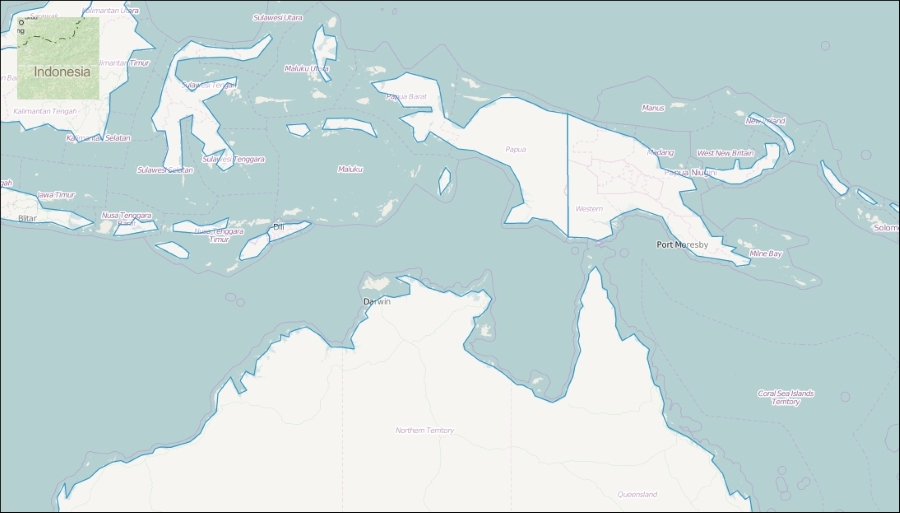
In the next example, called ch07_clip, we will use another useful canvas operation. We will use a clipping mask to restrict a layer to a small square, creating a peeking window, just like the one in the Google Maps application.
For this example, we extend our init function with a custom layer. We register the required precompose and postcompose events on it, and then silently add it to the map:
var clippedLayer = new ol.layer.Tile({
    source: new ol.source.MapQuest({
        layer: 'osm'
    }),
    zIndex: 9999
});
clippedLayer.on('precompose', function (evt) {
    var ctx = evt.context;
    ctx.save();
    ctx.beginPath();
    ctx.rect(20, 20, 100, 100);
    ctx.clip();
});
clippedLayer.on('postcompose', function (evt) {
    evt.context.restore();
});
clippedLayer.setMap(map);The trick of clipping a context is this: we save the context and then draw a rectangle. First, we begin a path. Next, we define the position of the rectangle relative to the top-left corner of the canvas in the first two arguments. In the second two arguments, we define the width and the height of the rectangle, respectively. Instead of drawing the rectangle on the canvas by calling the stroke or fillRect methods, we convert the path to a clipping mask using the context's clip method.
When the layer is drawn (the postcompose event), we restore the saved context, disabling the clipping mask for every other layer. If we skip this step, the entire map is clipped to the defined mask.
If you load the example, you can see our peeking window showing a MapQuest layer over our base map: