Table of Contents for
Mastering OpenLayers 3
 Mastering OpenLayers 3
Published by
Packt Publishing, 2016
Mastering OpenLayers 3
Published by
Packt Publishing, 2016
- Cover
- Table of Contents
- Mastering OpenLayers 3
- Mastering OpenLayers 3
- Credits
- About the Author
- About the Reviewer
- www.PacktPub.com
- Preface
- What you need for this book
- Who this book is for
- Conventions
- Reader feedback
- Customer support
- 1. Creating Simple Maps with OpenLayers 3
- Structure of OpenLayers 3
- Building the layout
- Using the API documentation
- Debugging the code
- Summary
- 2. Applying Custom Styles
- Customizing the default appearance
- Styling vector layers
- Customizing the appearance with JavaScript
- Creating a WebGIS client layout
- Summary
- 3. Working with Layers
- Building a layer tree
- Adding layers dynamically
- Adding vector layers with the File API
- Adding vector layers with a library
- Removing layers dynamically
- Changing layer attributes
- Changing the layer order with the Drag and Drop API
- Clearing the message bar
- Summary
- 4. Using Vector Data
- Accessing attributes
- Setting attributes
- Validating attributes
- Creating thematic layers
- Saving vector data
- Saving with WFS-T
- Modifying the geometry
- Summary
- 5. Creating Responsive Applications with Interactions and Controls
- Building the toolbar
- Mapping interactions to controls
- Building a set of feature selection controls
- Adding new vector layers
- Building a set of drawing tools
- Modifying and snapping to features
- Creating new interactions
- Building a measuring control
- Summary
- 6. Controlling the Map – View and Projection
- Customizing a view
- Constraining a view
- Creating a navigation history
- Working with extents
- Rotating a view
- Changing the map's projection
- Creating custom animations
- Summary
- 7. Mastering Renderers
- Using different renderers
- Creating a WebGL map
- Drawing lines and polygons with WebGL
- Blending layers
- Clipping layers
- Exporting a map
- Creating a raster calculator
- Creating a convolution matrix
- Clipping a layer with WebGL
- Summary
- 8. OpenLayers 3 for Mobile
- Responsive styling with CSS
- Generating geocaches
- Adding device-dependent controls
- Vectorizing the mobile version
- Making the mobile application interactive
- Summary
- 9. Tools of the Trade – Integrating Third-Party Applications
- Exporting a QGIS project
- Importing shapefiles
- Spatial analysis with Turf
- Spatial analysis with JSTS
- 3D rendering with Cesium
- Summary
- 10. Compiling Custom Builds with Closure
- Configuring Node JS
- Compiling OpenLayers 3
- Bundling an application with OpenLayers 3
- Extending OpenLayers 3
- Creating rich documentation with JSDoc
- Summary
- Index
The API documentation for OpenLayers 3.11.0, the version we are using, can be found at http://www.openlayers.org/en/v3.11.0/apidoc/. The API docs, like the library itself, are versioned, thus you can browse the appropriate documentation for your OpenLayers 3 version by changing v3.11.0 in the URL to the version you are currently using.
Note
The development version of the API is also documented; you can always reach it at http://www.openlayers.org/en/master/apidoc/. Be careful when you use it, though. It contains all of the newly implemented methods, which probably won't work with the latest stable version.
Check the API documentation by typing one of the preceding links in your browser. You should see the home page with the most frequently used classes. There is also a handy search box, with all of the classes listed on the left side. We have talked about default interactions and their lengthy nature before. On the home page you can see a link to the default interactions. If you click on it, you will be directed to the following page:
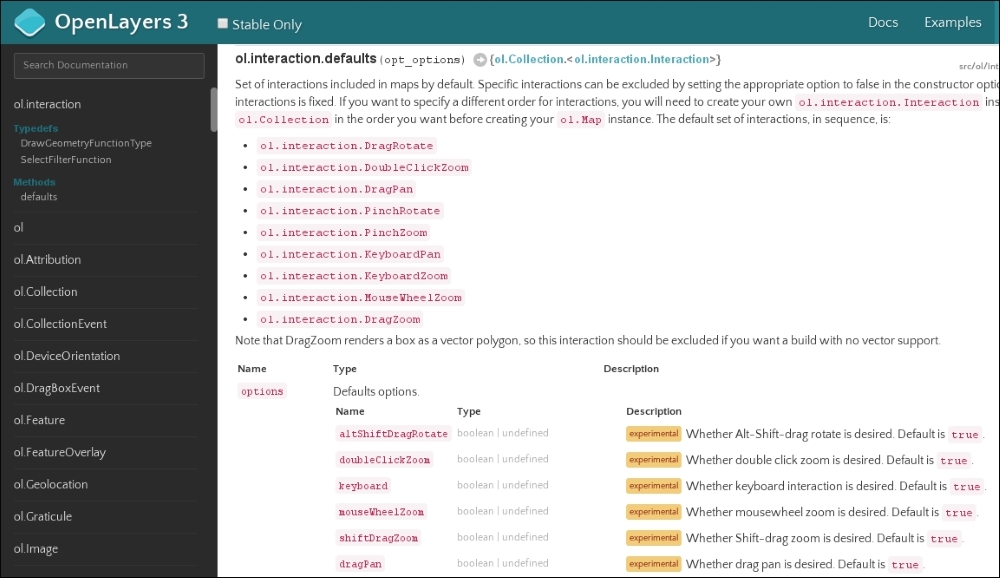
Now you can also see that nine interactions are added to the map by default. It would be quite verbose to add them one by one just to keep them when we define only one extra interaction, wouldn't it?
Note
You can see some features marked as experimental while you browse the API documentation with the Stable Only checkbox unchecked. Do not consider those features to be unreliable. They are stable, but experimental, and therefore they can be modified or removed in future versions. If the developer team considers a feature is useful and does not need further optimization or refactoring, it will be marked as stable.
For every constructor and function in the API, the input and expected output types are well documented. To see a good example, let's search for a function with inputs and outputs as well. If you search for ol.proj.fromLonLat, you will see the following function:
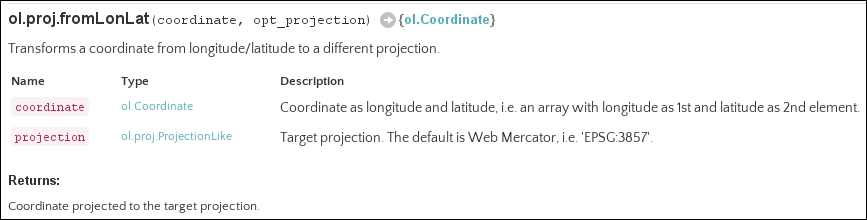
The function takes two arguments as input, one named coordinate and one named projection; projection is optional. coordinate is an ol.Coordinate type (an array with two numbers), while projection is an ol.proj.ProjectionLike type (a string representing the projection). The returned value, as we can see next to the white arrow, is also an ol.Coordinate type, with the transformed values.
Tip
A good developer always keeps track of future changes in the library. This is especially important with OpenLayers 3 when a major change occurs, as it lacks backward compatibility. You can see all of the major changes in the library in the OpenLayers 3 GitHub repository: https://github.com/openlayers/ol3/blob/master/changelog/upgrade-notes.md.