
Our home page will contain the following:
- Header: We will learn how to create and stylize a navigation section, with a logo and a menu on the right-hand side.
- A hero Image: In web design, it describes a front banner image, usually a big image. We'll learn how to create a full-width background image with a big title.
- A preview of the Blog with six blog posts: We'll learn how to display three responsive columns with images and content.
- An ABOUT US section: We will learn how to add a gradient to an image.
- A PARTNERS section: We will learn how to center content on the page.
- A footer: Basically the same thing as the header, but at the bottom.
You can check the image of the home page in full size in the resources files I provided, in Resources | Screens. There is also the Sketch source file of the project.
I strongly recommend you to install Sketch or Figma if you're not using one of these design tools yet. The Sketch app is commonly used for web design projects and can be downloaded at http://sketchapp.com. It has a free trial period of 14 days. Figma is similar to Sketch and can be used without a trial.
This is what our design looks like:
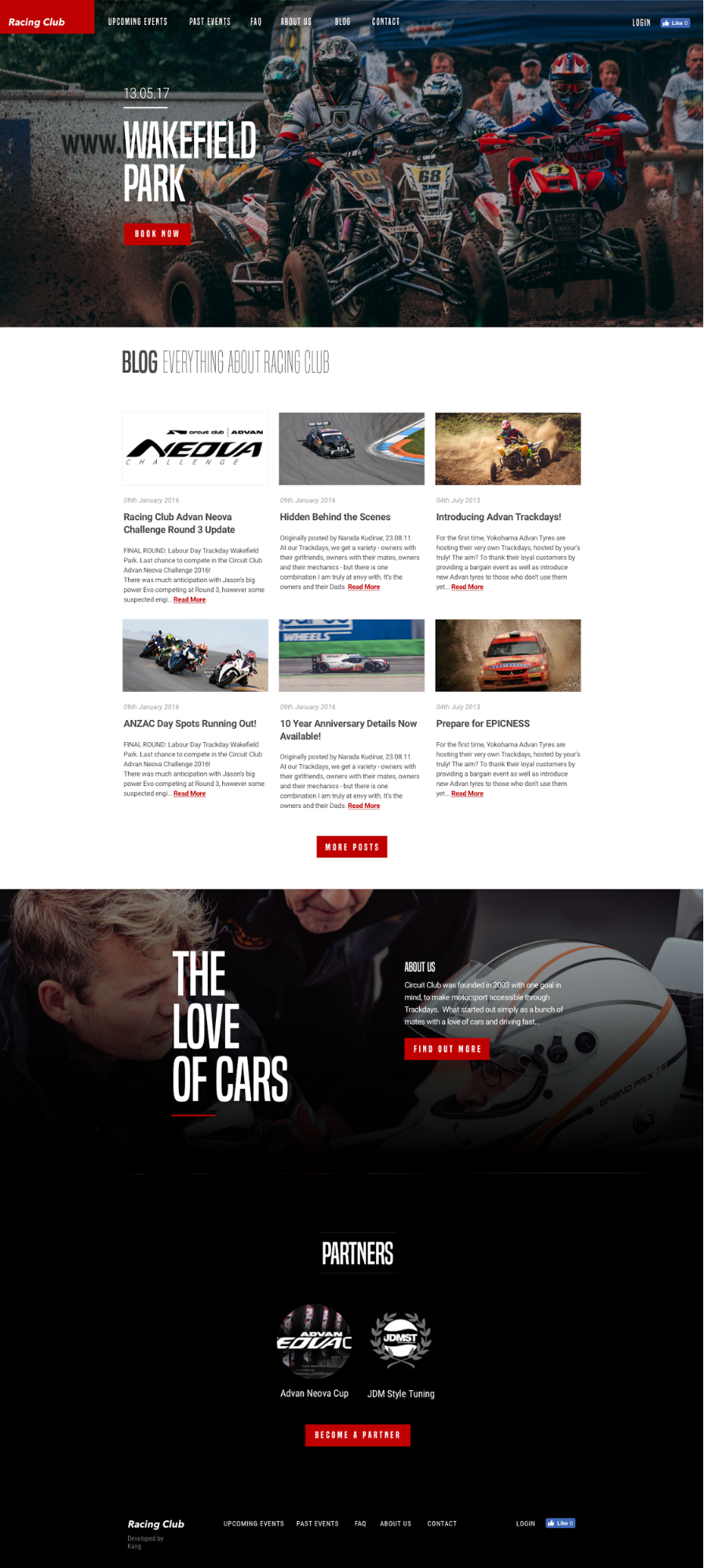
Our home page design
Without further ado, let's get started!