
To add the Facebook like button, we first need to create the button. To do so, we need to go to the Facebook Developer's website to get the information. I have the link handy for you: https://developers.facebook.com/docs/plugins/like-button. On this page, you'll find the means to customize your button, as shown in the following screenshot:
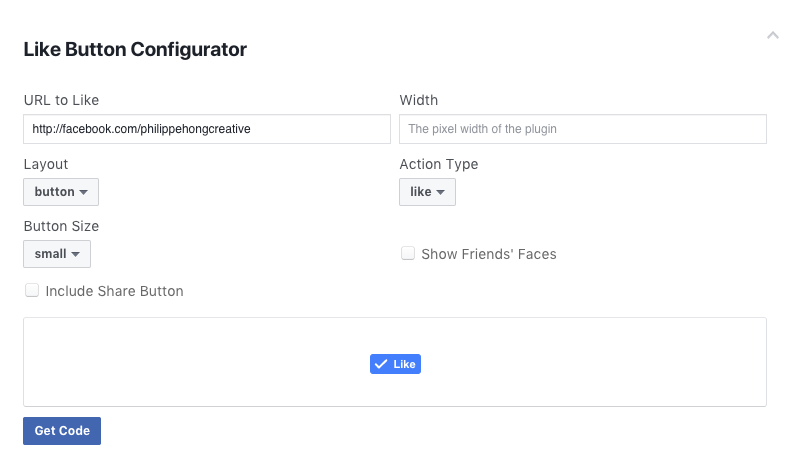
Once done, click on Get Code and select the tab IFrame:
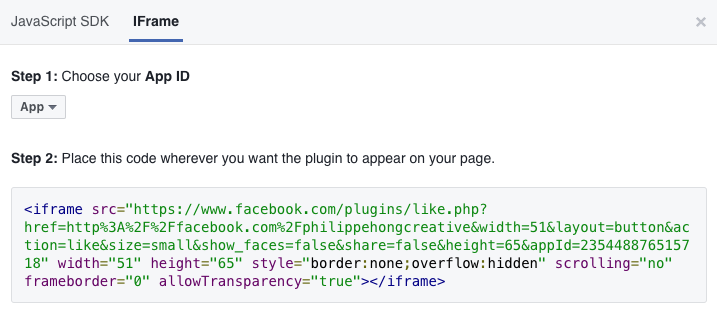
We can copy this piece of code into our website in our second <li> tag.
We're going to customize the button a bit; change the default value of the attribute height to 20px. You should end up with code like this:
<ul class="right-nav">
  <li><a href="login.html">Login</a></li>
  <li><a href="#"><iframe src="https://www.facebook.com/plugins/like.php?href=http%3A%2F%2Ffacebook.com%2Fphilippehongcreative&width=51&layout=button&action=like&size=small&show_faces=false&share=false&height=65&appId=235448876515718" width="51" height="20" style="border:none;overflow:hidden" scrolling="no" frameborder="0" allowTransparency="true"></iframe></a></li>
</ul>
We have now our menu in HTML; let's add some styling with CSS to make it look better.