
There are a few techniques that are useful in demonstrating other vulnerabilities on wireless networks that we can explore. One such issue is bypassing a common wireless control called MAC filtering. MAC filtering is a control on some routers whereby only specific MAC addresses or MAC types are allowed. For example, you may be testing a commercial location that utilizes iPads. The wireless network is only going to allow MAC addresses with the first three hex characters of 34:12:98. Other organizations may have a set list of MAC addresses that are allowed to join.
If you are able to compromise the WPA key but find that you are unable to join the network, the target organization may be utilizing some form of MAC address filtering. To bypass this, we will use the Macchanger command-line tool. This simple command allows us to change our MAC address to something that will allow us to connect. First, you can easily find a new MAC address from previous reconnaissance and cracking attempts. The Airodump-ng tool will identify clients that are connected to wireless networks. Furthermore, parsing through capture files with Wireshark will allow you to identify potentially valid MAC addresses.
For this example, we have identified a wireless client that was connected to the target wireless network with a MAC address of 34:12:98:B5:7E:D4. To change our MAC address to pose as that legitimate MAC address, simply type the following into the command line:
# macchanger -mac=34:12:98:B5:7E:D4 wlan0
The command produces the following output:

In addition, if we run the ifconfig wlan0 command, we can see our spoofed MAC address:
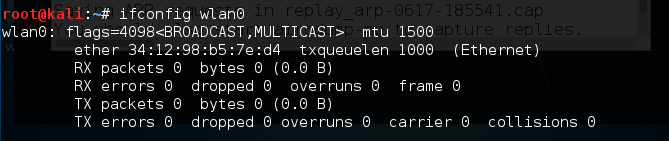
We now have the ability to bypass any MAC filtering that is taking place on the access point. There is now the ability to connect to the wireless network. Like any system that we are able to compromise, setting up persistence is another critical step. This gives us a certain measure of certainty that we will be able to access the system again if we lose our connection.