
In the previous section, we mentioned that you can specify an IPv6 target in Nmap. In this section, we will discuss this in depth.
For this scenario, the following is the IPv6 address of each machine involved:
Target machine: fe80::20c:29ff:fe18:f08
To scan an IPv6 target, just use the -6 option and define the IPv6 target address. Currently, you can only specify individual IPv6 addresses. The following is a sample command to port scan the IPv6 address:
nmap -6 fe80::20c:29ff:fe18:f08
The following is the result of this command:
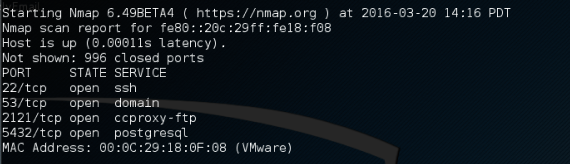
We can see that, in IPv6 testing, the number of ports open is less than in the IPv4 testing. This may be caused by services on the remote machine that do not support IPv6 yet.