Although Nmap itself has already become a powerful network-exploration tool, with the additional scripting engine capabilities, Nmap becomes a much more powerful tool. With the Nmap Scripting Engine (NSE), users can automate various networking tasks, such as checking for new security vulnerabilities in applications, detecting application versions, or other capabilities that are not available in Nmap. Nmap has already included various NSE scripts in its package, but users can also write their own scripts to suit their needs.
The NSE scripts utilize the Lua programming language (http://www.lua.org) embedded in Nmap, and, currently, the NSE scripts are categorized as follows:
- auth: The scripts in this category are used to find the authentication set on the target system; for example, by using the brute-force technique.
- default: These scripts are run using the -sC or -A options. A script will be grouped in the default category if it satisfies the following requirements:
- It must be fast
- It needs to produce valuable and actionable information
- Its output needs to be verbose and concise
- It must be reliable
- It should not be intrusive of the target system
- It should divulge information to the third party
- discovery: These scripts are used to find the network.
- DoS: The scripts in this category may cause Denial of Service (DoS) on the target system. Please use them carefully.
- exploit: These scripts will exploit security vulnerabilities on the target system. The penetration tester needs to have permission to run these scripts on the target system.
- external: These scripts may divulge information to third parties.
- fuzzer: These scripts are used to do fuzzing on the target system.
- intrusive: These scripts may crash the target system or use all of the target system's resources.
- malware: These scripts will check for the existence of malware or backdoors on the target system.
- safe: These scripts are not supposed to cause a service crash, Denial of Service (DoS), or exploit the target system.
- version: These scripts are used with the version detection option (-sV) to carry out advanced detection for the service on the target system.
- vuln: These scripts are used to check for security vulnerabilities on the target system.
In Kali Linux, these Nmap scripts are located in the /usr/share/nmap/scripts directories, and, currently, Nmap Version 7.70, which is included with Kali Linux, contains 588 scripts.
There are several command-line arguments that can be used to call NSE, as follows:
- -sC or --script=default: This performs a scan using default scripts.
- --script <filename> | <category> | <directories>: This performs a scan using the script defined in filenames, categories, or directories.
- --script-args <args>: This provides a script argument. An example of these arguments is the username or the password if you use the auth category.
To port scan the 172.16.43.156 host and utilize the default script categories, we can give the following command:
nmap -sC 172.16.43.156
The following is an abridged result:
    Starting Nmap 6.49BETA4 ( https://nmap.org ) at 2016-02-22 17:09 PST
    Nmap scan report for 172.16.43.156
    Host is up (0.000099s latency).
    Not shown: 977 closed ports
    PORT     STATE SERVICE
    21/tcp   open  ftp
    |_ftp-anon: Anonymous FTP login allowed (FTP code 230)
    22/tcp   open  ssh
    | ssh-hostkey:
    |   1024 60:0f:cf:e1:c0:5f:6a:74:d6:90:24:fa:c4:d5:6c:cd (DSA)
    |_  2048 56:56:24:0f:21:1d:de:a7:2b:ae:61:b1:24:3d:e8:f3 (RSA)
    23/tcp   open  telnet
    25/tcp   open  smtp
    |_smtp-commands: metasploitable.localdomain, PIPELINING, SIZE 10240000, VRFY, ETRN, STARTTLS, ENHANCEDSTATUSCODES, 8BITMIME, DSN,
    | ssl-cert: Subject: commonName=ubuntu804-base.localdomain/organizationName=OCOSA/stateOrProvinceName=There is no such thing outside US/countryName=XX
    | Not valid before: 2010-03-17T14:07:45
    |_Not valid after:  2010-04-16T14:07:45
    |_ssl-date: 2016-02-12T05:51:52+00:00; -10d19h17m25s from scanner time.
    53/tcp   open  domain
    | dns-nsid:
    |_  bind.version: 9.4.2
    80/tcp   open  http
    |_http-methods: No Allow or Public header in OPTIONS response (status code 200)
    |_http-title: Metasploitable2 - Linux
    8009/tcp open  ajp13
    |_ajp-methods: Failed to get a valid response for the OPTION request
    8180/tcp open  unknown
    |_http-favicon: Apache Tomcat
    |_http-methods: No Allow or Public header in OPTIONS response (status code 200)
    |_http-title: Apache Tomcat/5.5
    MAC Address: 00:0C:29:18:0F:08 (VMware)

    Host script results:
    |_nbstat: NetBIOS name: METASPLOITABLE, NetBIOS user: <unknown>, NetBIOS MAC: <unknown> (unknown)
    | smb-os-discovery:
    |   OS: Unix (Samba 3.0.20-Debian)
    |   NetBIOS computer name:
    |   Workgroup: WORKGROUP
    |_  System time: 2016-02-12T00:51:49-05:00

    Nmap done: 1 IP address (1 host up) scanned in 12.76 seconds
From the preceding information, you can see that the Nmap result is now more thorough. This is because it utilizes the NSE default scripts.
However, if you only want specific information on the target system, you can use the script by itself. If we want to collect information about the HTTP server, we can use several HTTP scripts in NSE, such as http-enum, http-headers, http-methods, and http-php-version, using the following command:
nmap --script http-enum,http-headers,http-methods,http-php-version -p 80 172.16.43.156
The following is the result of this command:
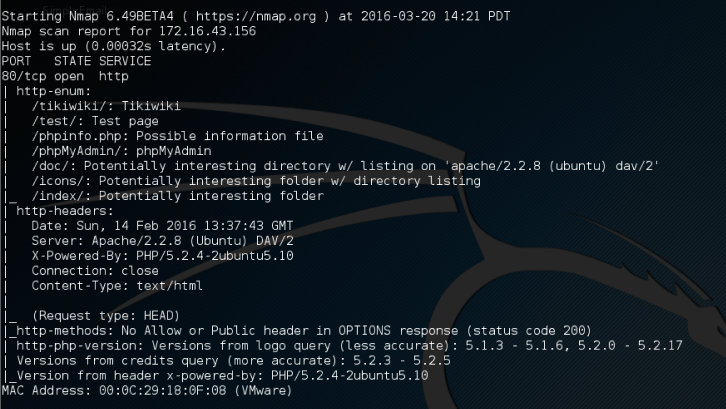
By utilizing four NSE scripts related to HTTP, we gain more information regarding the target system's web server:
- There are several interesting directories to check: Tikiwiki, test, and phpMyAdmin
- We have an interesting file: phpinfo.php
- We know the server is using PHP version 5.2.3 -5.2.5
After discussing Nmap, let's discuss another port-scanner tool.
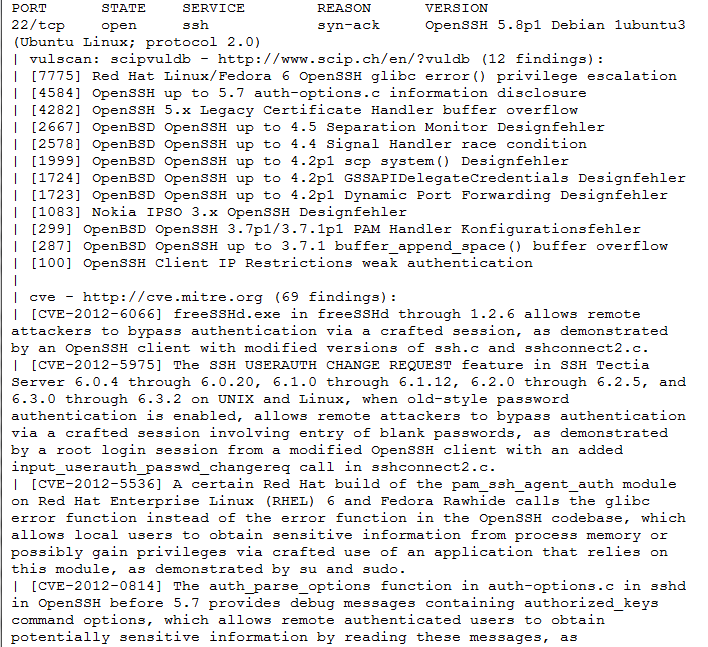
The following screenshot shows the sample result of the CVE script: