
Devploit 3.6 is listed as an information gathering tool, developed by Joker25000, and is available at https://github.com/joker25000/Devploit.
To use Devsploit, we first clone it onto our Kali Linux machine and then run the tools of choice when presented with the options. Cloning only has to be done once; every time you use Devploit thereafter, you simply browse to the Devploit directory.
Open a new Terminal and change to the directory of your choice using the cd command. (You can also use the ls command to list the content of the directory and ensure you are in the correct directory.)
Use the git clone command to clone Devploit onto your machine by typing the following:
git clone https://github.com/joker25000/Devploit.git

If copying the URL from the GitHub webpage, be sure to include .git at the end of the URL in the Terminal.
Press Enter to clone Devploit onto Kali:

In the Terminal, change to the Devploit directory on your desktop by typing cd Devploit and then use the ls command to view the directory contents. You should see the Devploit.py and README.me files among others.
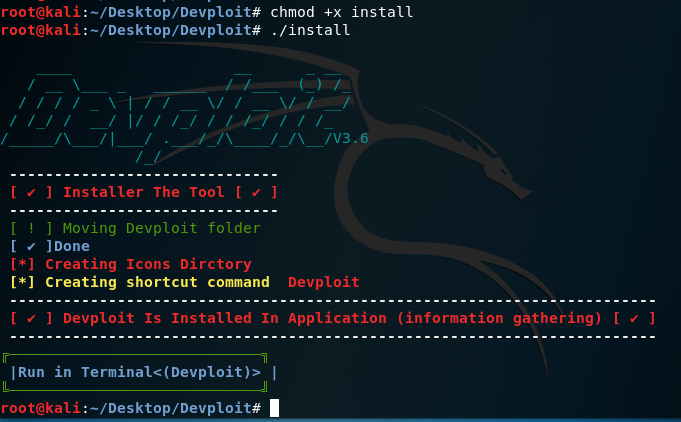
Give the file executable permissions to install by typing chmod +x install, and then start Devploit by typing ./install.
Once Devploit has been installed, open a new Terminal and type Devploit, as shown in the following screenshot:
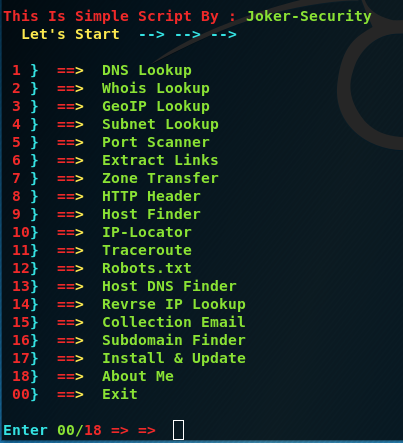
There are 19 options available for automated information gathering with Devploit:
To perform a DNS lookup, enter 1 and then enter the name of the domain, such as www.google.com:

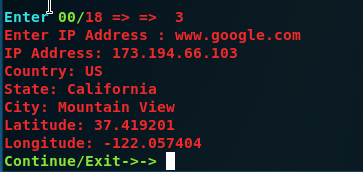
To find out basic geographic information about a domain or IP, choose option 3 and press enter, followed by the IP or domain name:
Be sure to familiarize yourself with the options available.