
Metagoogil is a tool that utilizes the Google search engine to get metadata from the documents available in the target domain. Currently, it supports the following document types:
- Word documents (.docx, .doc)
- Spreadsheet documents (.xlsx, .xls, .ods)
- Presentation files (.pptx, .ppt, .odp)
- PDF files (.pdf)
Metagoogil works by performing the following actions:
- Searching for all of the preceding file types in the target domain using the Google search engine
- Downloading all of the documents found and saving them to the local disk
- Extracting the metadata from the downloaded documents
- Saving the result in an HTML file
The metadata that can be found includes the following:
- Usernames
- Software versions
- Server or machine names
This information can be used later on to help in the penetration testing phase. Metagoogil is not part of the standard Kali Linux v 2.0 distribution. To install, all you need to do is use the apt-get command:
# apt-get install metagoofil
After the installer package has finished, you can access Metagoofil from the command line:
# metagoofil
This will display simple usage instructions and an example on your screen. As an example of Metagoogil usage, we will collect all the DOC and PDF documents (-t, .doc, .pdf) from a target domain (-d hackthissite.org) and save them to a directory named test (-o test). We limit the search for each file type to 20 files (-l 20) and only download five files (-n 5). The report generated will be saved to test.html (-f test.html). We give the following command:
# metagoofil -d example.com -l 20 -t doc,pdf -n 5 -f test.html -o test
The redacted result of this command is as follows:
    [-] Starting online search...

    [-] Searching for doc files, with a limit of 20
      Searching 100 results...
    Results: 5 files found
    Starting to download 5 of them:
    ----------------------------------------

    [1/5] /webhp?hl=en [x] Error downloading /webhp?hl=en
    [2/5] /intl/en/ads [x] Error downloading /intl/en/ads
    [3/5] /services [x] Error downloading /services
    [4/5] /intl/en/policies/privacy/
    [5/5] /intl/en/policies/terms/

    [-] Searching for pdf files, with a limit of 20
      Searching 100 results...
    Results: 25 files found
    Starting to download 5 of them:
    ----------------------------------------

    [1/5] /webhp?hl=en [x] Error downloading /webhp?hl=en
    [2/5] https://mirror.hackthissite.org/hackthiszine/hackthiszine3.pdf
    [3/5] https://mirror.hackthissite.org/hackthiszine/hackthiszine12_print.pdf
    [4/5] https://mirror.hackthissite.org/hackthiszine/hackthiszine12.pdf
    [5/5] https://mirror.hackthissite.org/hackthiszine/hackthiszine4.pdf
    processing

    [+] List of users found:
    --------------------------
    emadison

    [+] List of software found:
    -----------------------------
    Adobe PDF Library 7.0
    Adobe InDesign CS2 (4.0)
    Acrobat Distiller 8.0.0 (Windows)
    PScript5.dll Version 5.2.2

    [+] List of paths and servers found:
    ---------------------------------------

    [+] List of e-mails found:
    ----------------------------
    whooka@gmail.com
    htsdevs@gmail.com
    never@guess
    narc@narc.net
    kfiralfia@hotmail.com
    user@localhost
    user@remotehost.
    user@remotehost.com
    security@lists.
    recipient@provider.com
    subscribe@lists.hackbloc.org
    staff@hackbloc.org
    johndoe@yahoo.com
    staff@hackbloc.org
    johndoe@yahoo.com
    subscribe@lists.hackbloc.org
    htsdevs@gmail.com
    hackbloc@gmail.com
    webmaster@www.ndcp.edu.phpass
    webmaster@www.ndcp.edu.phwebmaster@www.ndcp.edu.ph
    [webmaster@ndcp
    [root@ndcp
    D[root@ndcp
    window...[root@ndcp
    .[root@ndcp
    goods[root@ndcp
    liberation_asusual@ya-
    pjames_e@yahoo.com.au
You can see from the preceding result that we get a lot of information from the documents we have collected, such as the usernames and path information. We can use the obtained usernames to look for patterns in the usernames and for launching a brute-force password attack on them. But, be aware that doing a brute-force password attack on an account may have the risk of locking the user accounts. The path information can be used to guess the operating system that is used by the target. We got all of this information without going to the domain website ourselves.
Metagoogil is also able to generate information in a report format. The following screenshot shows the generated report in HTML:
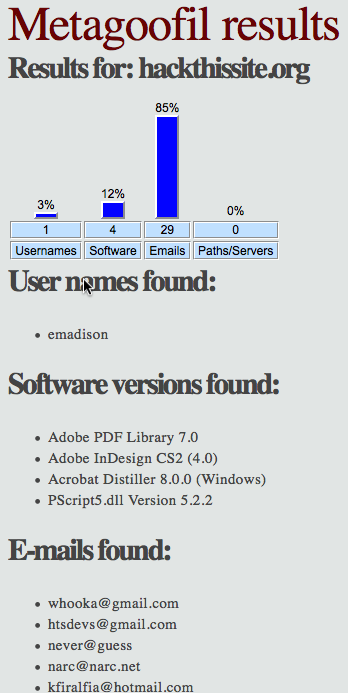
In the report generated, we get information about usernames, software version, email address, and server information from the target domain.