
Nmap will treat everything on the command line that isn't an option or option argument as a target host specification. We suggest that you use the IP address specification instead of the hostname. By using the IP address, Nmap doesn't need to do DNS resolution first. This will speed up the port-scanning process.
In the current version, Nmap supports the following IPv4 address specifications:
- It supports a single host, such as 172.16.43.156.
- It supports a whole network of adjacent hosts by using the CIDR notation, such as 172.16.43.0/24. This specification will include 256 IP addresses ranging from 172.16.43.0 to 172.16.43.255.
- It supports an octet range addressing, such as 172.16.2-4,6.1. This addressing will include four IP addresses: 172.16.2.1, 172.16.3.1, 172.16.4.1, and 172.16.6.1.
- It supports multiple host specifications, such as 172.16.43.1 172.168.3-5,9.1.
For the IPv6 address, Nmap only supports a fully qualified IPv6 format and hostname, such as fe80::a8bb:ccff:fedd:eeff%eth0.
Besides getting the target specification from the command line, Nmap also accepts a target definition from a text file by using the -iL <inputfilename> option. This option is useful if we already have the IP addresses from another program.
Make sure that the entries in that file use the Nmap-supported target-specification format. Each entry must be separated by spaces, tabs, or a new line.
The following code is a sample of that file:
172.16.1.1-254
172.16.2.1-254
Now, let's scan a network for 172.16.430/24. We want to see the packets sent by Nmap. To monitor the packets sent, we can use a packet-capture utility, such as tcpdump.
Open a console and type the following command:
tcpdump -nnX tcp and host 172.16.43.150
The 172.16.43.150 IP address belongs to our machine, which launches Nmap. You need to adjust it to your configuration.
Open another console on the same machine and type the following command:
nmap 172.16.43.0/24
In the tcpdump console, you will see the following packet:
    22:42:12.107532 IP 172.16.43.150.49270 >172.16.43.156.23: Flags [S], seq 239440322, win 1024, options [mss 1460], length 0
      0x0000:  4500 002c eb7f 0000 3006 ad2e c0a8 3866  E..,....0.....8f
      0x0010:  c0a8 3867 c076 0017 0e45 91c2 0000 0000  ..8g.v...E......
      0x0020:  6002 0400 4173 0000 0204 05b4            `...As......
From the preceding packet information, we know that the attacking machine sent a packet with a SYN flag set from port 49270 to the target machine port 23 (Telnet). The SYN flag is set by default if Nmap is run by a privileged user, such as root in Kali Linux.
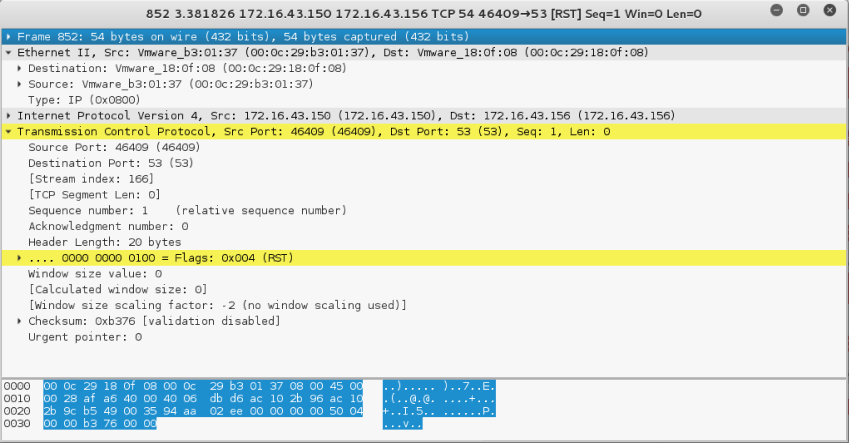
The following screenshot shows a packet sent by the attacking machine to other machines and ports on the target network:
If the remote machine responds, the response packet will look like the following code:
22:36:19.939881 IP 172.16.43.150.1720 >172.16.43.156.47823: Flags [R.], seq 0, ack 1053563675, win 0, length 0
  0x0000:  4500 0028 0000 4000 4006 48b2 c0a8 3867  E..(..@.@.H...8g
  0x0010:  c0a8 3866 06b8 bacf 0000 0000 3ecc 1b1b  ..8f........>...
  0x0020:  5014 0000 a243 0000 0000 0000 0000       P....C........
However, if the port is open, you will see the following network traffic:
22:42:12.108741 IP 172.16.43.156.23 >172.16.43.150.49270:Flags [S.], seq 1611132106, ack 239440323, win 5840,options [mss 1460], length 0
  0x0000:  4500 002c 0000 4000 4006 48ae c0a8 3867  E..,..@.@.H...8g
  0x0010:  c0a8 3866 0017 c076 6007 ecca 0e45 91c3  ..8f...v`....E..
  0x0020:  6012 16d0 e1bf 0000 0204 05b4 0000
You can see that the packet in the preceding code is to acknowledge the sequence number from the previous packet displayed. This packet has an acknowledgement number of 239440323, while the previous packet had a sequence number of 239440322.