
W3AF is a feature-rich web application attack-and-audit framework that aims to detect and exploit web vulnerabilities. The whole application-security assessment process is automated, and the framework is designed to follow three major steps: discover, audit, and attack. Each of these steps includes several plugins that might help the auditor focus on specific testing criteria. All of these plugins can communicate and share test data in order to achieve the required goal. It supports the detection and exploitation of multiple web application vulnerabilities, including SQL injection, cross-site scripting, remote and local file inclusion, buffer overflows, XPath injections, OS commanding, and application misconfiguration.
To start W3AF, navigate to Applications | Web Vulnerability Analysis | w3af, or, in a Terminal, type the following:
# w3af_console
This will drop you into a personalized W3AF console mode (w3af>>>). Note that the GUI version of this tool is also available in the location of the same menu, but we have chosen to introduce the console version to you because of its flexibility and customization:
w3af>>> help
This will display all of the basic options that can be used to configure the test. You can use the help command whenever you require any assistance following a specific option. In our exercise, we will configure the output plugin, enable the selected audit tests, set up the target, and execute the scan process against the target website, using the following commands:
- w3af>>> plugins
- w3af/plugins>>> help
- w3af/plugins>>> output
- w3af/plugins>>> output console, html_file
- w3af/plugins>>> output confightml_file
- w3af/plugins/output/config:html_file>>> help
- w3af/plugins/output/config:html_file>>> view
- w3af/plugins/output/config:html_file>>> set verbose True
- w3af/plugins/output/config:html_file>>> set output_file metasploitable.html
- w3af/plugins/output/config:html_file>>> back
- w3af/plugins>>> output config console
- w3af/plugins/output/config:console>>> help
- w3af/plugins/output/config:console>>> view
- w3af/plugins/output/config:console>>> set verbose False
- w3af/plugins/output/config:console>>> back
- w3af/plugins>>> audit
- w3af/plugins>>> audit htaccess_methods, os_commanding, sqli, xss
- w3af/plugins>>> back
- w3af>>> target
- w3af/config:target>>> help
- w3af/config:target>>> view
- w3af/config:target>>> set target http://http://192.168.0.30/mutillidae/index.php?page=login.php
- w3af/config:target>>> back
- w3af>>>
At this point, we have configured all of the required test parameters. Our target will be evaluated against the SQL injection, cross-site scripting, OS-commanding, and htaccess misconfiguration using the following command:
w3af>>> start
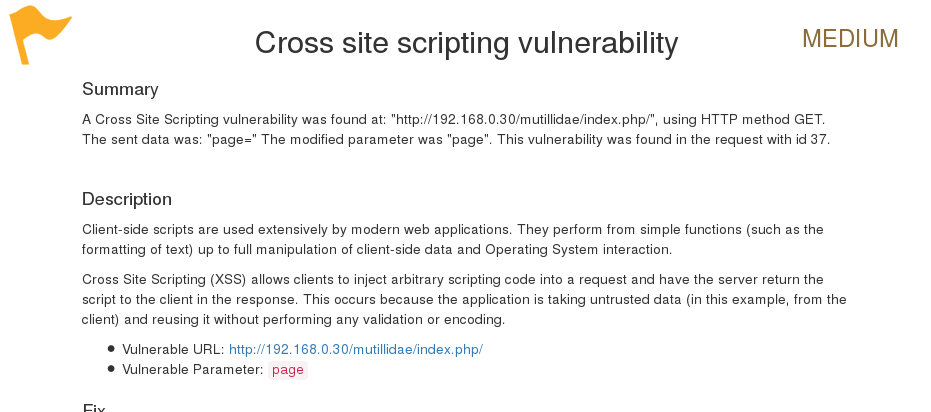
As you can see, we have discovered a cross-site scripting vulnerability in the target web application. A detailed report is also created in HTML and sent to the root folder. This report details all of the vulnerabilities, including the debug information about each request and response data transferred between W3AF and the target web application.