
The Nmap result can be saved to an external file. This option is useful if you want to process Nmap result with other tools. Even if you save the output to a file, Nmap still displays the result on the screen.
Nmap supports several output formats, as follows:
- Interactive output: This is a default output format, and the result is sent to the standard output.
- Normal output (-oN): This format is similar to the interactive output, but it doesn't include the runtime information and warnings.
- XML output (-oX): This format can be converted to an HTML format, parsed by the Nmap graphical user interface (GUI), or imported to the database. We suggest you use this output format as much as you can.
- Grepable output (-oG): This format is deprecated, but it is still quite popular. Grepable output consists of comments (lines starting with a pound sign (#)) and target lines. A target line includes a combination of six labeled fields that are separated by tabs and followed by a colon. The fields are Host, Ports, Protocols, Ignored State, OS, Seq Index, IP ID Seq, and Status. We sometimes use this output if we want to process the Nmap output using the UNIX commands, such as grep and awk.
To save a scan result to an XML file (myscan.xml), use the following command:
nmap 172.16.43.156 -oX myscan.xml
The following is a snippet of the XML file:
<?xml version="1.0" encoding="UTF-8"?>
<!DOCTYPE nmaprun>
<?xml-stylesheet href="file:///usr/bin/../share/nmap/nmap.xsl" type="text/xsl"?>
<!-- Nmap 6.49BETA4 scan initiated Mon Feb 15 18:06:20 2016 as: nmap -oX metasploitablescan.xml 172.16.43.156 -->
<nmaprun scanner="nmap" args="nmap -oX metasploitablescan.xml 172.16.43.156" start="1455588380" startstr="Mon Feb 15 18:06:20 2016" version="6.49BETA4"
<scaninfo type="syn" protocol="tcp" numservices="1000" services="1,3-4,6-7,9,13,17,19-26,30,32-33,37,42-43,49,53,70,79-85,88-90,99-100,106,109-111,113,119,125,135,139,143-144,146,161,163,179,199,211-212,222,254-256,259,264,280,301,306,311,340,366,389,406-407,416-417,425,427,443-445,458,464-465,481,497,500,512-515,524,541,543-545,548,554-555,563,587,593,616-617,625,631,636,646,648,666-668,683,687,691,700,
For brevity purposes, a number of the ports have been removed from the previous snippet. In the XML output, you will see each port that Nmap scans against. The following shows each of the ports being scanned separately and what the response is. Again, for brevity's sake, all of the ports have not been included:
    <verbose level="0"/>
    <debugging level="0"/>
    <host starttime="1455588380" endtime="1455588382"><status state="up" reason="arp-response" reason_ttl="0"/>
    <address addr="172.16.43.156" addrtype="ipv4"/>
    <address addr="00:0C:29:18:0F:08" addrtype="mac" vendor="VMware"/>
    <hostnames>
    </hostnames>
    <ports><extraports state="closed" count="977">
    <extrareasons reason="resets" count="977"/>
    </extraports>
    <port protocol="tcp" portid="21"><state state="open" reason="syn-ack" reason_ttl="64"/><service name="ftp" method="table" conf="3"/></port>
    <port protocol="tcp" portid="22"><state state="open" reason="syn-ack" reason_ttl="64"/><service name="ssh" method="table" conf="3"/></port>
    <port protocol="tcp" portid="23"><state state="open" reason="syn-ack" reason_ttl="64"/><service name="telnet" method="table" conf="3"/></port>
    <port protocol="tcp" portid="25"><state state="open" reason="syn-ack" reason_ttl="64"/><service name="smtp" method="table" conf="3"/></port>
    <port protocol="tcp" portid="53"><state state="open" reason="syn-ack" reason_ttl="64"/><service name="domain" method="table" conf="3"/></port>
    <port protocol="tcp" portid="80"><state state="open" reason="syn-ack" reason_ttl="64"/><service name="http" method="table" conf="3"/></port>
    <port protocol="tcp" portid="111"><state state="open" reason="syn-ack" reason_ttl="64"/><service name="rpcbind" method="table" conf="3"/></port>
    <port protocol="tcp" portid="139"><state state="open" reason="syn-ack" reason_ttl="64"/><service name="netbios-ssn" method="table" conf="3"/></port>
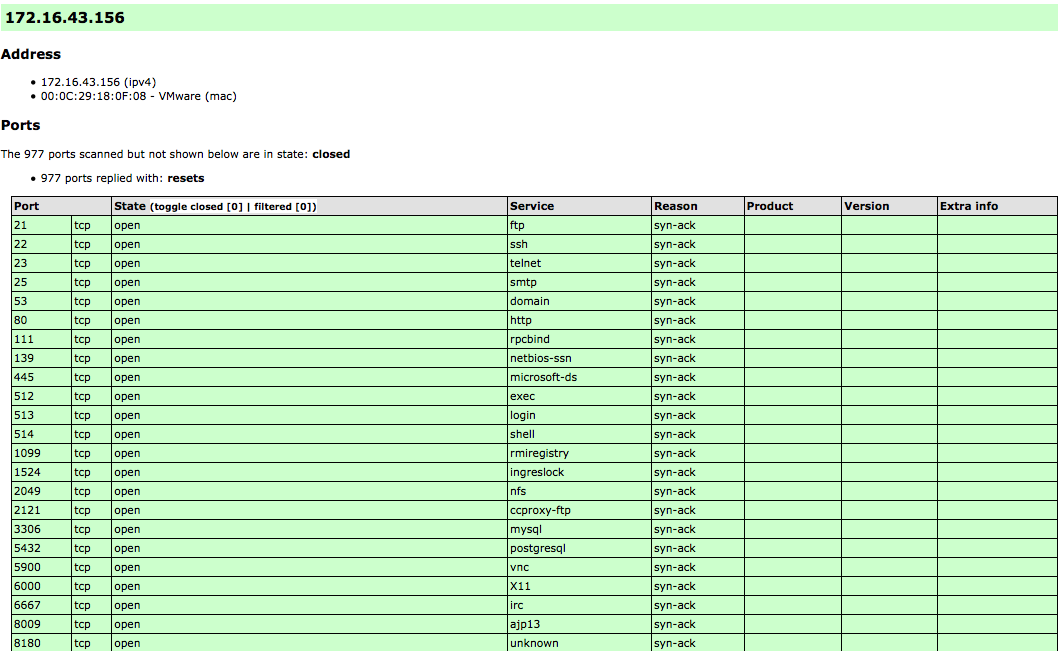
The XML output is a bit daunting to look at. To make it easier, you can convert the Nmap XML file to HTML. This allows you to have clean-looking output for reporting purposes, as some of the non-technical personnel you may report to may not be used to viewing raw outputs. To convert the XML file, you can use the xsltproc program. The following command is used to convert the XML file to an HTML file:
xsltproc myscan.xml -o myscan.html
The following is a part of the HTML report, as displayed by the Firefox ESR browser included in Kali Linux:
If you want to process the Nmap XML output to your liking, there are several programming language generic XML libraries that you can use for this purpose. Also, there are several libraries specifically developed to work with an Nmap output:
- Perl: Nmap-Parser (http://search.cpan.org/dist/Nmap-Parser/)
- Python: python-nmap (http://xael.org/norman/python/python-nmap/)
- Ruby: Ruby Nmap (http://rubynmap.sourceforge.net/)
- PowerShell: PowerShell script to parse Nmap XML output (http://www.sans.org/windows-security/2009/06/11/powershell-script-to-parse-nmap-xml-output)